Section 2: Operating Your Tennis Ball Machine
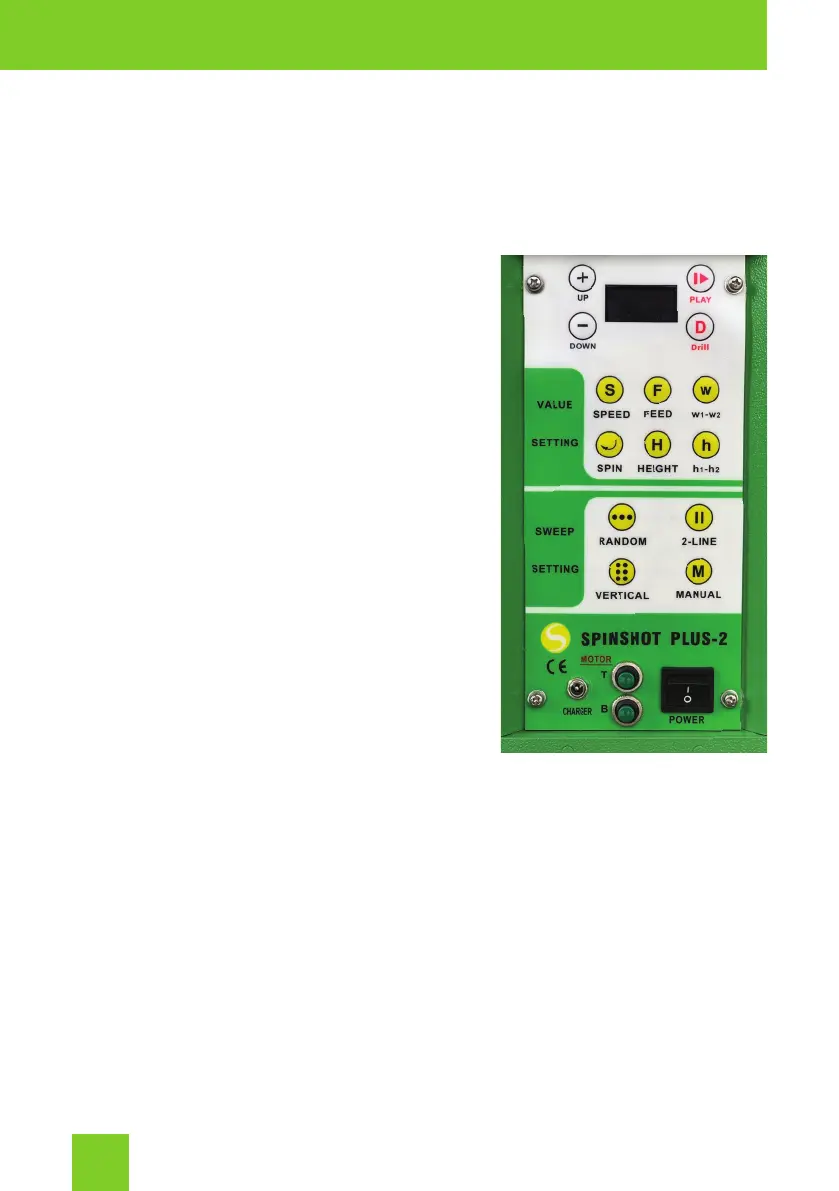
Your tennis ball machine can be operated via the Control Panel situated
on the side of the machine, the Drill Maker App on your phone, the
Spinshot Remote Watch (sold separately).
Control Panel
POWER SWITCH
The power switch is used to turn the
machine on and off. After the machine
is powered on, both horizontal and
vertical motors will perform a functional
initialization for proper function of the
machine. The current battery voltage will be
displayed on the LCD screen.
Put the machine at the center of the
baseline and adjust to face the center of
the court to ensure the machine sweeps the
balls evenly across the court.
The machine will default to the last mode
set. To start the ball feed, press the PLAY
button and then press the button of the
chosen program. To stop the ball feed press
the PLAY button.
If at anytime the machine malfunctions, turn off the power switch to reset
the machine’s control logic. In most circumstances, the improper working of
the machine is caused by low battery voltage. In this case, please recharge
your battery to resume normal operation.
CHARGER JACK
To charge your machine plug the charger cable into the charging jack and
the other end into a power outlet.
Please read the Battery Charging section for full instructions on charging
your machine.
2


 To Next Page