Need help?
Do you have a question about the Spinshot Pro and is the answer not in the manual?
Details on appropriate tennis balls for optimal performance and consistency.
Crucial safety guidelines and operational precautions to prevent damage or injury.
Step-by-step guide to powering on, positioning, and initializing the ball machine.
How to set the ball speed from 1 (30km/h) to 10 (110km/h).
Setting the interval between ball deliveries from slow (1) to fast (10).
Adjusting topspin, backspin, or flat shots using the spin dial.
Enabling oscillation for delivering balls across the full court width.
Using the toggle switch to control the ball's trajectory height.
Understanding the reset button's role in clearing ball jams.
How to connect and operate the remote watch for ball feed and oscillator control.
Recommendations for extending battery life and proper charging procedures.
Instructions for charging internal and hybrid/external battery systems.
Step-by-step guide for accessing and replacing the battery.
Proper procedures for moving and storing the tennis ball machine.
Explanation of static shock and the grounding mechanism.
Routine cleaning procedures for the machine and its components.
Recommended annual service for throwing wheels to ensure consistent performance.
Diagnosing and resolving issues with ball delivery or stopped wheels.
Addressing machine malfunctions possibly caused by a low battery.
Factors affecting ball speed, including spin and wheel condition.
Adjusting machine position and angle for accurate ball placement.
Explanation for why the reset button might pop out.
Information on upgrading from battery power to mains power.
Troubleshooting balls serving too far left or right.
Causes and solutions for the machine moving during operation.
This document is the owner's manual for the Spinshot Pro tennis ball machine, a device designed to help tennis players of all abilities improve their game by providing consistent ball delivery without the need for a training partner or coach. The manual covers essential information regarding the proper use, care, and maintenance of the machine.
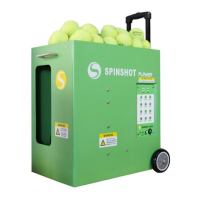
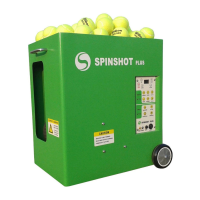
The Spinshot Pro is a tennis ball machine that delivers tennis balls at various speeds, spin types, and trajectories. It can be operated via its control panel or an optional Spinshot Remote Watch. The machine is designed to simulate different shot types, allowing players to practice a wide range of skills.
Ball Delivery: The machine delivers balls at speeds ranging from approximately 30 km/h (Speed 1) to 110 km/h (Speed 10). The feed rate, which is the interval between ball deliveries, can also be adjusted from 1 (slowest) to 10 (fastest), with Feed rate 10 delivering a ball approximately every second.
Spin Control: The Spinshot Pro offers control over ball spin. Users can dial towards "Top" for topspin or "Back" for backspin/slice. A "FLAT" setting is available for no spin. It's noted that a high level of topspin or backspin will reduce the ball speed, and adjusting spin may also affect ball height.
Oscillation: The machine features an Oscillator function that delivers balls across the full width of the court. When the Oscillator is off, balls are delivered to a constant point determined by the machine's facing direction. The Oscillator can be turned on via the control panel and then controlled (start/stop) with a short press on the remote watch button.
Height/Trajectory Adjustment: A Height toggle switch allows users to adjust the trajectory of the ball. Similar to spin, ball spin can also influence ball height, requiring users to adjust both height and spin to achieve the desired ball delivery.
Safety Features: The Spinshot Pro includes a Reset button that activates (pops out) if a ball jams inside the machine. This safety mechanism helps prevent damage and allows for easy troubleshooting. Users are warned not to reach or look into the ball exit hole without turning off the power and ensuring the wheels have stopped. Standing closer than 10 meters in front of the machine when powered on is also advised against.
Setting Up the Machine: To begin, the machine should be positioned at the center of the baseline at the far end of the court. The ball hopper can hold up to 120 tennis balls, and users are advised not to overfill it. After turning on the power switch, the machine performs an initialization sequence, turning left and right, and the service wheels begin to spin. Following initialization, the machine should be repositioned to be centered to ensure full court width delivery when using the Oscillator. The feeder tray starts rotating and ball delivery begins after a few seconds. Minor adjustments to the machine's angle can correct balls going too far to one side.
Tennis Balls: Both normal pressurized and pressureless tennis balls can be used. Pressureless balls are recommended for their longer life and more consistent bounce. Inconsistent ball throws can result from using a mixture of new and old balls or from dirt and ink buildup on the throwing wheels.
Remote Watch (Optional Upgrade): The remote watch requires a CR2032 battery. To connect, switch on the machine and press the remote watch button. A blinking red light indicates connection attempts, and the light goes out once connected. A single flash indicates a command has been sent. If the light blinks again, the signal has been lost. The remote watch enters sleep mode if the machine is turned off. It allows users to start/stop ball feed (long press) and start/stop the Oscillator (short press), provided the Oscillator is initially turned on at the control panel.
Battery Management: The Spinshot Pro can be powered by an internal battery or an external battery kit (Hybrid Power).
Transporting and Storage: Before transporting, all balls should be removed, and the ball hopper flaps closed. The machine should be stored in a clean, dry location. It should never be stored in a vehicle with very high temperatures, as extreme conditions can affect the electronic board and battery. Storing the machine outside in cold or wet weather (rain or snow) will shorten its life.
General Cleaning:
Annual Maintenance (Throwing Wheels): It is recommended to clean the ball throwing wheels annually or after 150 hours of use, especially if the machine is not throwing balls consistently. This should only be done when the machine is powered off. Firmly rub coarse sandpaper across the throwing wheels to remove dirt and ink buildup. Sand the entire circumference of each wheel with enough pressure to rough up the rubber surface.
Troubleshooting:
Static Electricity: The machine is fitted with a small chain on the underside of the base to ground it, eliminating static electric shocks that could occur from tennis balls rubbing against the throwing wheels.
 General
| Type | Tennis Ball Machine |
|---|---|
| Ball Capacity | 120 Balls |
| Ball Feed Interval | 2-10 seconds |
| Oscillation | Horizontal |
| Remote Control | Yes |
| Spin | Topspin, Backspin |
| Power | Battery |
| Battery Life | 2-3 hours |
| Weight | 45 lbs |


 To Next Page