IM-S27-06 CH Issue 22
1. Introduction
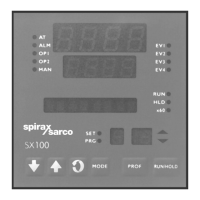
The purpose of this manual is to allow quick set-up of the SX100 controller, providing information
on the most commonly used functions when used for control of the EasiHeat unit. See
the SX100 Operator's Manual and Site Manual.
2. Controller
Please use this manual as a guide, in conjunction with the Controller Site Manual and Operator's
Manual supplied.
The programmer has four operating modes (plus a configuration mode):
Display status - RUN, HOLD, SET, PRG indicators Off
Base mode This is for PID control operations with no program running. In this
mode a program may be selected to run.
Display status - Run indicator On
Program run mode
A selected program is running, held or waiting for a pre-defined
delay before starting. In this mode the operator can view status
and program information.
Display status - SET and PRG indicators On
Program define mode Used to view/create/edit programs. This mode is entered from
BASE MODE or from PROGRAM RUN MODE.
Controller define mode Display status - SET indicator On
Refer to SX100 Site Manual Used to define the controller characteristics.
Display status - 'ConF' visible in top display
Configuration mode Used to configure the controller for different hardware and
input/output options.
Additional information and details of factory settings when used for the EasiHeat
application are detailed in the following Sections.





 To Next Page