EasyManua.ls Logo

Spirax Sarco SX80 - User Manual

Spirax Sarco SX80
48 pages
Print Icon
To Next Page IconTo Next Page
Loading...
IM-P323-32
CTLS Issue 5
1
SX80 and SX90 Quickstart Guide
© Copyright 2023
Printed in France
3231351/5
SX80 and SX90
Quickstart Guide
Installation and Maintenance Instructions
IM-P323-32
CTLS Issue 5

Other manuals for Spirax Sarco SX80

Question and Answer IconNeed help?

Do you have a question about the Spirax Sarco SX80 and is the answer not in the manual?

Summary

Safety Information

Unpacking and Storage Precautions

Guidelines for safe handling and storing the controller to prevent damage and ensure proper condition before use.

Electrostatic Discharge and Service

Precautions against static electricity and guidelines for servicing or repairing the instrument.

Electromagnetic Compatibility and Charged Capacitors

Information on EMC compliance and a warning about discharging internal capacitors before handling.

Personnel and Wiring Safety

Emphasizes qualified personnel and provides crucial wiring safety instructions for installation.

General Product Information

Product Overview and Specifications

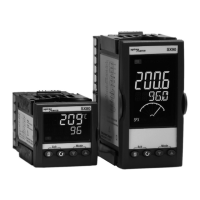
Describes the SX series, its sizes, capabilities, and general operating specifications like temperature and sealing.

Front Panel Layout and Controls

Identifies the LCD display, buttons (Ack, Mode, Select, Scroll), and their labels on the SX80/SX90 front panel.

Quick Code Configuration Process

Explains how to use the 5-character quick code for initial input and output functionality configuration.

Home Display and Parameter Navigation

Details the default home display screen and how to navigate through parameters using operator buttons.

Installation

Controller Unpacking and Preparation

Instructions on how to safely remove the controller from its sleeve and ensure proper sealing upon reinsertion.

Mechanical Panel Mounting

Steps for mounting the controller into a panel cut-out, including gasket fitting and retaining clips.

Environmental Conditions for Installation

Guidance on selecting a suitable indoor environment for permanent installation, minimizing interference.

Electrical Installation and Wiring

Instructions for safe electrical installation, including isolating the mains supply and wiring terminal specifications.

Commissioning

Basic Operation Mode Selection

How to select Auto, Manual, or OFF modes and acknowledge alarms using the controller's buttons.

Accessing Operator Level 2

Steps to enter Operator Level 2 for deeper parameter access, including entering the pass code.

Configuring Level 2 Parameters

Details on navigating and adjusting parameters like setpoint limits, rates, and units within Operator Level 2.

Maintenance

Summary

Safety Information

Unpacking and Storage Precautions

Guidelines for safe handling and storing the controller to prevent damage and ensure proper condition before use.

Electrostatic Discharge and Service

Precautions against static electricity and guidelines for servicing or repairing the instrument.

Electromagnetic Compatibility and Charged Capacitors

Information on EMC compliance and a warning about discharging internal capacitors before handling.

Personnel and Wiring Safety

Emphasizes qualified personnel and provides crucial wiring safety instructions for installation.

General Product Information

Product Overview and Specifications

Describes the SX series, its sizes, capabilities, and general operating specifications like temperature and sealing.

Front Panel Layout and Controls

Identifies the LCD display, buttons (Ack, Mode, Select, Scroll), and their labels on the SX80/SX90 front panel.

Quick Code Configuration Process

Explains how to use the 5-character quick code for initial input and output functionality configuration.

Home Display and Parameter Navigation

Details the default home display screen and how to navigate through parameters using operator buttons.

Installation

Controller Unpacking and Preparation

Instructions on how to safely remove the controller from its sleeve and ensure proper sealing upon reinsertion.

Mechanical Panel Mounting

Steps for mounting the controller into a panel cut-out, including gasket fitting and retaining clips.

Environmental Conditions for Installation

Guidance on selecting a suitable indoor environment for permanent installation, minimizing interference.

Electrical Installation and Wiring

Instructions for safe electrical installation, including isolating the mains supply and wiring terminal specifications.

Commissioning

Basic Operation Mode Selection

How to select Auto, Manual, or OFF modes and acknowledge alarms using the controller's buttons.

Accessing Operator Level 2

Steps to enter Operator Level 2 for deeper parameter access, including entering the pass code.

Configuring Level 2 Parameters

Details on navigating and adjusting parameters like setpoint limits, rates, and units within Operator Level 2.

Maintenance

Spirax Sarco SX80 Specifications

General IconGeneral
BrandSpirax Sarco
ModelSX80
CategoryController
LanguageEnglish

Related product manuals