Spirent C1 and C2 Installation Instructions
Connecting to the SPT-C1 and SPT-C2
22 | Spirent C1 and C2 Installation Instructions
PN 71-008959 Rev A April 2020
Connecting to the SPT-C1 and SPT-C2
SPT-C1/SPT-C2 connect and operate through your local network much like a standard PC.
It boots with the IP address and subnet mask:
192.168.0.100/255.255.255.0. If you
need to reconfigure the IP address information refer to “Setting the SPT-C1/SPT-C2
Addressing mode, IP Address, Netmask and Gateway” on page 24.
To connect to your product’s GUI:
1 Configure a laptop or workstation with the IP address and subnet mask:
192.168.0.101/255.255.255.0.
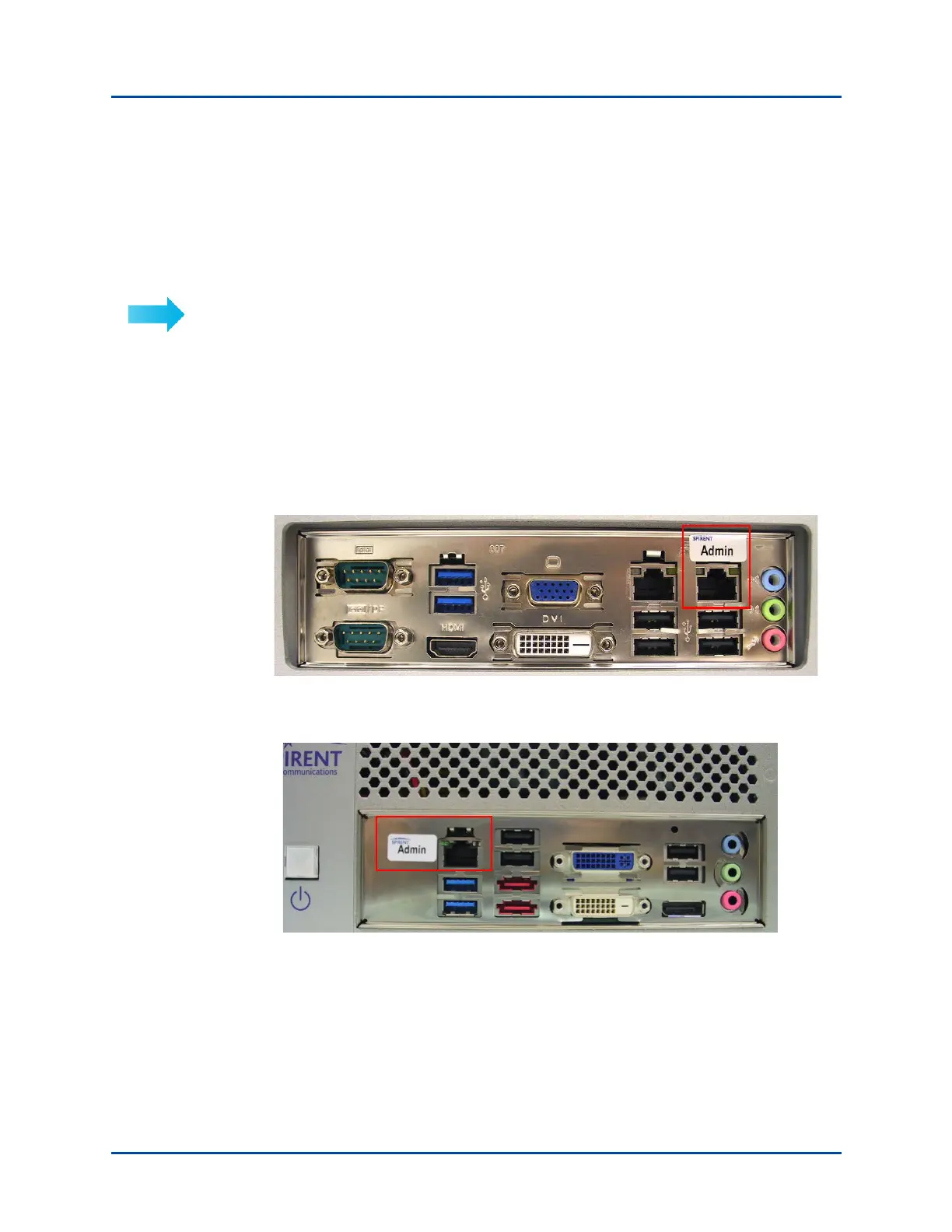
2 Connect the laptop or workstation to the appliance’s administrative port with a
straight-through or crossover Ethernet cable or through a (preferably full-duplex)
network switch or hub.
• SPT-C1 administrative port is shown in Figure 17 and Figure 18.
• SPT-C2 administrative port is shown in Figure 19.
Figure 17. SPT-C1 Administrative Port (model revisions Rev J and later)
Figure 18. SPT-C1 Administrative Port (model revisions prior to Rev J)



 To Next Page