Page 7
Stereo Input Channel
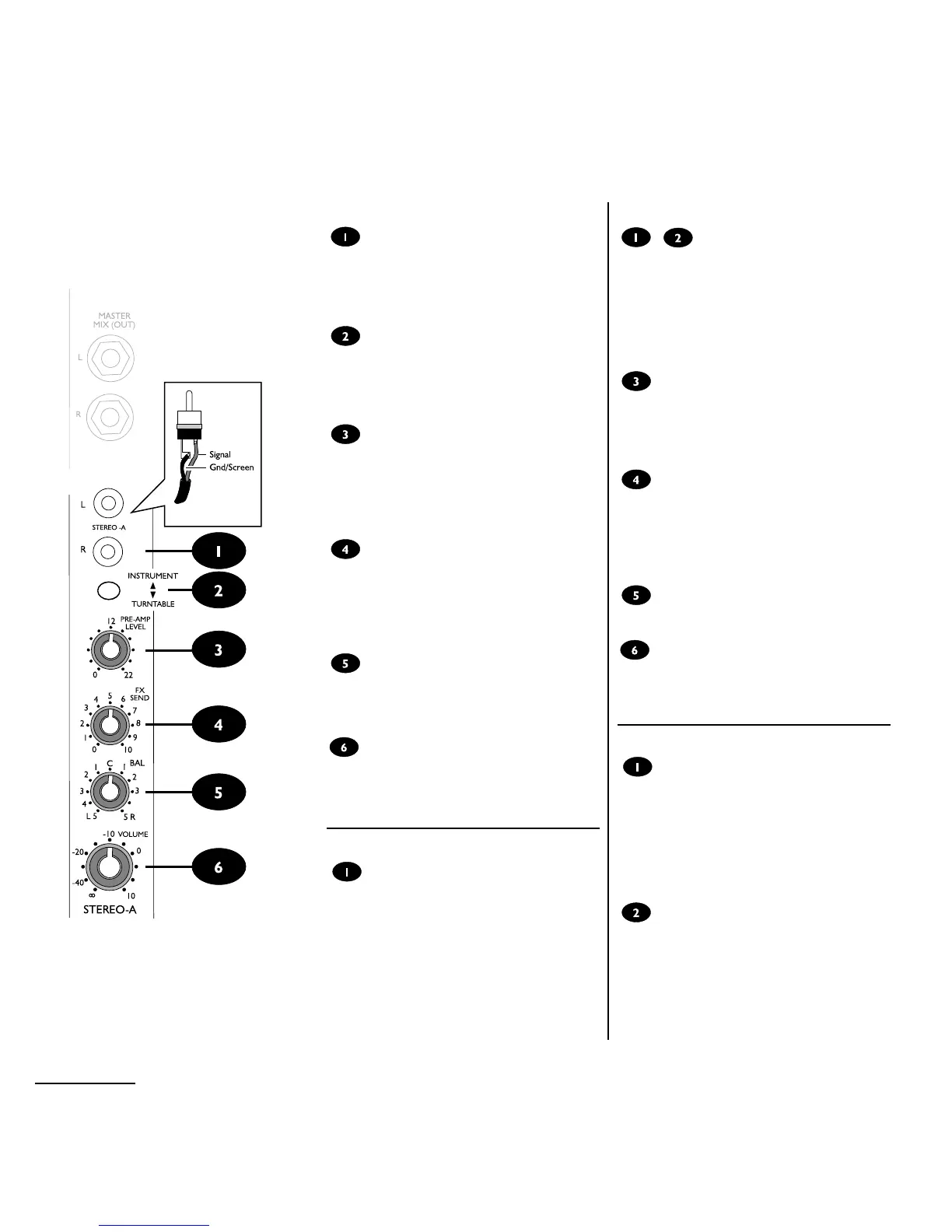
Stereo Input
Stereo sources, such as keyboards, drum machines,
CD players or turntables may be connected to the
two Stereo Inputs via RCA phono plugs. If you need
tone controls you could connect to two mono inputs
instead, with PAN set left and right accordingly.
Instrument/Turntable
When this switch is up these inputs are suitable for
instruments, tape machines, DAT or CD players.
When the button is pressed an RIAA preamplifier is
switched into circuit allowing record turntables to be
connected.
Pre-Amp Level
This control sets the level of your source as the signal
enters the mixer. It is important to set this level cor-
rectly (see page 11) - if its set too high the sound
will overload and distort, and if its set too low you
may not be able to get enough volume from the
mixer without a lot of background hiss.
FX Send
This control allows you to create a separate mono
mix of each channel to send to an external effects or
reverb unit. This signal can then be fed back to the
mix via the FX RET jack. The send comes after the
volume control so that it follows changes in channel
level.
Balance
Adjusts the relative level of the left and right sides of
your source with this control. When the knob is
turned fully left or right you feed only that side of the
signal to the mix.
Volume
This control sets the level of your source in the
stereo mix. You should try to work with this knob
near to the 0 mark to give a good range of control,
and adjust the PREAMP LEVEL if necessary.
Master Section
Master Mix (Out) (see diagram, page 9)
These jacks allow you to take the combined mix of all
of your sources to an external amplifier and PA
speakers for live performance, or to a DAT tape
machine or computer sound card when recording.
The output level is set by the MASTER MIX VOL-
UME control, which should be set to the 0 mark for
maximum level control (see also page 11 for tips on
setting up your inputs). Adjust the input channel vol-
ume controls to give a suitable output level, with the
AVG LED meters glowing.
Stereo Eingangskanal
Stereo Eingang
Hier können Stereoquellen wie Keyboards, Drum
Computer, CD-Spieler oder Plattenspieler mit
Cinch-Steckern angeschlossen werden (drücken Sie
Turntable für Plattenspieler, sonst Instrument).
Wenn Sie die Klangregelung benötigen, können Sie
eine Stereoquelle auch alternativ an zwei Monokanäle
anschließen und die beiden Kanäle entsprechend im
Panorama nach links und rechts drehen.
Vorverstärker Pegel
Regelt die Vorverstärkung des Signals. Es ist äußerst
wichtig, diese Anpassung korrekt vorzunehmen
(siehe Seite 11). Ist der Pegel zu hoch eingestellt,
verzerrt das Signal, ist er zu niedrig, bekommen Sie
nicht genug Lautstärke oder das Signal ist verrauscht.
Effekt Send
Dieses Poti erlaubt die Auskopplung des Signals zu
einem externen Effekt- bzw. Hallgerät. Dieses
Effektsignal kann dann durch den FX Ret-Anschluß
wieder zum Hauptmix gebracht werden. Die
Auskopplung erfolgt nach dem Lautstärkeregler, d. h.
ändert sich mit diesem mit.
Balance
Regelt das Lautstärkeverhältnis vom rechten zum
linken Signal im Stereomix.
Lautstärke
Kontrolliert die Lautstärke des Kanalsignals im Mix. Es
empfiehlt sich, bei Einstellungen von ± 0 zu arbeiten,
evtl. durch Abgleich des Vorverstärker Pegels, um
beste Ergebnisse zu erzielen.
Master Sektion
Master Mix Ausgang
(siehe Diagramm Seite 9)
An diesen Buchsen liegt das gemischte Signal aller
Eingänge an. Es kann zu externen Verstärkern für
Beschallung oder auf DAT bzw. Computer
Soundkarte für Aufnahmen gehen. Der Gesamtpegel
wird mit Master Mix Volume eingestellt. Der Pegel
sollte so eingestellt sein, daß die AVG-LED
leuchtet.
Effekt Return (Eingang)
Hier können die Ausgänge eines Effektgerätes
angeschlossen werden, ohne andere Eingangskanäle
zu belegen. Der Eingang ist unsymmetrisch. Bei
einem Mono Effektsignal ist nur die linke (L) Buchse
zu benutzen, das Signal wird dann automatisch auf
beiden Seiten wiedergegeben. Mit FX RET VOLUME
wird die Lautstärke des Signals im Stereo Mix bes-
timmt.



 To Next Page