Page 11
Setting Up & Troubleshooting
Setting Input Preamp Level
It is important to set the input level correctly to get
the best sound from your mixer. Follow the steps
below to set the Preamp Level controls on each
input:
l Set the channel Volume and Master Mix Volume
to maximum
l Set the tone controls to centre
l Connect a source and set the Preamp Level until
the PK meters are just glowing
l Turn the channel Volume back to the 0 mark
during mixing.
Troubleshooting
No Power
- Is the mains supply present - check the outlet with
another device.
- Is the power lead firmly connected?
- If appropriate, is the PortaPower unit connected
correctly?
Condenser Mic Not Working
- Is the Mic Power turned on?
- Is the mic plugged into the Mic input?
- Is the mic cable a balanced 3-wire type?
Meters not showing any signal
- Has the Preamp Level been set correctly (see
above)?
- Is the source connected to the appropriate input
socket for the level of signal?
- Is Master Mix Volume set at max., and are input vol-
ume controls set high enough?
- If monitoring Tape (In), is the Master Mix/Tape
switch pressed to select the Tape input?
Turntable has low level
- Is the Instrument/Turntable switch pressed?
- Is the turntable cartridge correctly fitted?
Turntable is buzzing/humming
- Connect the turntable earthing lead to any ground
contact (Mic pin 1, jack sleeve or phono shield)
No Monitor Amp output
- Is a headphone jack plugged in?
3
1
2
+48V
MIC
INPUT
LINE INPUT
PRE-AMP
LEVEL
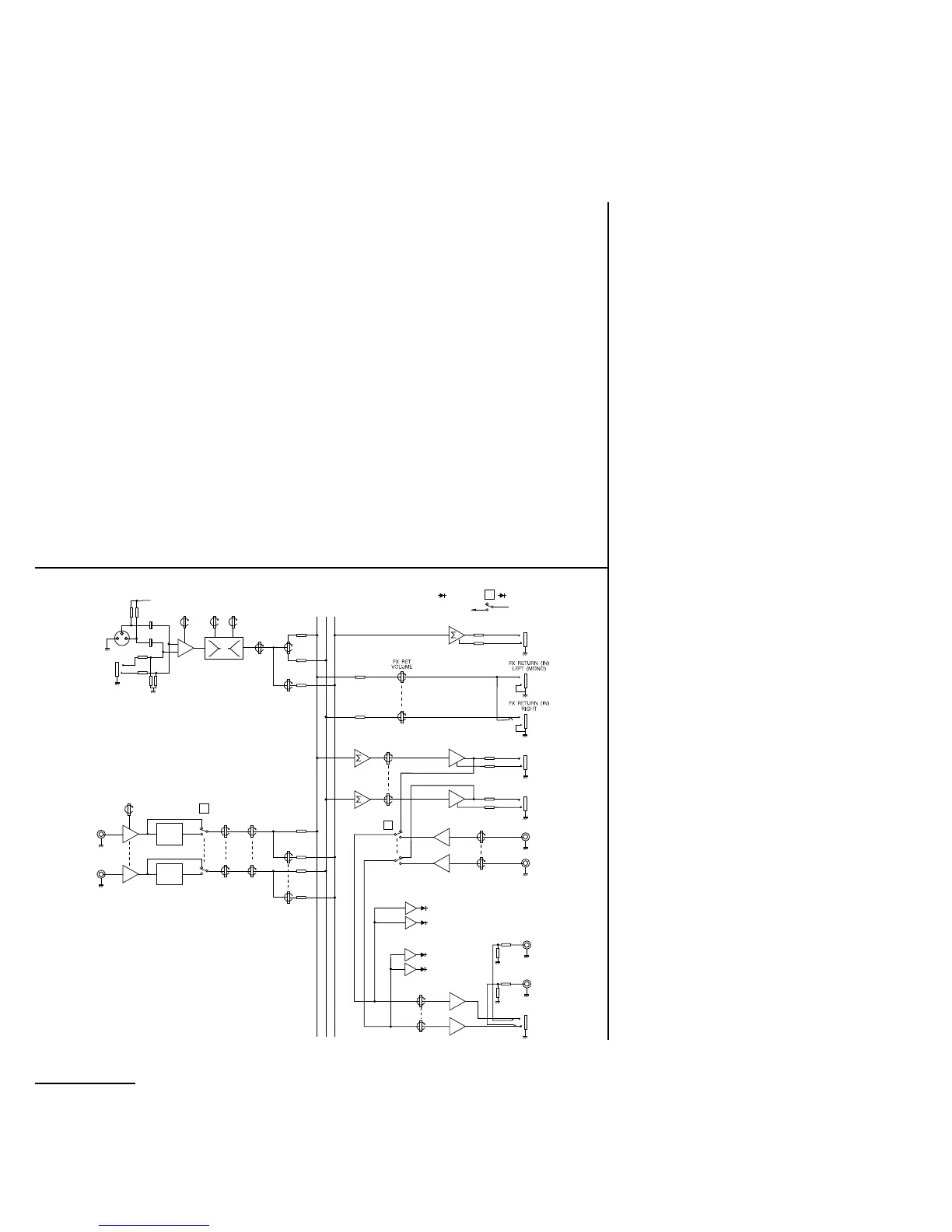
LEFT BUS
RIGHT BUS
AUX BUS
MIC POWER
+48V
MASTER MIX /
TAPE
FX SEND (OUT)
POWER ON
MONO INPUTS 1 - 4
STEREO INPUTS A & B
MASTER
SECTION
TREBLE BASS
PRE-AMP
LEVEL
INSTRUMENT/
TURNTABLE
VOLUME
VOLUME
PAN
BALANCE
FX
SEND
FX
SEND
MONITOR AMP /
H/PHONES VOLUME
PK
LEFT
RIGHT
PK
AVG
AVG
MASTER MIX
VOLUME
TAPE VOLUME
MASTER MIX
(OUT) LEFT
MASTER MIX
(OUT) RIGHT
TAPE (IN)
LEFT
LEFT
RIGHT
RIGHT
STEREO A
(B SIMILAR)
MONITOR AMP
LEFT (OUT)
MONITOR AMP
RIGHT (OUT)
H/PHONES
➚➚
➚➚
➚➚
➚➚
➚➚➚➚
RIAA
RIAA
System Block Diagram
Anschluß und Fehlersuche
Einstellen des Vorverstärker Pegels
Das richtige Einstellen des Vorverstärker Pegels
ist extrem wichtig, um gute Soundergebnisse zu
erzielen. Gehen Sie wie folgt vor:
l Stellen Sie Kanal Volume und Master Mix
auf Maximum und die Klangregelung neutral
(= 0).
l Schließen Sie die Quelle an und drehen Sie
den Pre Amp Level auf, bis die PK-LED
gerade aufleuchtet
l Stellen Sie die Lautstärkeregler (Kanal +
Master) zurück auf ca. 0, evtl. pegeln Sie
den Pre Amp Level nach.
Fehlersuche
Keine Spannung
- Ist das Netzgerät richtig angeschlossen?
- Prüfen Sie die Ausgangsspannung des
Netzgeräts.
Kondensator Mikrofon funktioniert nicht
- Phantomspannung angeschaltet?
- Mikro von XLR angeschlossen?
- symmetrisches 3-Pol-Kabel verwendet?
Keine Pegelanzeige
- Vorverstärker Pegel richtig eingestellt?
- Ist die Quelle an den gewählten Eingang
angeschlossen?
- Sind Master Volume und Kanal Volume
weit genug aufgedreht?
- Ist Tape In/Master Mix richtig gewählt?
Plattenspieler zu leise
- Ist Turntable-Kopf gedrückt?
- Ist der Plattenspieler richtig angeschlossen?
Kein Monitor Ausgangspegel
- Steckt der Kopfhörer?



 To Next Page