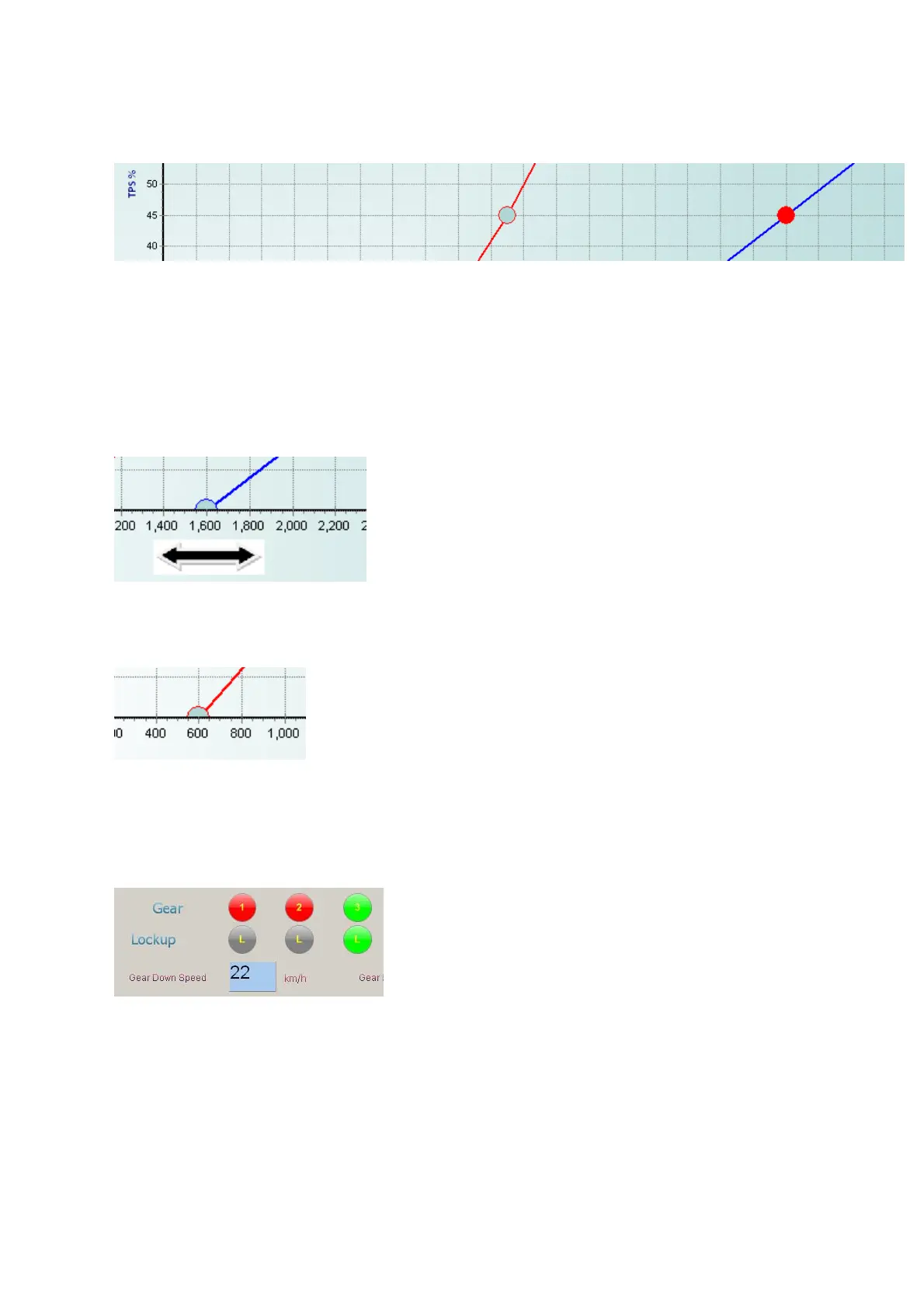
15. Now set the Up Shift (Blue Line) Low Dot to idle RPM plus 800 RPM. An example is if idle
RPM is 800, set this Dot to 1200RPM. Do this for each gear.
16. Now set the Down Shift (Red Line) Low Dot to idle RPM plus 200 RPM. An example is if
idle RPM is 800, set this Dot to 1000RPM. Do this for each gear. This will ensure that the
gear does shift back when idling RPM is reached.
17.
18. Now set the Up Shift (Blue Line) Middle Dot to 45% TPS value, and set the RPM value to
form a straight line between the Low and High Dot. Do this for each gear.
19. Now set the Down Shift (Red Line) Middle Dot to 45% TPS value, and set the RPM value to
form a straight line between the Low and High Dot. Do this for each
Preparation is now done and the gearbox should shift and make the vehicle drivable. Save this to
the TCU.
9.1.2 Driving and Basic Settings
1. Now start the engine and pull off in drive. Calibrate the speedometer.
2.
3. The first setting to adjust is low throttle pull off. Push the throttle to about 5 to 10 % TPS
value and feel each gear when it shifts forward. This is an important setting if you crawl in
traffic. If it shifts too quick to your liking, move the Up Shift (Blue Line) Low Dot more to the
right and vice versa. Do this for each gear.
4.
5. The next setting to adjust is low throttle gear down. For this setting we use the Gear Down
Speed setting. It is better to use actual road speed for gear down than RPM’s. The reason
is that torque converter slip give a false sense of engine RPM al low RPM’s. There is also a
difference in RPM when the Torque Converter Clutch is engage or not. First you need to set
the Down Shift (Red Line) Low Dot to idle RPM minus 200 RPM. An example is if idle RPM
is 800, set this Dot to 600RPM. Do this for each gear.
6.
7. Enter a value for the Gear Down Speed setting in, for all the gears except Gear 1. Leave it
at 100 Km/h. Use a value which you thing it should gear down.
8. Go to top gear and release the throttle. Now feel each gear when it shifts back. If it shifts
back too quick to your liking, decrease the value and vice versa. Do this for each gear.
9. The Gear Down Speed setting in Gear 1 is used as a forward shift speed to second gear.
This is handy when the vehicle starts rolling on a downhill where the driver does not touch
the throttle. When the vehicle exceeds this speed, the TCU will automatically shift to second
gear. This speed must be higher than the second gear, Gear Down Speed setting,
otherwise the shift will hunt between the gears. On the Lexus gearbox this setting is
important as 1
st
and 2
nd
gear has a free running clutch and no engine brake, which means
that RPM stay at idle regardless of the speed of the vehicle.



 To Next Page