EasyManua.ls Logo

SPL Diamond - User Manual

SPL Diamond
19 pages
Print Icon
To Next Page IconTo Next Page
Loading...
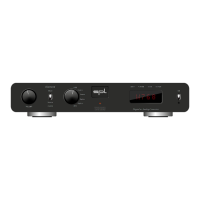
Professional Fidelity
Diamond
Digital to Analog Converter
120V DC Audio Rail
ONWord
CLOCK
Source
Coax 1
Coax 2
Optic 1
Optic 2
AES
USB
PCM76832BIT DLP120DSD4
V
O
L
U
M
E
Diamond User Manual
DA Converter
This User Manual is optimized for
Acrobat Reader.
Interactive buttons may not
appear in other applications.

Other manuals for SPL Diamond

Question and Answer IconNeed help?

Do you have a question about the SPL Diamond and is the answer not in the manual?

Summary

Welcome

Getting Started

Manual Navigation

Learn how to navigate the manual using I, F, R buttons for TOC, front/rear views.

Front View Overview

Front Panel Controls

Identifies and labels controls like Volume, Source, Display, Stand-by, Word Clock, and Power LED.

Rear View Overview

Rear Panel Connections

Details digital inputs, analog outputs (RCA, XLR), word clock input, mains voltage, switches, and DIP switches.

VOLTAIR - 120 V Rail Technology

Technology Explanation

Explains the 120V Rail Technology, its advantages in dynamic range, headroom, and sonic performance.

VOLTAIR Technology Comparisons

Operating Voltage and Dynamic Range

Compares VOLTAIR's operating voltage and dynamic range against other circuits using bar charts.

Performance Metrics

Details dB scale interpretation, max audio level, and THD&N performance of VOLTAIR technology.

Operation

Volume Control

Adjusts analog output level using the volume knob.

Source Selection

Selects the audio input source via the Source switch.

Display Modes

Shows selected source, sampling rate, or error messages on the display.

Word Clock Operation

External Word Clock Setup

Connect and set the switch for external word clock input.

Internal Clock Source

Derive clock from the selected digital source when not using external word clock.

DIP Switch Configuration

RCA Output Level Settings

Configures RCA output to variable or fixed (Unity Gain) via DIP switch 1.

XLR Output Level Settings

Configures XLR output to variable or fixed (Unity Gain) via DIP switch 2.

Specifications

Inputs and Outputs Overview

Lists digital input types (USB, Coax, Optical, AES/EBU) and converter chip.

Supported Sample Rates

Details supported PCM and DSD sample rates.

Output Specifications

Details analog stereo outputs (XLR, RCA), impedance, and max output level.

Performance Measurements

Lists frequency range, crosstalk, THD, noise, and dynamic range.

Internal Voltage and Power Supply

Details internal voltage, mains voltage, fuses, and power consumption.

Physical Dimensions and Weight

Provides unit dimensions in mm/inches and weight in kg/lbs.

Important Notes and Compliance

Manual Disclaimer and Copyright

States no guarantee, technical specifications subject to change, and copyright information.

CE Conformity Declaration

Confirms the unit complies with European Community standards and regulations.

Summary

Welcome

Getting Started

Manual Navigation

Learn how to navigate the manual using I, F, R buttons for TOC, front/rear views.

Front View Overview

Front Panel Controls

Identifies and labels controls like Volume, Source, Display, Stand-by, Word Clock, and Power LED.

Rear View Overview

Rear Panel Connections

Details digital inputs, analog outputs (RCA, XLR), word clock input, mains voltage, switches, and DIP switches.

VOLTAIR - 120 V Rail Technology

Technology Explanation

Explains the 120V Rail Technology, its advantages in dynamic range, headroom, and sonic performance.

VOLTAIR Technology Comparisons

Operating Voltage and Dynamic Range

Compares VOLTAIR's operating voltage and dynamic range against other circuits using bar charts.

Performance Metrics

Details dB scale interpretation, max audio level, and THD&N performance of VOLTAIR technology.

Operation

Volume Control

Adjusts analog output level using the volume knob.

Source Selection

Selects the audio input source via the Source switch.

Display Modes

Shows selected source, sampling rate, or error messages on the display.

Word Clock Operation

External Word Clock Setup

Connect and set the switch for external word clock input.

Internal Clock Source

Derive clock from the selected digital source when not using external word clock.

DIP Switch Configuration

RCA Output Level Settings

Configures RCA output to variable or fixed (Unity Gain) via DIP switch 1.

XLR Output Level Settings

Configures XLR output to variable or fixed (Unity Gain) via DIP switch 2.

Specifications

Inputs and Outputs Overview

Lists digital input types (USB, Coax, Optical, AES/EBU) and converter chip.

Supported Sample Rates

Details supported PCM and DSD sample rates.

Output Specifications

Details analog stereo outputs (XLR, RCA), impedance, and max output level.

Performance Measurements

Lists frequency range, crosstalk, THD, noise, and dynamic range.

Internal Voltage and Power Supply

Details internal voltage, mains voltage, fuses, and power consumption.

Physical Dimensions and Weight

Provides unit dimensions in mm/inches and weight in kg/lbs.

Important Notes and Compliance

Manual Disclaimer and Copyright

States no guarantee, technical specifications subject to change, and copyright information.

CE Conformity Declaration

Confirms the unit complies with European Community standards and regulations.

SPL Diamond Specifications

General IconGeneral
BrandSPL
ModelDiamond
CategoryMedia Converter
LanguageEnglish

Related product manuals