Need help?
Do you have a question about the SPL Mercury and is the answer not in the manual?
Explains the core technology and features of the Mercury D/A converter, focusing on its high demands and connections.
Details the unique 120V technology, its development, and its benefits for audio performance and dynamic range.
Explains the Dual Low Pass filter technology (DLP120) and its advantages for PCM and DSD signal processing.
Visual representation of the performance advantages of 120V technology compared to other circuits with lower operating voltages.
Instructions on how to correctly set the mains voltage for the device to match the local power grid.
Initial procedures to follow before operating the Mercury D/A Converter, including power cord connection.
Explains the balanced and unbalanced XLR connections, including pinout and conductor descriptions.
Describes the function of the ground lift switch for preventing and resolving ground loops.
Details how to connect and use the USB input for audio data, including driver requirements.
Explains the two TOSLINK optical inputs, their specifications, and cable quality recommendations.
Describes the two S/P-DIF coaxial inputs, their specifications, and cable types used.
Details the AES/EBU input specifications for a single AES signal and its connector type.
Covers the AES 2 input, including its regular mode and Dual Wire mode for doubled sampling rates.
Explains how to synchronize the unit using an external word clock via a BNC connection.
Describes the fixed-level analog stereo output (XLR, male) and its calibration options.
Details the variable-level analog stereo output, functioning as a monitor controller with adjustable level.
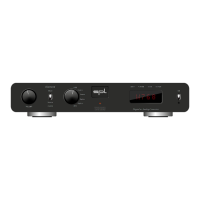
Identifies the input selection buttons and indicators on the front panel of the Mercury Mastering D/A Converter.
Explains the Sync button's functions for synchronization source selection and status displays.
Describes the information shown on the digital display, including sync source and sample rate.
Details the VAR OUT potentiometer for analog volume control, highlighting its quality and feel.
Detailed explanation of how each input selection button (USB, AES, Coax, Opt) routes signals to the DA converter.
Describes the operation and visual indicator for the Mute button, which silences output signals.
Elaborates on the Sync button's role in synchronization source, reference level selection, and status display.
Explains what information is presented on the unit's display, related to sync source and reference levels.
Lists key performance metrics like maximum output level, output impedance, noise, and THD & N.
Details power consumption, fuse requirements, physical dimensions, and weight of the unit.
Covers safe connections, handling water/humidity, object insertion, ventilation, power supply, and cord management.
Specific advice regarding disconnecting the device from power and connections during thunderstorms.
Instructions on operating controls, repairs, part replacement, safety checks, and cleaning the device.
Information on responsible disposal and recycling of the product at its end-of-life.
SPL electronics GmbH contact and location information, including phone, fax, and email.
Links to follow SPL online via their website, blog, Facebook, Instagram, Twitter, and YouTube.
 General
| Brand | SPL |
|---|---|
| Model | Mercury |
| Category | Media Converter |
| Language | English |

 To Next Page