
 Need help?
Do you have a question about the SPL DrumXchanger and is the answer not in the manual?
Process to activate the Analog Code plug-in via your account.
Information on system needs and supported platforms for the plug-in.
Instructions for installing the plug-in on macOS and Windows operating systems.
Defines key terms related to SPL Analog Code plug-ins.
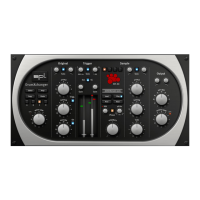
Highlights the DrumXchanger's design philosophy emphasizing simplicity and effectiveness.
Explains the dual threshold recognition and the integrated Transient Designers.
Details the included 1 GB sound library, its contents, and recording specifications.
Describes plug-in applications and the utility of mouse wheel control for adjustments.
Covers keyboard shortcuts and the plug-in's mono, stereo, and multi-channel capabilities.
Provides a brief overview of the five vertical modules: Editor, Settings & Input, Original, Trigger, Sample, Output.
Accessing the Editor for samples, help, and managing settings via presets.
Processing the original signal with filters, Transient Designer, and ducker.
Sound recognition process and options to optimize recognition.
Choosing SPL Kits, processing samples with filters, and adjusting pitch/delay.
Merging signals, setting ratio, filters, and volume for output.
A step-by-step guide to getting started with the DrumXchanger plug-in.
Details on the Editor, Help function, and preset management (A/B/C/D, Copy/Paste).
Adjusting the input level of the original sound and its effect on the signal.
Controls for processing the original signal, including filters and Transient Designer.
Controls for sound recognition, including frequency, bandwidth, and gain settings.
Controls for selecting and processing samples, including kits, filters, and transient designers.
Controls for shaping the final output, including pitch, filters, and dry/wet mix.
Loading three drum variations to achieve random natural sound.
Loading volume variations into slots based on loudness.
Loading rim shot sounds into the dedicated RIM slot.
Buttons for loading, playing, or clearing samples from slots.
Exporting the edited multisample in SPLX format.
Exiting the Editor window and returning to the main interface.
 General
| MIDI Support | Yes |
|---|---|
| Real-time Processing | Yes |
| Type | Drum Replacement Software |
| Software Compatibility | VST, AU, AAX |
| Platform | Windows, macOS |
| Bit Depth | 64-bit |
| Operating System | macOS 10.9 or later |
| Features | Drum replacement |
| Manufacturer | SPL |

 To Next Page