10
DrumXchanger Analog Code
®
Plug-in
Module Overview
Operation
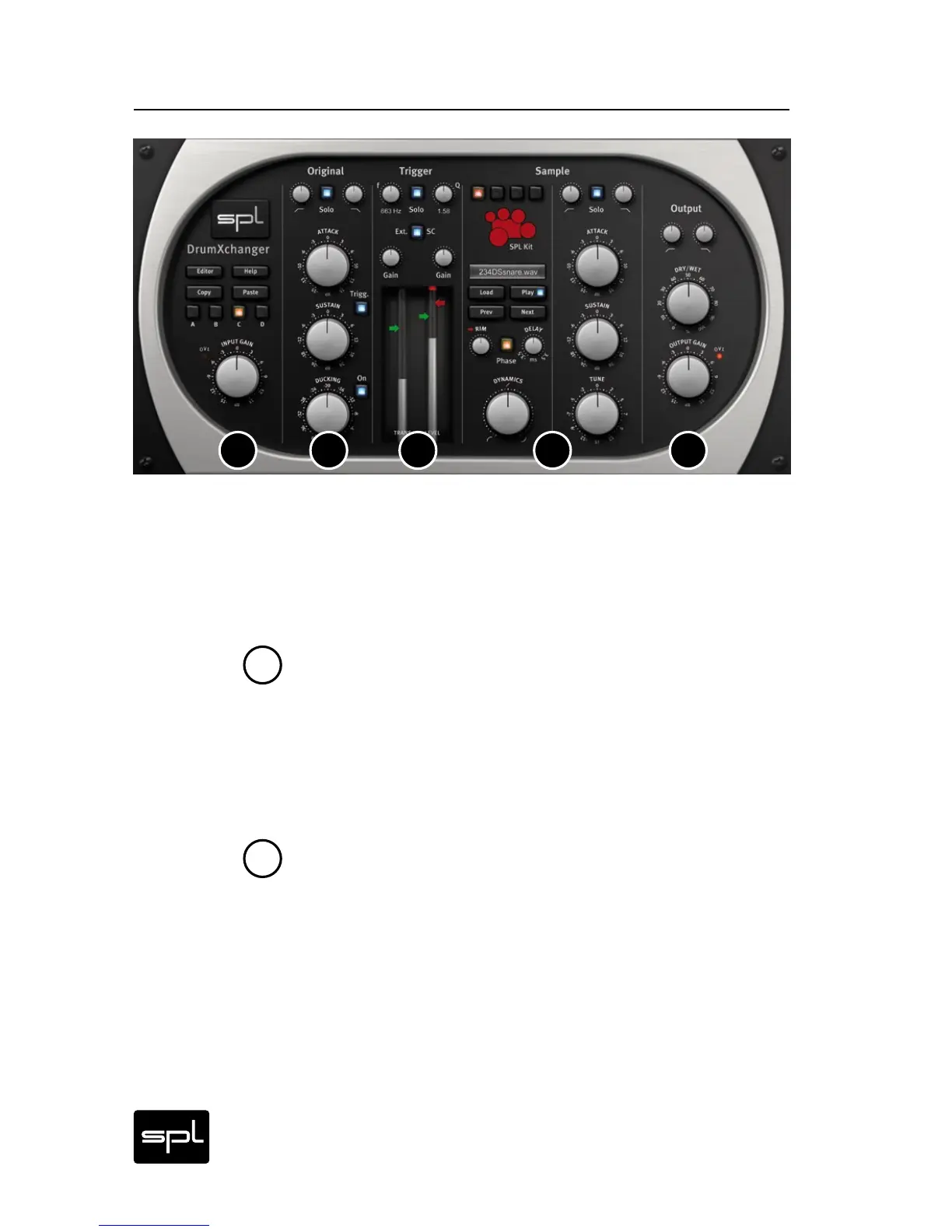
The DrumXchanger is divided in five vertical sections: Editor, Set-
tings & Input, Original, Trigger, Sample, and Output. We call these
sections Modules. Here you will find a short overview of the differ-
ent Modules. To learn more about the functions refer to „Control
Elements“ on page 13 et seq.
Editor, Settings & Input
Here you can access the EDITOR to create and import samples, and
you can also open the quick HELP guide.
Use buttons A-D to save your settings in a preset. COPY and PASTE
allow you to copy the settings from one preset to another.
The INPUT GAIN control determines the input level.
Original
Here you can process the original signal with a high pass filter,
a low pass filter, a Transient Designer, and a ducker. The sound
changes you make in this module have no influence on the actual
sound recognition and replacement.
1 2
2
3 4
5
1


 To Next Page