Phonitor 2 – Quickstart Phonitor 2 – Quickstart
IR REMOTE
IR REMOTE
OUTPUT
OUTPUT
L
R
R
L
LEARN
RLRLRL
SOURCES
SOURCES
2
2
LR
1
1
LR
Learning Volume Up/Down:
1. Press L EARN but ton below
2. Point you r remote at VUs
and press a but ton for
VOLUME DOWN (LED s flash 1x)
3. Repeat un til LEDs fla sh 3x
4. Press a bu tton for
VOL UME UP (LEDs fl ash 1x)
5. Repeat un til LEDs fla sh 3x
XLRs: balanced , Pin 2 = Hot (+)
For unbalanced operation
bridge P in 3 to GND.
RCAs: Unbalanced, T ip = Hot (+)
AVIS: RIS QUE DE CHOC ÉLE CTRIQUE • N E PAS OUVRIR
RISK OF EL ECTRIC SHOC K
DO NOT OPEN
CAUTION
ON BOTT OM SIDE:
DIP SWITCH WIRING
This output can also drive balanced headphones
(Gender changer may be required).
3
3
Phonitor
2
~ 115V AC / ~230V AC
50 Hz / 60 Hz, P max. 35 W
Fuses:
Voltage Selection:
115V AC: T 1 A L 250 V
230V AC: T 50 0 mA L 250 V
1. Remove Fu se Holder
2. Flip O ver 3. Reinstal l
1 ON: Output +12dB
2 ON: Outp ut + 6dB
3 ON: RCA -10dB V to +4dBu
4 ON: Sour ces 1:1 to Output
Serial
Number
Made in Germany
PGM
Power LED
12
10
Start up
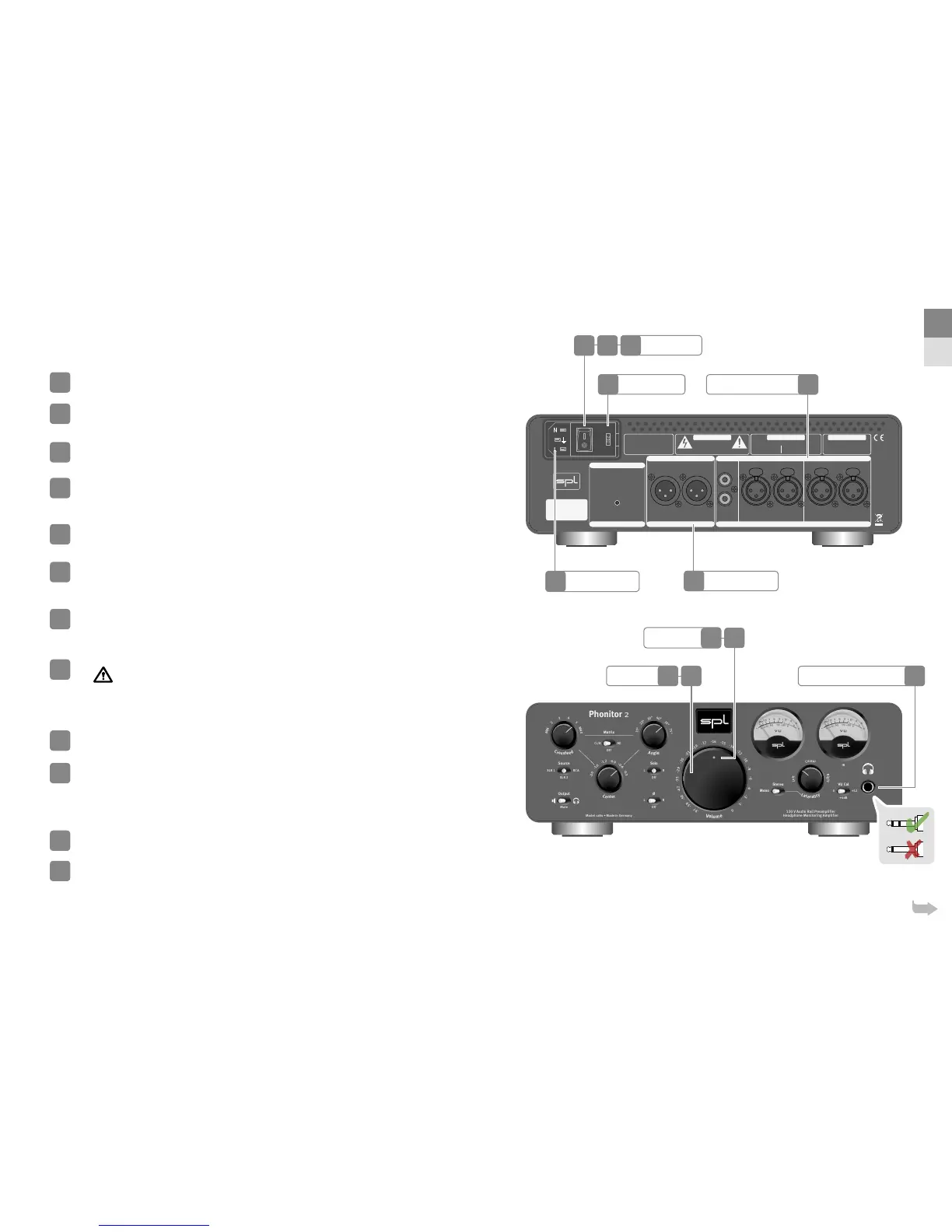
Read the security advices on page !
Make sure that the selected mains voltage of the Phonitor is according to the
mains voltage of your region.
Make sure that the mains switch on the rear of the Phonitor is set to O
(O=O/On=I).
Connect the supplied power cord to the Phonitor and an appropriate mains
socket outlet.
If the supplied power cord does not match your mains socket outlet, please contact your dealer.
Turn o all devices you wish to connect to the Phonitor .
Connect the outputs of your analog sources (e.g. CD Player) to the analog inputs
of the Phonitor . Please use appropriate audio cables (XLR, RCA).
Audio cables not included in the scope of delivery.
Connect audio XLR cables between the Phonitor and a following amplier or a
balanced headphone.
Audio cables not included in the scope of delivery.
Connect your headphone to the headphone output of the Phonitor .
Warning: Never connect a mono jack cable to the front panel stereo jack. Make sure that the stereo jack is
fully inserted, otherwise a short circuit might damage the headphone amplier.
Power up
Turn down the volume of the Phonitor .
Switch on mains switch on the back of the Phonitor (On = I).
Power LED is dimly lit.
Power down
Turn down the volume of the Phonitor .
Switch o mains switch on the rear of the Phonitor (O = O).
Power LED no longer lights up.
1
2
3
4
5
6
7
8
9
10
11
12
Analog Audio Inputs
Audio Output
Headphone ConnectionVolume
Mains Voltage
Mains Switch
Mains Connector
6
7
8119
1210
2
3
EN
DE
4


 To Next Page
 Loading...






