Phonitor 2 – Quickstart Phonitor 2 – Quickstart
IR REMOTE
IR REMOTE
OUTPUT
OUTPUT
L
R
R
L
LEARN
RLRLRL
SOURCES
SOURCES
2
2
LR
1
1
LR
Learning Volume Up/Down:
1. Press L EARN but ton below
2. Point you r remote at VUs
and press a but ton for
VOLUME DOWN (LED s flash 1x)
3. Repeat un til LEDs fla sh 3x
4. Press a bu tton for
VOL UME UP (LEDs fl ash 1x)
5. Repeat un til LEDs fla sh 3x
XLRs: balanced , Pin 2 = Hot (+)
For unbalanced operation
bridge P in 3 to GND.
RCAs: Unbalanced, T ip = Hot (+)
AVIS: RIS QUE DE CHOC ÉLE CTRIQUE • N E PAS OUVRIR
RISK OF EL ECTRIC SHOC K
DO NOT OPEN
CAUTION
ON BOTT OM SIDE:
DIP SWITCH WIRING
This output can also drive balanced headphones
(Gender changer may be required).
3
3
Phonitor
2
~ 115V AC / ~230V AC
50 Hz / 60 Hz, P max. 35 W
Fuses:
Voltage Selection:
115V AC: T 1 A L 250 V
230V AC: T 50 0 mA L 250 V
1. Remove Fu se Holder
2. Flip O ver 3. Reinstal l
1 ON: Output +12dB
2 ON: Outp ut + 6dB
3 ON: RCA -10dB V to +4dBu
4 ON: Sour ces 1:1 to Output
Serial
Number
Made in Germany
PGM
Various settings
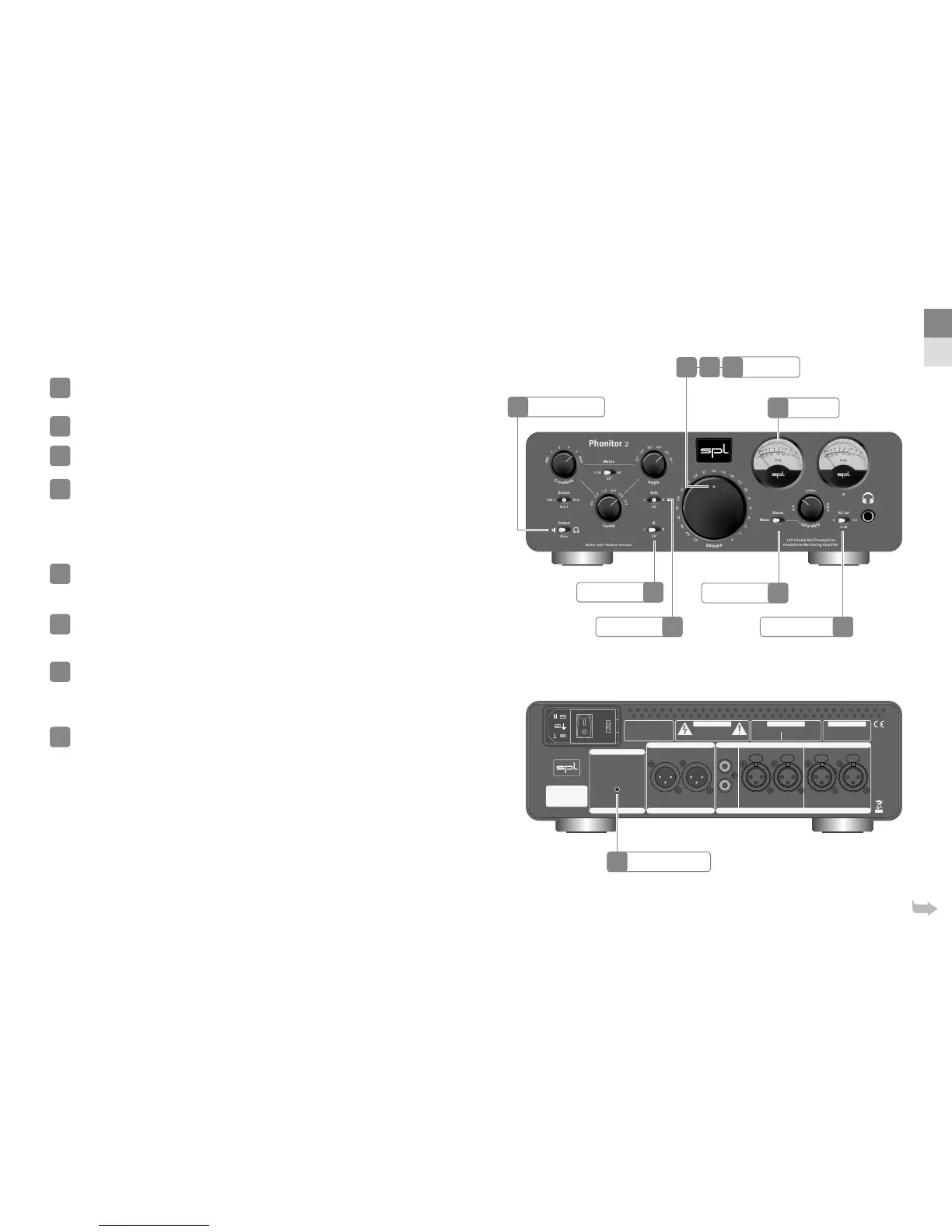
The Stereo switch selects the playback mode – mono, stereo and stereo with an
extremely ne balance (Laterality).
Engage the Solo switch to monitor only the le or right channel of the stereo signal.
To hear a chosen solo channel in both ears, set the Stereo switch to Mono.
With the Phase switch you can invert the phase of the le or right channel.
When setting the VU Cal switch to +6 (+) dB the VU meter is attenuated by
dB. VU = + (+) dBu
Learn IR remote control
The volume potentiometer of the Phonitor is motorized and can be operated
by any infrared (IR) remote control. Set the Output switch to Mute while learning
the IR remote control commands.
The VU display now lights up red.
Press the IR REMOTE LEARN button.
Power LED now lights up brighter.
Point your remote control towards the VU display and push the button you wish
to use to
lower
the volume. The Power LED lights up once per push. Press the
same button repeatedly until the Power LED lights up three times within a short
interval – programming of this button is then completed.
Point your remote control towards the VU display and push the button you wish
to use to
increase
the volume. The Power LED lights up once per push. Press
the same button repeatedly until the Power LED lights up three times within a
short interval – programming of this button is then completed.
Learn mode ends automatically aer the second button is learned.
19
20
21
22
23
24
25
26
IR Remote Learn
VU Cal Switch
VU Meter
Power LED
Stereo Switch
Solo Switch
Phase Switch
24
22
22
26
25
24
19
20
21
EN
DE
Output Selection
23


 To Next Page
 Loading...






