-9-
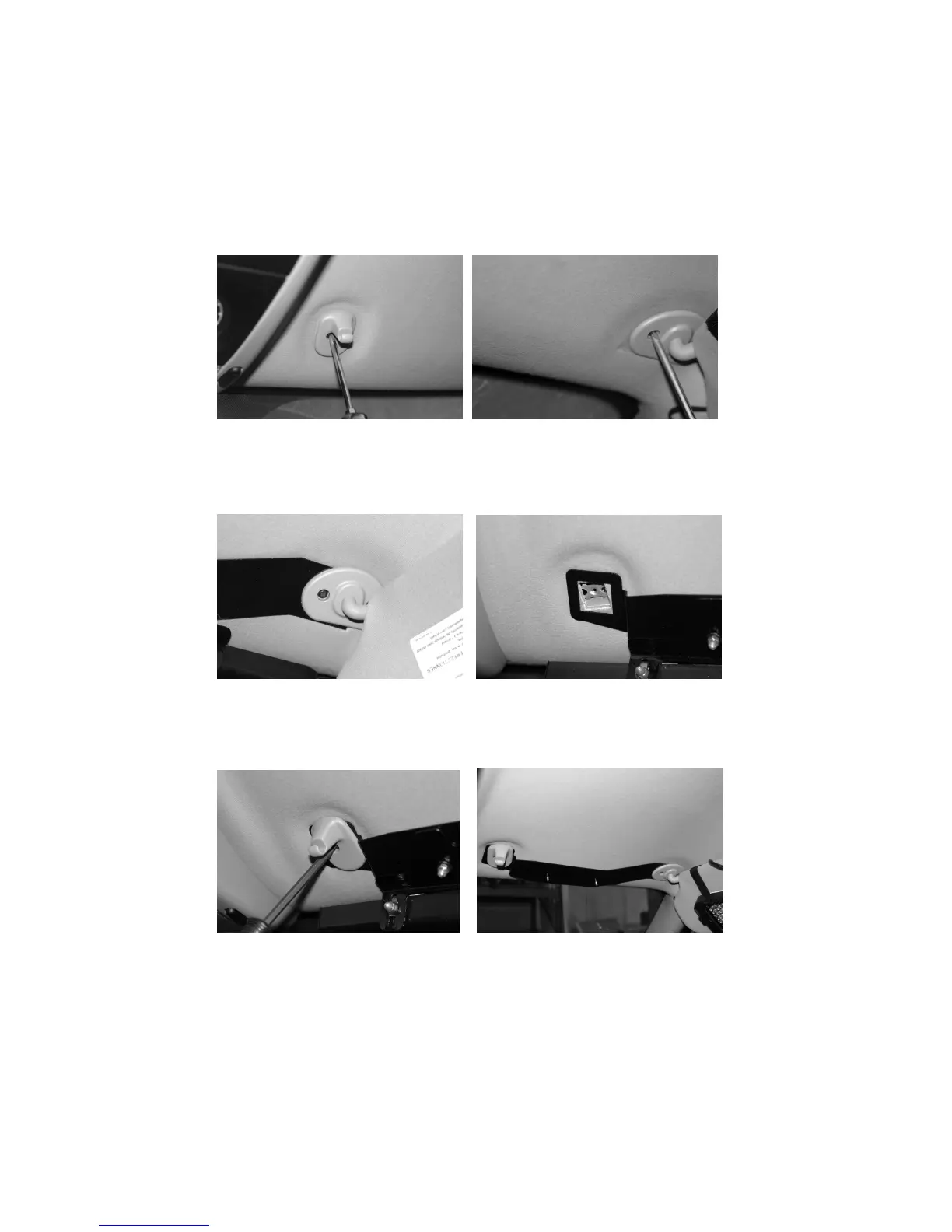
1. Remove both the driver and
passenger visor clips from
the vehicle.
3. Slide the forked end of the visor
bracket under the visor pivot arm
that you just loosened.
(Passenger’s side shown)
2. Loosen (LOOSEN, DO NOT REMOVE!!)
the three visor pivot arm screws on one
side of the vehicle with appropriate
screwdriver.
(Passenger’s side shown)
4. Align the square hole on the other
end of the visor bracket with the visor
clip hole.
(Passenger’s side shown)
VEHICLE SPECIFIC BRACKET INSTALLATION
(Models 274-ULB21-CH, 274-ULB21-CV, 274-ULB21-EX,
274-ULB21-IM, and 274-ULB21-TA)
6. Tighten the screws on the visor arm
to hold the visor bracket in place.
(Passenger’s side shown)
5. Replace and tighten visor clip to
secure the visor bracket to your
vehicle.
(Passenger’s side shown)
Note: Bracket styles can vary with
some not needing the additional “L”
bracket shown in step 9.


 To Next Page