Addyourmodel
DownloadtheMoonRayKeychain.STLfilefromourwebsiteat
http://www.sprintray.us/rayware/MoonRay_keychain.STL
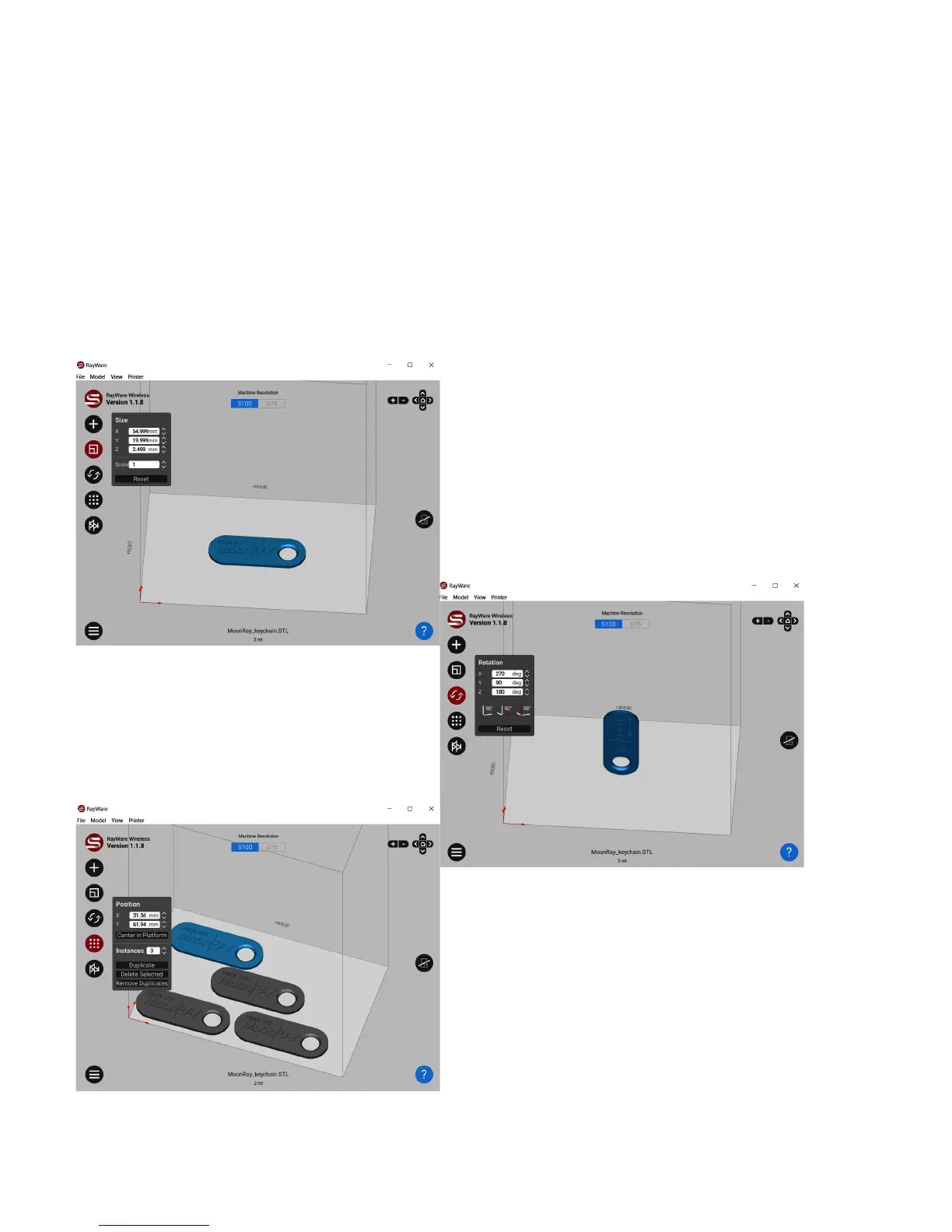
Clickthe+buttononthetopleftsidetoaddyourmodel.YoucanalsogotoFile>Openor
draganddropfilesontothebuildplatform.Thewhitearearepresentsthebottomofthe
platform.Modelswillprintupsidedown;thesurfacethatisflushwiththewhiteareawillbe
attachedtotheplatformafterprinting
Ontheleftsideofthewindow,you'llseeseveral
optionsunderneaththe+button.
SizeandScale:
Youcanchangethesizeofyourmodelorscale
yourmodelupordownwithinRayWare.
RotationandBase:
Thisoptionallowsyoutorotateyour
modelontheplatform,orchangewhich
sideofyourpartisitsbasewhen
printing.
Positioning/Instances/Duplication:
Youcanalwaysmoveitemsbyclickingand
movingthem,orcenterthemwiththebuttonon
thistab.
Ifyouwanttoprintmultiplecopiesofthesame
modelatonce,youcanusethisoptiontoto
selecthowmanycopiesyouwouldlike.


 To Next Page