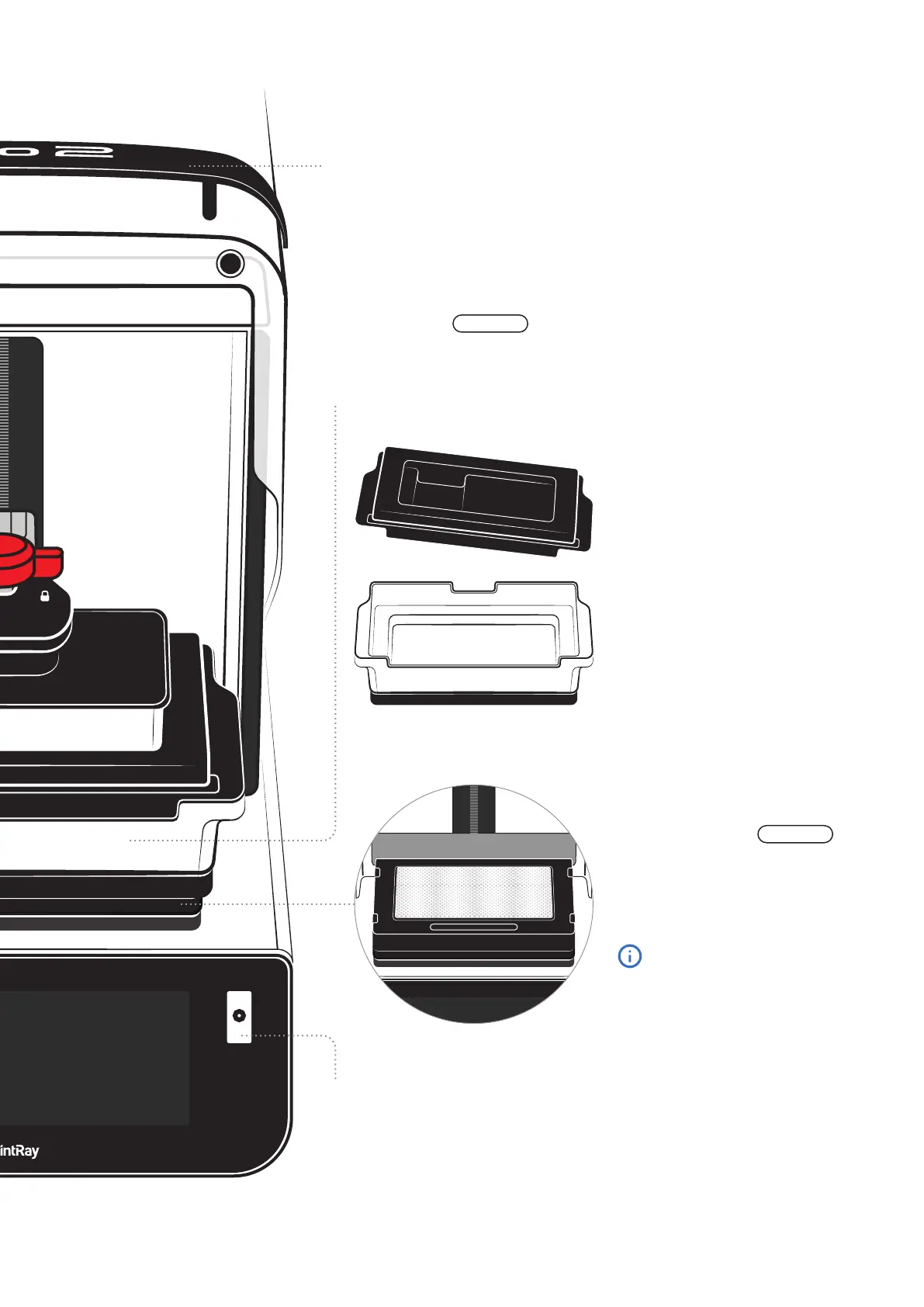
Resin Tank
Liquid resin is poured directly into this tank. Take note of the ‘Max’ and ‘Min’ lines
- overfilling can cause damage to your printer. Resin tanks are consumable
products. How long they last depends on the type of appliances printed, the resin
used, and how they are maintained.
Barcode Scanner
Pro 2 uses barcode scanning to track and log resin usage,
expiration dates, and other important material information.
When you add or assign resin to a resin tank, the touch-
screen will provide instructions for using the scanner.
Ergonomic Handle
Use the handle to open and close the lid to keep fingerprints and resin
marks off the UV lid. Clean the handle with IPA 91% and a soft towel.
Consumable Product
Your Pro 2 monitors the resin, usage,
and health of your resin tank.
The onboard computer will notify you
on the touchscreen when it’s time to
replace the tank.
Tank Lid
This lid should be removed before each
print job and reinstalled when you’re
finished printing for the day. This helps
preserve the life of your resin.
CONSUMABLE
Optical Panel
Located just beneath the resin tank, the
Optical Panel is the heart of Pro 2.
Your printer monitors the usage and
health of the Optical Panel.
REPLACEABLE
Learn more about when and how
to replace the Optical Panel later
in this guide.



 To Next Page