© 2022 Radiodetection Ltd 36
inspecting drains. Sondes used in underground drilling
and boring operations are normally housed in the boring
or drill head behind the boring or drill bit.
Locating and tracing a sonde
Insert the sonde in the drain or duct access and locate it
while it is still just in view at the drain or duct entrance.
Hold the locator vertical directly over the sonde with the
antenna in line with the sonde. Adjust the locator
sensitivity so the bar graph reads between 60% and
80%.
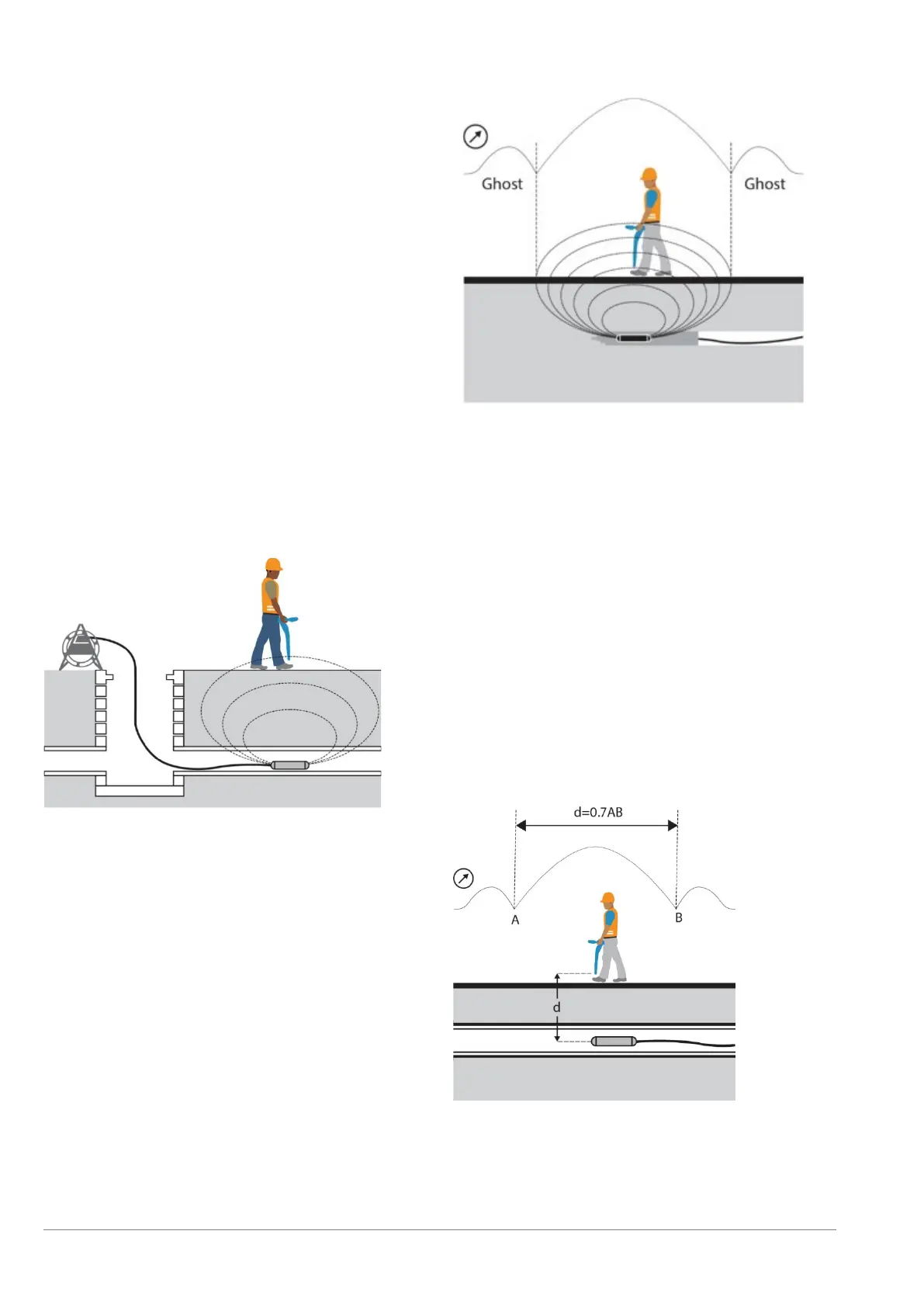
The sonde radiates a Peak field from the center of its
axis with a ghost signal at each end of the Peak. Move
the locator a little way behind and then in front of the axis
of the sonde to detect the ghost signals. Finding the two
ghost signals positively confirms the locate. Reduce the
locator sensitivity to lose the ghost signals but still
indicate a clear Peak response directly over the sonde.
Locator sensitivity is now set for tracing the duct or drain
unless the distance between sonde and locator
changes.
Propel the sonde three paces along the drain or duct and
stop. Place the locator over the supposed position of the
sonde. Do not adjust the sensitivity level.
Figure 9.7 Sonde deployment
To locate a sonde:
1 Move the locator backwards and forwards and stop
when the bar graph indicates a Peak. You can use
the LCD compass to orient the blade of the locator
with the direction of the sonde.
2 Rotate the locator as if the blade is a pivot. Stop
when the bar graph indicates a Peak.
Figure 9.8 Locating a sonde
3 Move the locator from side to side until the bar graph
indicates a Peak.
4 Repeat 1, 2 and 3 with the antenna vertical and
resting on or just above the ground. The locator
should then be directly above the sonde with the
antenna in line with it. Mark the position of the sonde
and its direction.
5 Propel the sonde a further 1 or 2 meters, pinpoint,
and mark the position. Repeat this pinpoint
procedure at similar intervals along the line of the
drain or duct until the survey is completed.
Checking sonde depth
The RD7200 locator will automatically display the depth
of a located sonde providing the locator is correctly
oriented and positioned above the sonde. Using the LCD
compass as a guide, rotate the locator until the compass
indicates the sonde is in East / West position.
Figure 9.9: Calculating sonde depth
Calculation method
Pinpoint the sonde. Move the locator in front of the
sonde and still with the antenna in line with it, increase
sensitivity to find the Peak of the ghost signal. Move the


 To Next Page