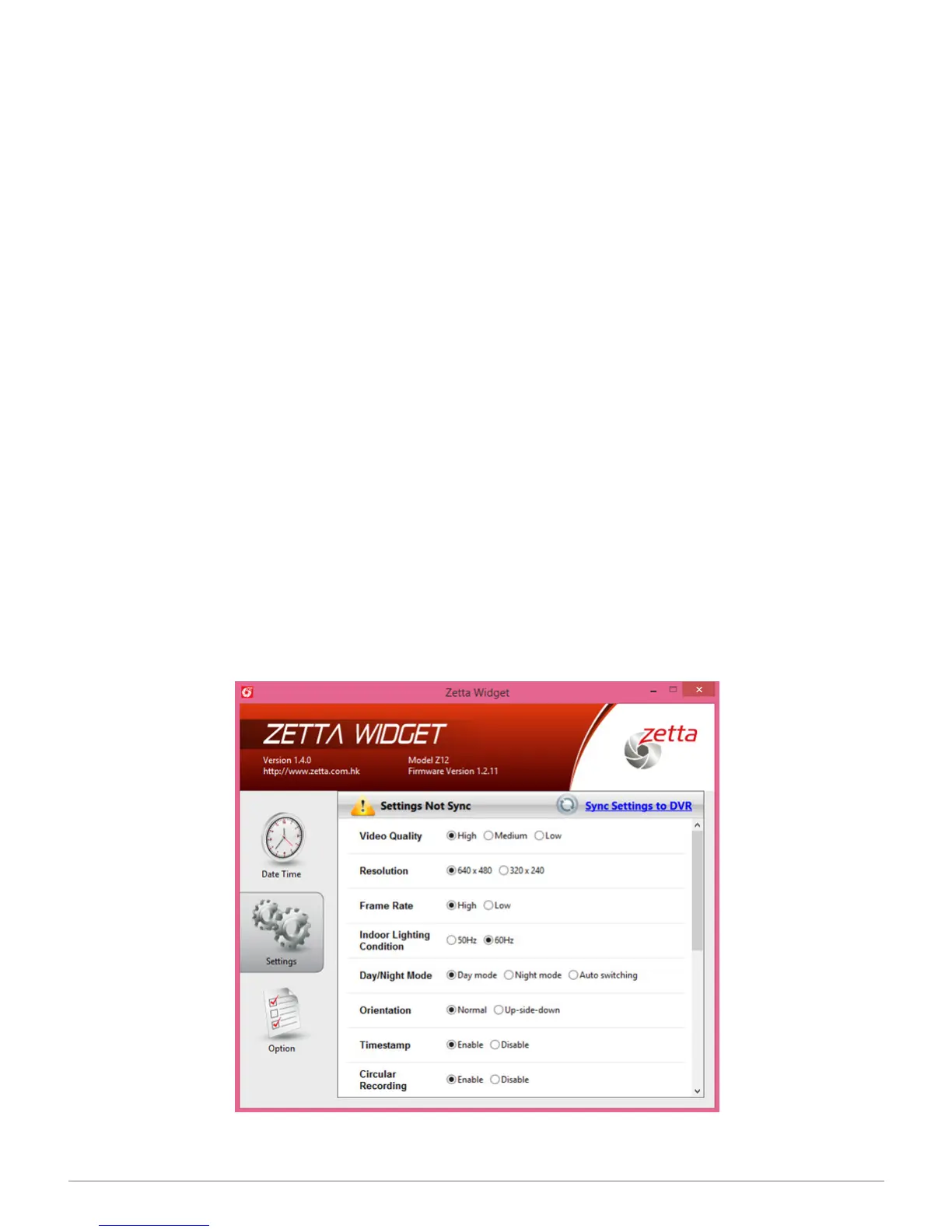
Time Stamp
Without doing anything, the video’s date and run time are superimposed by default
along the bottom right of the screen in the format: 2016/03/04 11:04:58 (year/month/
day hour/minute/second). This allows you to identify the exact moment an incident
occurred. However, if you prefer not to time stamp the picture, click on the Disable
button, then on Sync Settings to DVR. Make sure to keep the slider switch on the
camera in the Custom Mode position. The time stamp will not be recorded, and it will
not appear on the video.
Note: You cannot change the time stamp format.
Circular Recording
Also called loop recording, circular recording means that the camera will automatically
overwrite the oldest video le with the newest video. That way, you don’t have to keep
changing memory cards or transferring les to your computer. The setting assumes
you don’t need to archive days-old video but simply want the ability to retrieve recent
footage when a surveillance situation or vehicular accident warrant further review.
Click on the Enable button, then Sync Settings to DVR. Keep the three-position
switch on the camera on Custom Mode. You can always disable Circular Recording
from the software. When the camera’s three-way switch is set to Surveillance mode,
circular recording is enabled; with On-the-go, it’s disabled; the Custom mode default
is enabled.
SPYTEC Z12 INTELLIGENT SECURITY CAMCORDER USER GUIDE 8


 To Next Page