1918
www.sunnyrooproducts.com
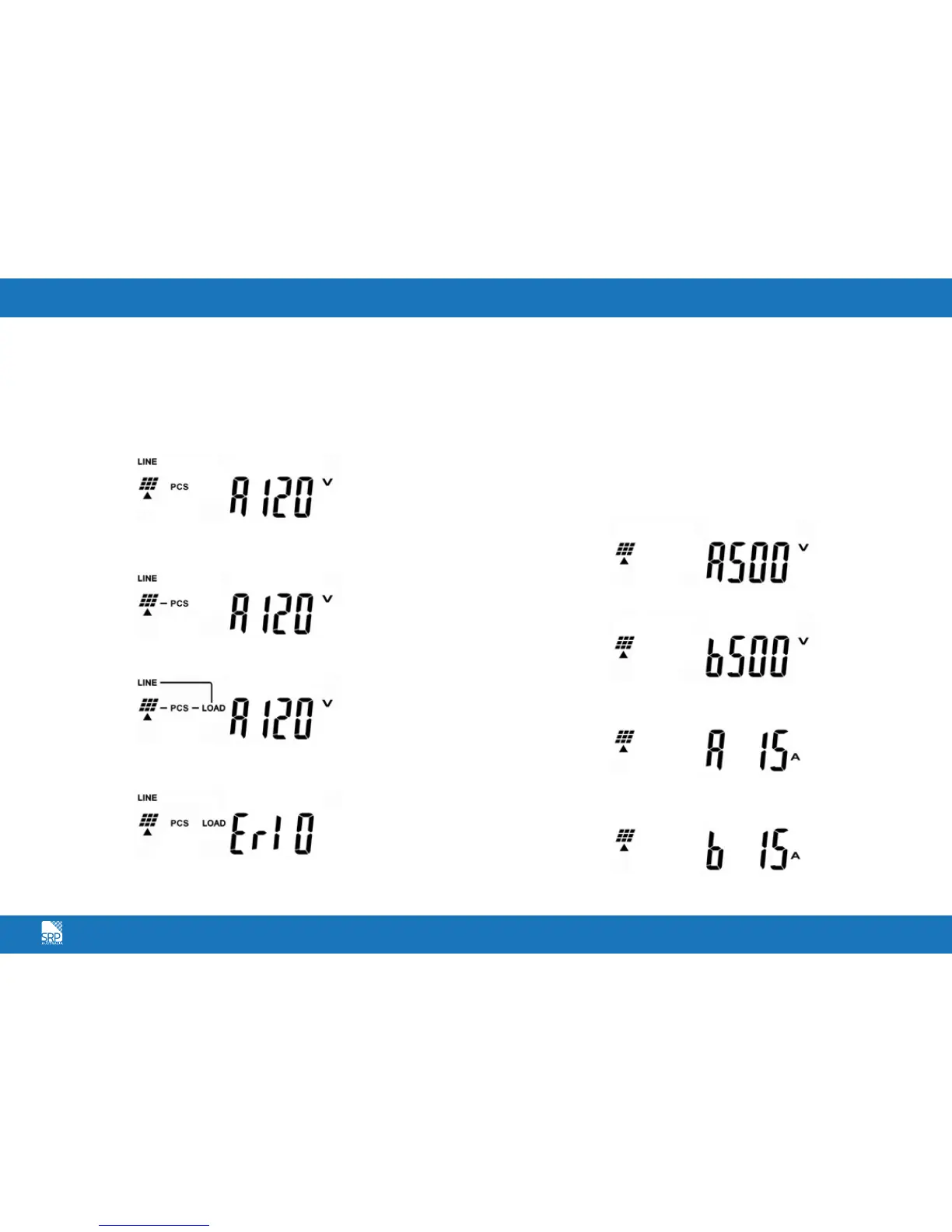
Turn on the AC breaker. If Utility specification (ex. voltage, frequency etc.) is
matched with the specs of the inverter, after 300 seconds the LCD display will
illustrate drawing C. And the Yellow LED will go out to indicate that the utility
is acceptable by the inverter. If the Utility’s specification (ex. voltage, frequency
etc.) is not matched with the specs of the inverter then an error code or error
status will be shown on the screen.
After 5 seconds, if the DC soft start of the inverter is successful, the LCD display
will illustrate drawing D. The Green LED still flashes.
After 10 seconds, if the AC soft start of inverter is successful the LCD display
will illustrate drawing E.
If the inverter is in failure (ex. Output Current Over Range), then an error code
or error status will be shown on the screen. ( Example: Drawing F)
If start-up operation of the inverter is complete and successful. The LCD display
will illustrate drawing E.
Checking Measured Values & Figures
If you would like to check the measured values and figures detected by
the Inverter, please scroll up and scroll down using the key pad.
When scrolling down using the key pad, the LCD display will illustrate
as follows:
Input DC Voltage of String A, as drawing G.
Input DC Voltage of String B, as drawing H.
Input DC Current of String A, as drawing I.
Input DC Current of String B, as drawing J.
C.
G.
H.
I.
J.
D.
E.
F.



 To Next Page