1312
www.sunnyrooproducts.com
Connecting to the Grid (AC utility)
To connect the AC cable, proceed as follows:
Step 1. Measure the voltage and frequency of the Grid/Utility.
The voltage and frequency of the Grid/Utility will differ between countries.
Step 2. Before wiring the SR Series Inverter, ensure the main breaker in the
primary utility breaker box is switched to OFF. Switch this breaker to ON only
after all wiring has been completed as instructed in this User Manual.
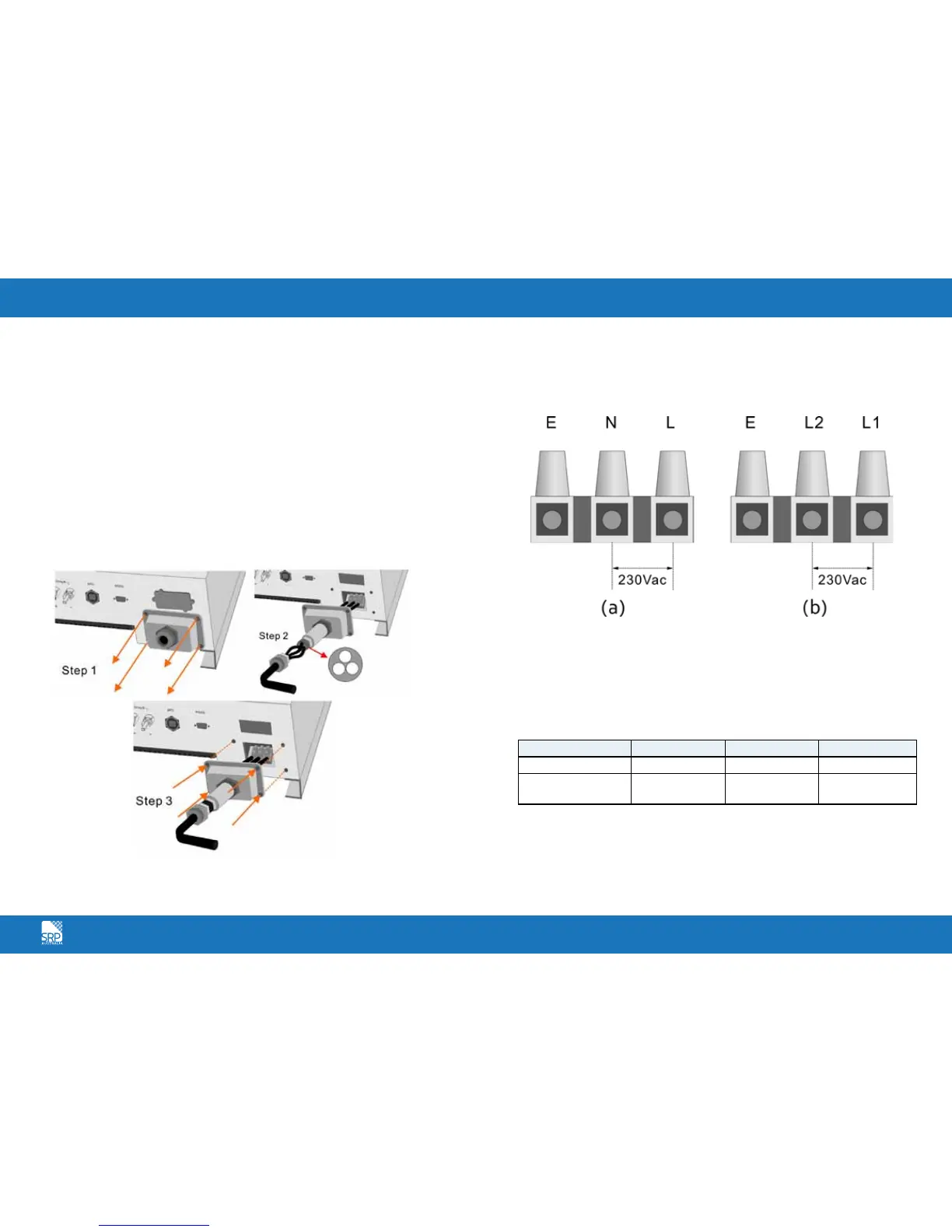
Step 3. Remove the screws that secure the case of the SR Series Inverter and
carefully remove the cover. Remove the connection from the cover as shown
in Fig. 2.
Step 4. Insert utility wires through cable gland. Connect wires according to
polarities indicated on terminal block.
L1 means LINE1 (black), N means Neutral (White), L2 means LINE2 (Red), E
means system Earth (yellow-green) as shown in Fig. 3
Step 5. Fix the housing cover of the SR Series Inverter and evenly tighten the
four screws.
To prevent risk of electric shock, ensure the Earth wire is properly Earthed
before operating the SR Series Inverter.
Suggested cable width for AC wire;
Model Diameter (mm) Area (mm
2
) AWG no.
SR 4200TL/5000TL >2.59 >5.5 >10
SR 1500TL/ 2000TL/
3000TL
>2.05 >3.5 >12
Fig. 2
Fig. 3



 To Next Page