Connections and status indicators
Page 11
4 Connections and status indicators
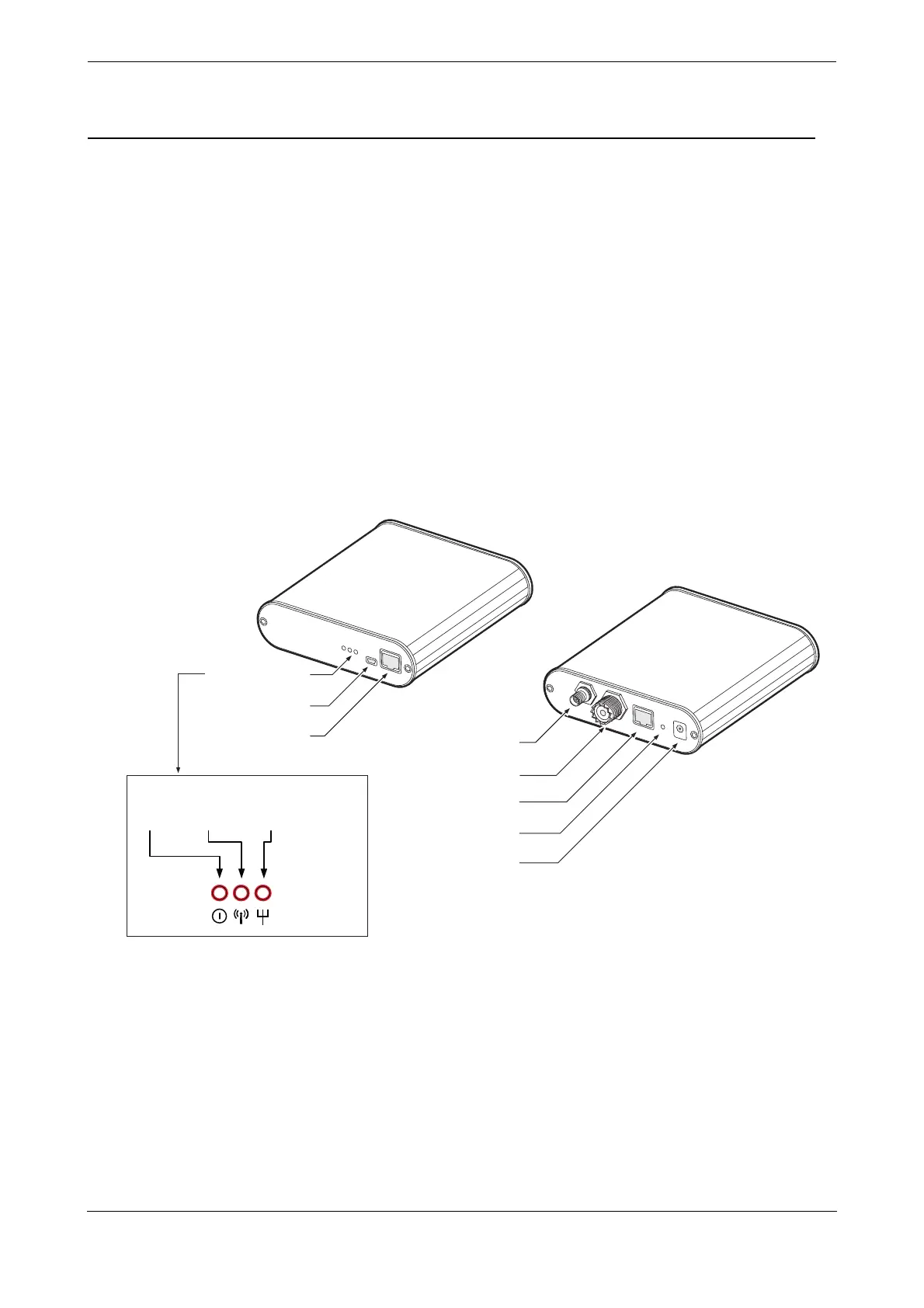
The Coast Station has a number of connections and status indicators as follows and shown in Figure 5 and
Figure 5:
● VHF antenna connector for connection to a VHF antenna (not supplied). AIS messages are received
and transmitted via the VHF antenna
● GPS antenna connector for connection to the supplied GPS antenna. The Coast Station requires a
GPS position fix in order to transmit any AIS messages and to provide a time reference for data
logging.
● Ethernet connector for connection to a Local Area Network (LAN) using the supplied Ethernet cable.
● Power connector for connection to a mains power source using the supplied mains adaptor.
● Reset button used to manually reset the Coast Station to its default settings if required.
● USB connector for direct connection to a PC for configuration of the transceiver using proAtoN or
direct monitoring of AIS traffic.
● Ethernet configuration port for direct connection to a PC for configuration of network settings.
Status indicators showing the status and activity of the Coast Station including power status, AIS reception and
network activity.
Figure 5 Coast Station connections
Status indicators
USB port
Ethernet port
Power
AIS
reception
Network
activity
GPS antenna connector
VHF antenna connector
Ethernet port (internet)
Reset button
Power connector
(for conguration)



 To Next Page