SECTION FOUR – Routine Maintenance and Professional Servicing
LL
LL
oo
oo
cc
cc
aa
aa
tt
tt
ii
ii
oo
oo
nn
nn
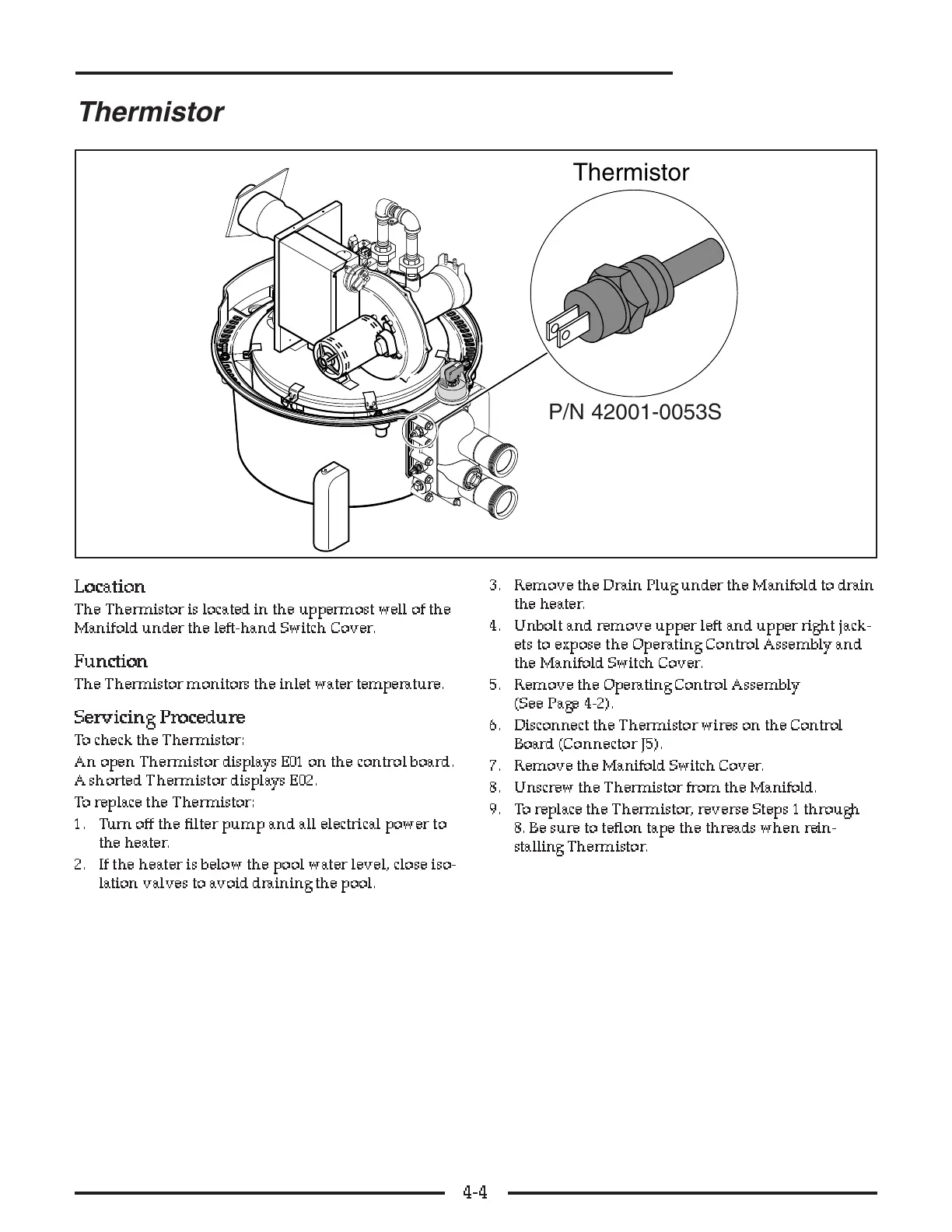
The Thermistor is located in the uppermost well of the
Manifold under the left-hand Switch Cover.
FF
FF
uu
uu
nn
nn
cc
cc
tt
tt
ii
ii
oo
oo
nn
nn
The Thermistor monitors the inlet water temperature.
SS
SS
ee
ee
rr
rr
vv
vv
ii
ii
cc
cc
ii
ii
nn
nn
gg
gg
PP
PP
rr
rr
oo
oo
cc
cc
ee
ee
dd
dd
uu
uu
rr
rr
ee
ee
To check the Thermistor:
An open Thermistor displays E01 on the control board.
A shorted Thermistor displays E02.
To replace the Thermistor:
1. Turn off the filter pump and all electrical power to
the heater.
2. If the heater is below the pool water level, close iso-
lation valves to avoid draining the pool.
3. Remove the Drain Plug under the Manifold to drain
the heater.
4. Unbolt and remove upper left and upper right jack-
ets to expose the Operating Control Assembly and
the Manifold Switch Cover.
5. Remove the Operating Control Assembly
(See Page 4-2).
6. Disconnect the Thermistor wires on the Control
Board (Connector J5).
7. Remove the Manifold Switch Cover.
8. Unscrew the Thermistor from the Manifold.
9. To replace the Thermistor, reverse Steps 1 through
8. Be sure to teflon tape the threads when rein-
stalling Thermistor.
4-4



 To Next Page