P a g e | 14P a g e | 14 DOC 001 REV A DOC 001 REV A P a g e | 15
Power→”ON”
Throle→5%-10% rotaon
LED→Green, Yellow, Red
(Full Baery Charge)
Power Switch→”OFF”
Throle→”FULL” posion
HOLD THROTTLE IN FULL
POSITION!
Power→”ON”
Throle→5%-10% rotaon
LED→Red
(Low Baery Charge)
Power→”ON”
Throle→5%-10% rotaon
LED→Yellow and Red
(Med-Low Baery Charge)
5. If you connue to twist the throle (10%+), the motor will be
acvated. The more the throle is twisted, the more power is
delivered to the motor, based on the power program selected.
6. Exercise cauon around moving parts and wheels.
7. Contact STACYC customer service or go visit:
www.STACYCstabilitycycle.com if unsure about any operaonal
procedure.
CHANGING POWER MODES (FOR ADULT USE ONLY!!!!)
Your STACYC is equipped with 3 power modes for dierent skill levels. Training Mode,
Standard Mode and Advanced Modes. We do not advise showing children how to
adjust the modes. Each child should have the mode set by an adult who will be close-
ly supervising the child. DO NOT put your child on the “Advanced” mode without
working through the process of learning the Training and Standard Modes.
Acvate Program Selecon:
1. Ensure power switch is in “OFF” posion.
2. Install Baery.
3. Ensure bike power switch is “OFF” and no LED lights are on, or no
beeps were heard.
o If any LED light is on, turn bike Power Switch to “OFF”
o If you heard a beep, turn bike Power Switch to “OFF”
4. Turn throle gently and hold throle in “FULL” posion. Do
not release.
5. Turn power switch to “ON” posion , do not let throle move from
“FULL” posion.
o The yellow LED light will ash 5 mes, then all the LED lights
will ash and beep 5 mes, all LEDs will remain lit. Wait 1 sec,
then release throle. All LED lights should be o.
o If LED lights are on, repeat from step 3, and be sure not to
twist the throle quickly as it is not in Program Mode!!!
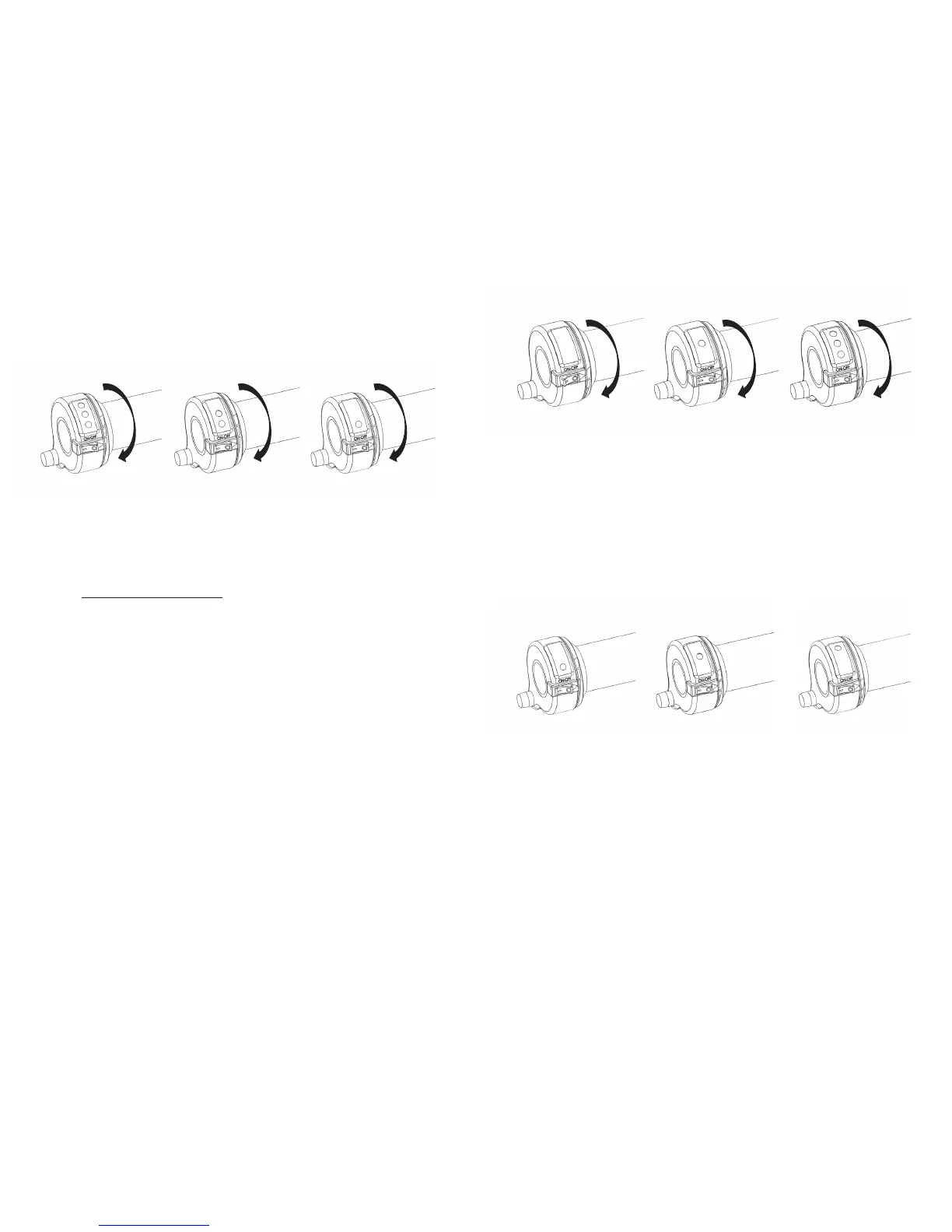
Power Switch→”ON”
Throle→”FULL” posion
LED→ashing YELLOW
5 yellow ashes
Selecon MODE:
Throle→”FULL” posion
LED→solid GREEN
(training mode)
Selecon MODE:
Throle→”MID” posion
LED→solid YELLOW
(standard mode)
Selecon MODE:
Throle→”LOW” posion
LED→solid RED
(advanced mode)
Power Switch→”ON”
Throle→”FULL” posion
LED→ashing GREEN, YELLOW
AND RED
5 Green/Yellow/Red ashes with
5 beeps, all LEDS stay lit, release
throle, all LED lights o, ready
to choose power model
Select Program:
6. Turn throle, and as the throle moves through the range of power
modes, the Red, Yellow, or Green LED light will illuminate.
7. Hold Throle at the power mode (LED posion) desired
approximately 5 seconds unl “2 short beeps” are heard.
o Red→training mode (slow)
o Yellow→standard mode (medium)
o Green→advanced mode (fast)
Exit Program Selecon:
8. Release throle.
9. All LED lights ash together 1 me with “1 long beep”.
10. LED Light indicang selected power mode will now be illuminated!
o Operaon of STACYC will be with the illuminated power
mode. STACYC will stay in this power seng unless changed
as per steps above:
o Red→training mode (slow)
o Yellow→standard mode (medium)
o Green→advanced mode (fast)


 To Next Page
 Loading...