P a g e | 12P a g e | 12 DOC 001 REV A DOC 001 REV A P a g e | 13
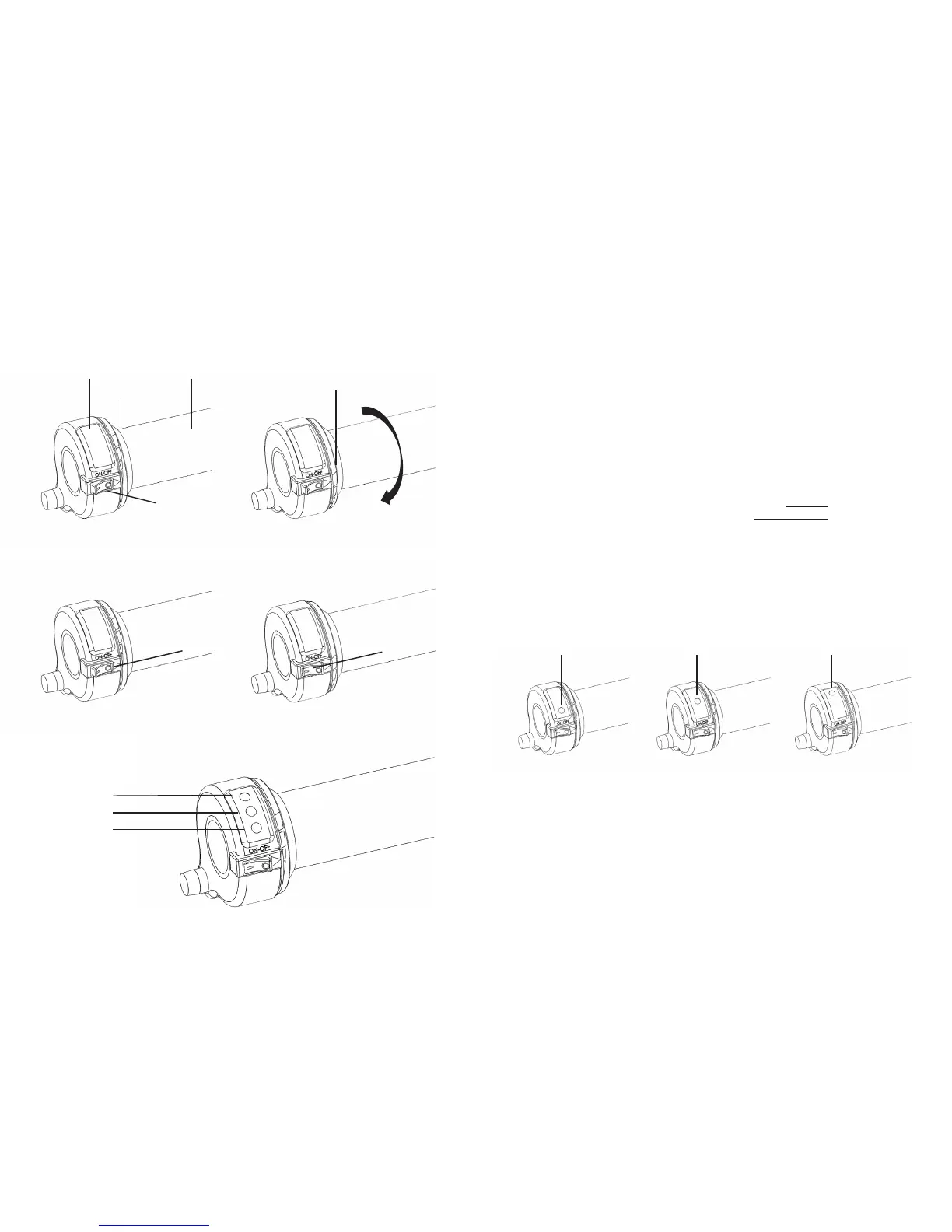
THROTTLE COMPONENTS/FEATURES:
LED
Throle gauge
“zero” posion
Throle gauge
“full” posion
Rotaon
Throle grip
Power Switch
◀
◀
◀
◀
◀
◀
◀
◀
◀
◀
Power Switch
(shown in “OFF” Posion)
LED → GREEN
LED → YELLOW
LED → RED
Power Switch
(shown in “ON” Posion)
RED LED illuminated
(default)
Low-Speed/Power
YELLOW LED illuminated
Medium-Speed/Power
GREEN LED illuminated
Fast-Speed/Power
THROTTLE OPERATION:
(Conrm Speed Mode & Check Baery Level)
Operaon of throle is only for those supervised by an adult. In no circumstances
should a child be allowed to operate the STACYC without proper training and super-
vision. If the child cannot walk, run, coast and brake, they are surely not ready for
throle control.
1. Ensure power switch is in “OFF” posion, throle in “zero” posion.
2. Install Baery.
3. Power on bike. (Power Switch to “ON” posion)
a. Audible Beep.
b. Followed by a light indicator.
c. Light indicates the power mode that is currently selected.
i. RED-Low Speed/Power *factory default
• (training mode)
ii. YELLOW-Medium Speed/Power
• (standard mode)
iii. GREEN-Fast Speed/Power
• (advanced mode)
4. While sing on the bike, both hands gripping the handlebar, both
feet at on the ground and ready to ride, turn the throle slightly, the
lights will show the baery level (twist slowly and a very lile amount,
careful to not acvate motor!)
a. Green, Yellow, Red lights→indicate full charge
b. Yellow, Red lights→indicate medium-low baery level
c. Red light→low baery level and baery needs to be changed.
◀
◀
◀


 To Next Page