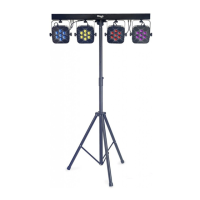
Using one LightTheme™ fixture
Press the menu button, use the up and down buttons to select the Auto mode and press
the enter key to confirm. Then, use the up and down buttons to choose the theme that
best fit your mood (Th-1 to 13). Press enter again to control the sensibility to the music
thanks to the up and down buttons (se-1 to 9).
Using several LightTheme fixtures
1. Connect LightTheme-compatible fixtures using a standard DMX cable (see the
DMX 512 connections section).
2. Choose the first light as a controller (see the One Light Theme fixture procedure)
or connect the LightTheme remote control (sold separately) with a DMX cable..
3. On the other lights, select either theme slave A or B, which are complementary
presets specifically programmed for each theme. To do that, with the menu button,
select the slave mode (SLAv) and press the enter key to confirm. Then use the up and
down buttons to select Slave A or B (SL-A or B).
4. Select the theme that best fits your mood on the first fixture or on the remote
control.
5. Enjoy!


 To Next Page