Operation............Continued
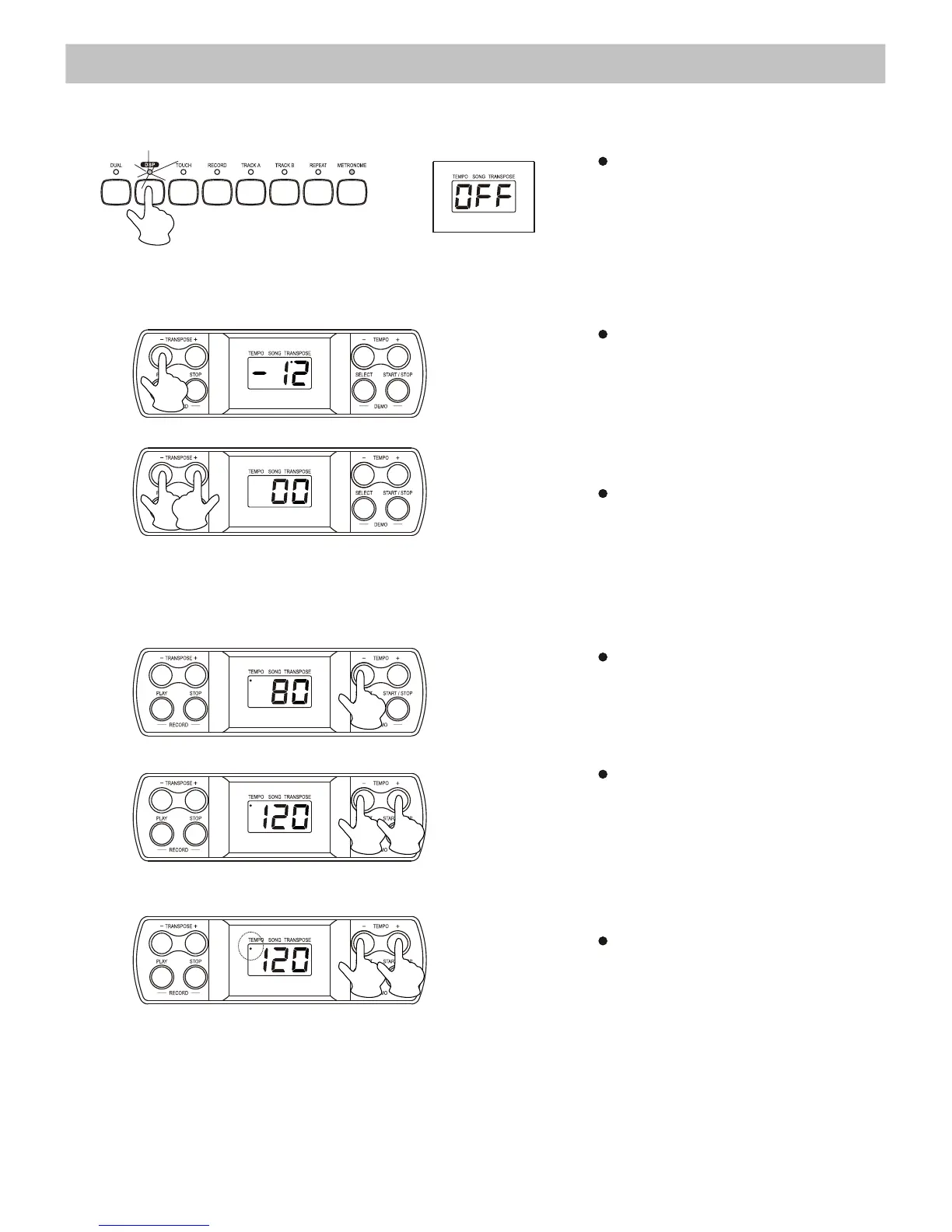
4. DSP (Digital Signal Processor)
5. Transpose
To restore the normal
Transpos
e position, press
both
the +/- buttons
simultaneously
.
6. Tempo
You can speed up or slow
down
the tempo of a song
or
metronome by pressing
the
[TEMPO +/-] buttons.
To restore the default tempo,
press
both the +/- buttons
simultaneously
. When you
press
both the +/- buttons
when
the song/metronome
is
stopping, the tempo will
return
to 120.
When
you are adjusting the
tempo,
the tempo indicator
will
appear on the display.
11
Press the [DSP] button to turn
on/ off the Digital Signal
Processor. The LED display
will clearly show the DSP
status.
The Transpose function allows
you to change the pitch of the
instrument in semi-tone steps, up
to a maximum of 12 semi-tones
(one octave) above or below the
standard pitch.


 To Next Page