Operation............Continued
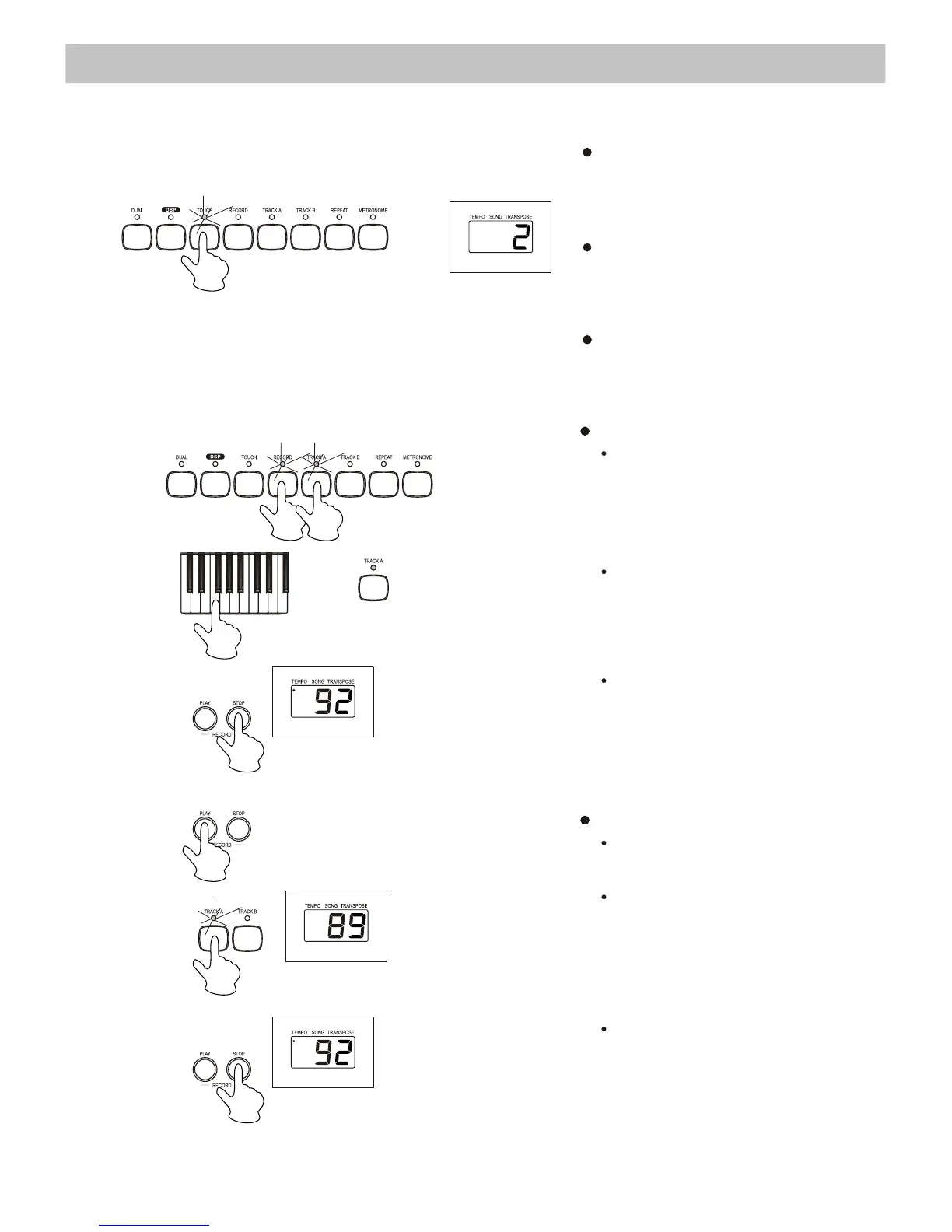
7. T ouch Response
8. Record & Playback
Record
Play
a key on the keyboard to
start
recording.
Press the [STOP] button to
stop
the recording.
Playbac
k
Press
the [RECORD - STOP]
button
to stop the playback.
12
The digital piano features a touch-
sensitive keyboard. This function is
a default setting when you turn on
the piano.
Pressing the [TOUCH] button
repeatedly adjusts the touch
response level from 1 to 3, where 2
is the default level.
To cancel the touch response effect,
press the [TOUCH] button until the
LED display shows “OFF”.
Press the [RECORD] button. The
indicator lights up. Then, press
[TRACK A] or [TRACK B] to
select a track to record.
Press the [PLAY] button to start the
playback.
Recorded Track A or B can be
deactivated to play Track B or A
only


 To Next Page