Operation............Continued
Use the
Voice
button
twice
to select
a Demo song.
9. Demo Song
13
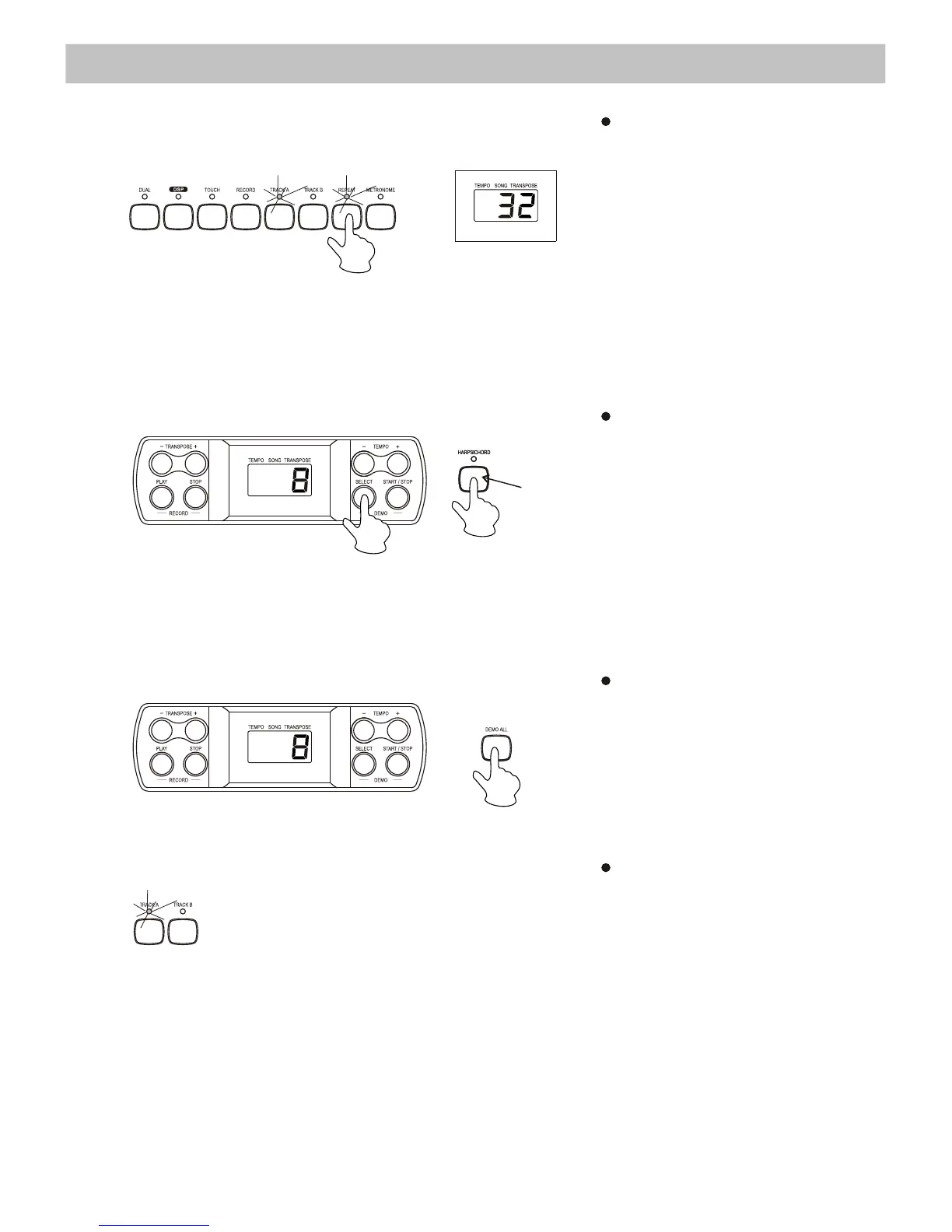
During the playback, press the
[REPEAT] button once to set
the starting point of the
repeated part you want to
listen.“r-A” appears on the
display. Then, press the
[REPEAT] button again to set the
ending point of the playback.
"r-B" appears on the display and
the recorded song is then played
back repeatedly from point “r-A” to
“r-B”.
Press
the Demo [SELECT]
button
. The display shows the
number of the current Demo song.
To choose a new Demo song, hold
down
the Demo [SELECT] button
while
entering a 2-digit number
(00-19) with the Voice Select
buttons (0-9). For example, to select
Demo Song n°8, press first “0”
(piano) then “8” (harpsichord).
Repeat
the playback
Select a Demo song
Selecting a track of the demo song
Play the Demo songs in sequence
Press
the [DEMO ALL] button
to make the Demo songs play
one after the other
. To stop
playing the Demo songs, press
once the [DEMO ALL] or
[START/ STOP] button.
While the Demo song is
playing, you can deactivate
the corresponding track by
pressing
the [TRACK A] or
[TRACK B] button.


 To Next Page