ASSEMBLY INSTRUCTIONS
10
STEP 6
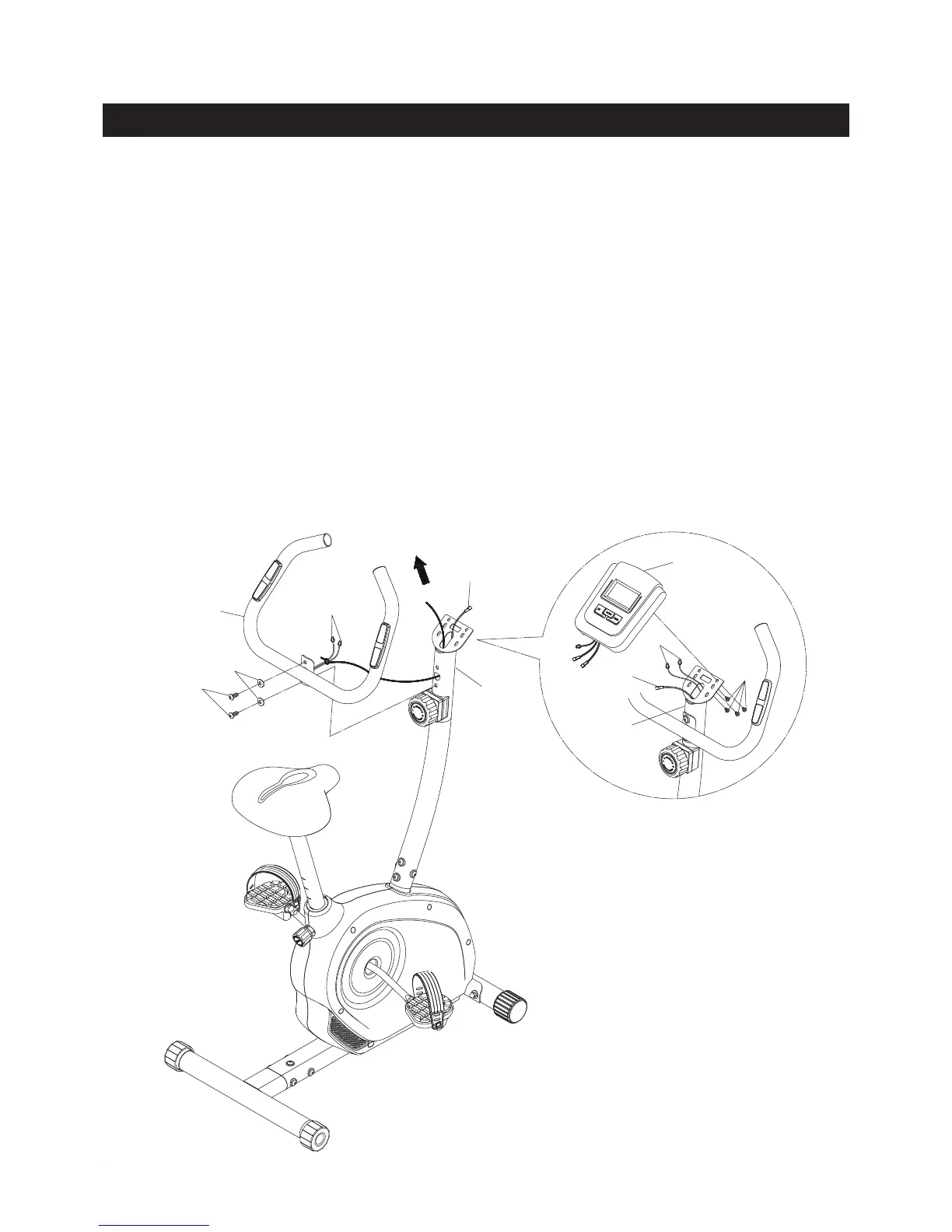
There is a strap attached inside of the UPRIGHT(5) to assist when pulling the PULSE SENSOR WIRES(42)
through the UPRIGHT(5). Tie the strap to the plug ends of PULSE SENSOR WIRES(42). Pull the strap
from the oval hole on the top of the UPRIGHT(5) until the PULSE SENSOR WIRES(42) are pulled through
and extend out of the oval hole.
Attach the HANDLEBAR(6) to the UPRIGHT(5) with BUTTON HEAD
BOLTS(M8x1.25x15mm)(47) and ARC WASHERS(M8)(52).
STEP 7
Install two AA batteries into the METER(38), the batteries are not included. See page 14 for detailed battery
installation instructions. Plug the EXTENSION WIRE(40) and the PULSE SENSOR WIRES(42) into the
connecting wires of the METER(38), and push the excess wires back into the UPRIGHT(5). Place the
METER(38) onto the plate on the UPRIGHT(5) and secure with ROUND HEAD SCREWS(M5x0.8x10mm)
(50).
NOTE: Be careful not to damage the wires when attaching the METER(38).
42
47
52
42
40
50
38
5
5
6
40



 To Next Page