EasyManua.ls Logo

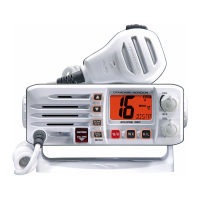
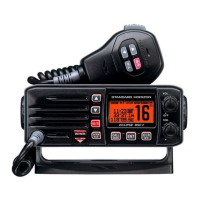
Standard Horizon Explorer GX1600 - User Manual

Standard Horizon Explorer GX1600
112 pages
Print Icon
To Next Page IconTo Next Page
Loading...
Page 1GX1600
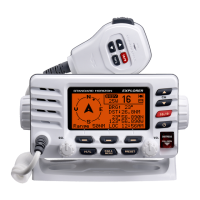
EXPLORER GX1600
25 Watt VHF/FM
Marine Transceiver
Owner's Manual
Ultra slim and compact rear case design (3.5” depth)
Meets ITU-R M493-13 Class D DSC (Digital Selective Calling)
Oversized full dot matrix display
Automatically poll the GPS position of up to 4 ships using DSC
Enter, Save, and Navigate to Waypoints with the Compass page
GPS information(LAT/LON, SOG, and COG) information shown on the LCD
Submersible JIS-8 1.5M (4.92Ft) for 30 minutes
Noise canceling microphone with channel UP/DOWN, 16/9 and H/L keys
NOAA weather channel selection with alert
Programmable Scan, Priority Scan, and Dual Watch
Programmable soft keys
RAM3 Remote Access Microphone capable
Intercom between radio and RAM3 microphone
NMEA 0183 Input and Output
Die-cast chassis
E20 (Easy to Operate)
3 Year Waterproof Warranty
When connected to an optional GPS

Table of Contents

Questions and Answers

  • J
    jessica73Jul 29, 2025
    Why does my Standard Horizon Explorer GX1600 Transceiver show 'HI BATTERY' or 'LO BATTERY'?
    • L
      Leslie WrightJul 29, 2025
      If your Standard Horizon Transceiver displays a “HI BATTERY” or “LO BATTERY” message when turned on, it means the power supply voltage is too high or too low. Confirm that the connected power supply voltage is not 17 volts or lower than 10 volts.
  • T
    Trevor SimonAug 3, 2025
    How to fix Standard Horizon Transceiver that fails to power up?
    • J
      Justin JonesAug 3, 2025
      If your Standard Horizon Transceiver fails to power up, first check the 12VDC battery connections and the fuse. Also, ensure that the power key is pressed and held to turn the radio on. The cause may be no DC voltage to the transceiver or a blown fuse.
  • M
    Mr. Daniel WardAug 6, 2025
    What to do if Standard Horizon Explorer GX1600 blows fuse?
    • K
      Kristin ShermanAug 6, 2025
      If your Standard Horizon Transceiver blows a fuse when connected to the power supply, the power wires may be reversed. Check the power cable for DC voltage and replace the fuse (6A 250V). Make sure the red wire is connected to the positive (+) battery post, and the black wire to the negative (–) battery post. If the fuse still blows after these steps, consider contacting your Dealer.
  • A
    Alexander RamirezAug 11, 2025
    What to do if the position is not displayed on Standard Horizon Explorer GX1600?
    • L
      Lauren HughesAug 11, 2025
      If your position is not displayed on your Standard Horizon Transceiver, it might be due to the accessory cable or the GPS Chart Plotter settings. * Check the accessory cable connection. * Some GPS Chart Plotters use the battery ground for NMEA connection. * Verify the output signal format of the GPS Chart Plotter; this radio requires NMEA0183 format with GLL, RMB, or RMC sentence as an input signal. * If the GPS has a baud rate setting, make sure to select 4800 and parity to NONE.
  • C
    Carmen CastroAug 15, 2025
    Why is Standard Horizon Explorer GX1600 transmit power low?
    • W
      william40Aug 15, 2025
      If a receiving station reports low transmit power from your Standard Horizon Transceiver, even when set to HI power, the issue might be with the antenna. You should have the antenna checked or test the transceiver with another antenna. If the problem persists, contact your Dealer for servicing.
  • J
    James StephensAug 20, 2025
    How to eliminate noise from Standard Horizon Explorer GX1600 speaker?
    • R
      Robert SchneiderAug 20, 2025
      If you hear a popping or whining noise from the speaker of your Standard Horizon Transceiver while the engine runs, it's likely due to engine noise. Try re-routing the DC power cables away from the engine. You can also add a noise suppressor on the power cable, change to resistive spark plug wires, and/or add an alternator whine filter.
  • A
    Alice RodriguezAug 25, 2025
    Why is there no sound from Standard Horizon Explorer GX1600 Transceiver speaker?
    • J
      James MarksAug 25, 2025
      If no sound is emitted from the internal or external speaker of your Standard Horizon Transceiver, the cause may be in the accessory cable. Check the connections of the accessory cable, specifically looking for an external speaker cable (WHITE/SHIELD) shorted together.

Summary

Getting Started

Emergency Channel 16 Use

Provides a procedure for making distress calls on Channel 16.

Calling Another Vessel

Explains procedures for hailing other vessels on channels 16 and 9.

Installation

Safety and Warning Information

Provides safety and warning information regarding radio use and RF exposure.

Mounting the Radio

Explains how to mount the radio using supplied or optional brackets.

Electrical Connections

Details proper electrical connections for power and antenna.

Accessory Cable Connections

Explains accessory cable connections for GPS and external speakers.

RAM3 Remote Mic Installation

Provides instructions for installing the RAM3 remote microphone.

Controls and Indicators

Front Panel Controls

Identifies and describes the controls and indicators on the front panel.

Rear Panel Connections

Identifies and describes the connectors on the rear panel.

Microphone Controls

Details the controls and functions of the microphone.

Basic Operation

Reception

Instructions for receiving signals and setting up the radio.

Transmission

Procedures for transmitting voice messages clearly and safely.

Scanning

Explains memory scan and priority scan functions.

Intercom Operation

Instructions for using the intercom feature with RAM3 mic.

Digital Selective Calling (DSC)

General DSC Information

Introduces Digital Selective Calling (DSC) and its purpose.

MMSI: Maritime Mobile Service Identity

Explains what an MMSI is and its importance for DSC.

Programming the MMSI

Step-by-step guide to programming the MMSI number into the radio.

DSC Distress Alert

How to transmit a DSC Distress Alert with GPS position.

Transmitting DSC Distress Alert with Nature of Distress

Transmitting distress alerts with specific nature categories.

Transmitting DSC Distress Alert by Manual Position

Transmitting distress alerts with manually entered position data.

Receiving a DSC Distress Call

How to respond to a received DSC Distress Call.

Individual Call Overview

Overview of initiating individual calls to other vessels.

Individual; Position Call Directory Setup

How to set up the DSC directory for individual calls.

Transmitting an Individual Call

How to transmit an individual DSC call using the directory.

Individual Call by Manually Entering MMSI

Transmitting an individual DSC call by manually entering the MMSI.

Receiving an Individual Call

How to respond to an incoming individual DSC call.

Group Call Setup

How to program Group MMSI numbers for group calls.

Transmitting a Group Call

How to transmit a group DSC call using the directory.

Group Call by Manually Entering MMSI

Transmitting group DSC calls by manually entering the MMSI.

Position Request Overview

Overview of requesting another vessel's position via DSC.

Transmitting Position Request to Another Vessel

How to transmit a position request using the directory.

Position Request by Manually Entering MMSI

Transmitting position requests by manually entering the MMSI.

Position Report Overview

Overview of sending your vessel's position via DSC.

Transmitting DSC Position Report Call

How to transmit a DSC position report using the directory.

DSC Position Report Call by Manually Entering MMSI

Transmitting DSC position reports by manually entering the MMSI.

Manual GPS Position Input (LAT;LON)

Manually entering Latitude/Longitude for DSC calls.

DSC Test

How to perform a DSC test call to verify functions.

DSC Setup

Individual Directory

Stores vessel names and MMSI numbers for DSC calls.

Group Directory

Stores Group MMSI numbers for group calls.

Waypoints

RAM3 Remote Mic Operation

Remote Mic Controls

Identifies and describes the controls on the RAM3 remote microphone.

Maintenance

Troubleshooting Chart

Provides a chart of common symptoms, causes, and remedies.

Channel Assignments

Warranty

Marine Products Limited Warranty

Details the limited warranty terms for the product.

Reset Procedures

Microprocessor Resetting

Resets the radio to factory defaults.

Standard Horizon Explorer GX1600 Specifications

General IconGeneral
BrandStandard Horizon
ModelExplorer GX1600
CategoryTransceiver
LanguageEnglish

Related product manuals