EasyManua.ls Logo

Stanley TLM 130i - User Manual

Stanley TLM 130i
10 pages
Print Icon
To Next Page IconTo Next Page
Loading...
Stanley TLM 130i.book Page 1 Tuesday, February 5, 2008 5:00 PM

Questions and Answers

  • E
    elizabeth13Jul 31, 2025
    What to do if the laser beam is interrupted on my Stanley Measuring Instruments?
    • A
      Ashley OliverJul 31, 2025
      If the laser beam on your Stanley Measuring Instruments gets interrupted, repeat the measurement. There is no further information available.
  • J
    John HarrisAug 4, 2025
    What to do if my Stanley Measuring Instruments shows measuring error because of too much background light?
    • M
      Matthew FarleyAug 4, 2025
      If your Stanley Measuring Instruments is showing a measuring error due to excessive background light, try to shadow the target area. There is no further information available.
  • G
    Gabrielle SmithAug 8, 2025
    What to do if reception signal is too weak or measuring time is too long on my Stanley Measuring Instruments?
    • A
      averymichaelAug 8, 2025
      If your Stanley Measuring Instruments has a weak reception signal or the measuring time is too long, consider changing the target surface. For example, use white paper. There is no further information available.
  • M
    Mary LaraAug 12, 2025
    What to do if the temperature is too high on my Stanley Measuring Instruments?
    • C
      Charles HaynesAug 13, 2025
      If your Stanley Measuring Instruments indicates that the temperature is too high, allow the device to cool down. There is no further information available.
  • J
    Jessica HardyAug 17, 2025
    What to do if input signal is too high on my Stanley Measuring Instruments?
    • C
      Carol TranAug 17, 2025
      If your Stanley Measuring Instruments is showing that the input signal is too high, try changing the target surface to something like white paper. There is no further information available.
  • C
    Christopher WoodAug 21, 2025
    What to do if the temperature is too low on my Stanley Measuring Instruments?
    • R
      Raymond NielsenAug 21, 2025
      If your Stanley Measuring Instruments indicates that the temperature is too low, warm the device up. There is no further information available.
  • R
    Raymond WilliamsAug 25, 2025
    What to do if my Stanley Measuring Instruments measurement is outside of the measuring range?
    • M
      merrittsarahAug 26, 2025
      If your Stanley Measuring Instruments gives a measurement that is outside of its measuring range, mind the range. There is no further information available.

Summary

Symbols

Warning notices

Details the meaning of different warning signs like caution, warning, and danger for property, bodily harm, and life.

Other symbols

Explains symbols for notes, hints on handling laser devices, and composition of operating instructions and schedules.

Safety and dangers

Correct ways of employment

Foreseeable misuse

Areas of responsibility

Area of responsibility of the manufacturer of the original equipment

Defines Stanley's responsibility for safe delivery and operating instructions of the device.

Area of responsibility of the operator

Outlines operator obligations including understanding safety information and accident control directives.

Overview

Keys

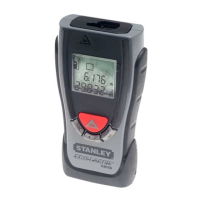
Identifies and describes the function of each key on the Stanley TLM130i laser measurement device.

Display

Details the various elements and indicators shown on the device's digital display.

Initial operation

Insert the batteries

Instructions for inserting batteries, recommending alkaline types and correct polarity for reliable use.

Changing the batteries

Guidance on when and how to replace the batteries when the battery symbol flashes.

How to use

Measuring conditions

Explains how surface quality and environmental factors affect measurement accuracy.

Switching on;off

Describes the procedure for powering the device on and off using the designated keys.

Clear key

Explains how the clear key (key 5) is used to undo the most recent action.

Adjusting the measuring plane

Details how to set the measurement origin from either the front or rear edge of the device.

Unit setting

Explains how to change the measurement units and cycle through available options.

Measuring

Measuring single distances

Step-by-step guide to measure single distances using the device.

Continuous measuring

Instructions for using the continuous measuring function to stake out distances.

Functions

Add;Subtract

Describes how to add or subtract measurement results sequentially for calculations.

Troubleshooting

Technical data

Electromagnetic compatibility (EMC)

Laser classification

Care

Warranty

Disposal

Stanley TLM 130i Specifications

General IconGeneral
BrandStanley
ModelTLM 130i
CategoryMeasuring Instruments
LanguageEnglish

Related product manuals