TE C H N I C A L S P E C I FI C ATI O N S
Line inputs: 2 (RCA), 150 mV / 27K ohm
Phono inputs: 2 (RCA), 3 mV / 47K ohm
Master output: 1 (1/4” TRS Balanced/RCA unbalanced),
775 mV / 1K ohm
Record output: 1 (RCA), 245 mV / 10K ohm
Headphone output: 1 (1/4 inch), 32 - 200 ohms recommended
Frequency Response: 20 Hz - 20 kHz, +/- 2 dB
Gain Control: 0-20dB
S/N Ratio: Less than 70dB
T.H.D: less than 0.2%
Dimension(LxWxD): 9” x 9.75” x 3.5” ( 226 x 248 x 87 mm)
Weight: 7 lbs (3.2 Kg)
WA R R A N T Y
This unit has been designed and manufactured using quality
components. Therefore, it is warranted to be free from defects in materi-
als (limited as specified below), and workmanship for a period of twelve
(12) months from the original purchase date. During this period, all
service and parts necessary to repair a defect will be free of charge. This
limited warranty applies to mechanical parts which are subject to wear
and tear as specified:
• Faders, specified durability: 15,000 cycles
• Rotary potentiometers, specified durability: 10,000 cycles
• Switches, specified durability: 10,000 cycles
Consequently, the parts listed above are warranted to be free from
defects in materials and workmanship for a period of thirty days (30)
days from the original purchase date.
FOR THE WA R R A N T Y TO BE VA LID, PLEASE CO M PLE T E THE
O N LINE WA R R A N TY REGIST R ATION FORM FOUND AT
W W W. STA N TO N M AG N E TI CS . CO M
2821 Evans Street • Hollywood, FL 33020
FA DER CLE A N I N G
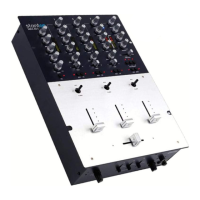
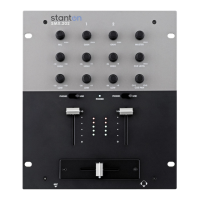
The SK FIVE faders may need lubrication from time to time. This will extend the
fader life and eliminate any potential damage due to extended heavy usage.
R E P LAC E M E N T PA RTS
To replace the cross or channel faders, follow steps 1 and 2 of the cleaning
instructions. The following replacement parts are available from Stanton or your
local Stanton dealer.
ROTATING AND REPLACING THE INPUT TOGGLE SWITCHES
Cleaning Instructions
1. Remove the 3 fader knobs and 4 screws
located in the corners of the PROTEKT™
(see “ ” inside) panel
and take the panel off the mixer.
2 . Remove the fader to be cleaned by
unscrewing the 2 outer screws (removing
the 2 inner screws will detach the fader
from the fader plate) and disconnect the
cable coming from the mixer.
3. Spray a small amount of cleaner or
lubricant into both ends of the fader and
slide the fader back and forth a few times
to spread the fluid evenly throughout the
fader.
4. Shake and wipe off excess fluid before
re-assembling the fader.
PL-SK1 Two way input toggle switch
3PL-SK1 Three way input toggle
switch with FLASH™
LF-SK5 Channel input fader
CF-SK5 Crossfader
PP-SK5 PROTEKT™ panel
PS-13US US Power Supply (110v)
PS-13EU European Power Supply (220v)
PS-13UK UK only Power Supply (240v)
ROTATING I NST RU C TI O N S
1 . Remove the PROTEKT™ panel
2. Remove the 2 outer screws from the tog-
gle switch plate (removing the 2 inner
screws will detach the switch from the
plate)
3. Rotate the plate to the desired position
and tighten the screws back in the top and
bottom holes


 To Previous Page
 Loading...