EasyManua.ls Logo

Star Pro-Max 2.0 - User Manual

Star Pro-Max 2.0
8 pages
Print Icon
To Next Page IconTo Next Page
Loading...
These symbols are intended to alert the
user to the presence of important operating
and maintenance instructions in the manual
accompanying the appliance.
Go to:
www.star-mfg.com/scripts/manuals.aspx
to obtain this units installation & operations manual
along with other documents.
NOTICE
Using any part other than genuine Star factory supplied parts
relieves the manufacturer of all liability.
Star reserves the right to change specications and product
design without notice. Such revisions do not entitle the buyer to
corresponding changes, improvements, additions or replacements
for previously purchased equipment.
Due to periodic changes in designs, methods, procedures, policies
and regulations, the specications contained in this sheet are subject
to change without notice. While Star Manufacturing exercises
good faith efforts to provide information that is accurate, we are
not responsible for errors or omissions in information provided
or conclusions reached as a result of using the specications.
By using the information provided, the user assumes all risks in
connection with such use.
GENERAL SAFETY INFORMATION
This equipment is designed and sold for commercial use only by
personnel trained and experienced in its operation and is not sold
for consumer use in and around the home nor for use directly by
the general public in food service locations.
Before using your new equipment, read and understand all the
instructions & labels associated with the unit prior to putting it into
operation. Make sure all people associated with its use understand
the units operation & safety before they use the unit.
All shipping containers should be checked for freight damage both
visible and concealed. This unit has been tested and carefully
packaged to insure delivery of your unit in perfect condition.
If equipment is received in damaged condition, either apparent or
concealed, a claim must be made with the delivering carrier.
Concealed damage or loss - if damage or loss is not apparent until
after equipment is unpacked, a request for inspection of concealed
damage must be made with carrier within 15 days. Be certain to
retain all contents plus external and internal packaging materials
for inspection. The carrier will make an inspection and will supply
necessary claim forms.
GENERAL INSTALLATION INFORMATION
The unit time and temperature are preset by the factory to the
customer requirements. If adjustments are required, refer to the
time or temperature programming sections in this manual.
INSTALLATION
1. Plug unit into dedicated receptacle,
see nameplate for voltage requirements.
2.
DO NOT plug into incorrect voltage line.
Doing so will damage the unit and void the warranty.
3. Each unit has been properly wired and inspected at the factory
for operation on the voltage specied on the nameplate.
4. DO NOT operate without burn guards (Certian units only).
DO NOT CONNECT TO ANY OTHER
TYPE OF CURRENT OR THE MACHINE
WILL BE SERIOUSLY DAMAGED.
MAINTENANCE AND REPAIRS
Contact the factory, a service representative or a local
service company for service or required maintenance.
Go to www.star-mfg.com to nd a service agent near you.
Replacement cord sets must be purchased from Star Manufacturing
International, Inc. or our authorized agents.
Should you need any assistance regarding the operation or
maintenance of any Star equipment; write, phone, fax or e-mail
our service department. In all correspondence mention the
model number and the serial number of your unit, along with the
voltage.
Business Hours: 8 am to 4:30 p.m. Central Standard Time
Telephone: (314) 678-6303
Fax: (314) 781-2714
E-mail: Parts@star-mfg.com
Service@star-mfg.com
Warranty@star-mfg.com
Website: www.star-mfg.com
Mailing Address: Star Manufacturing International Inc.
10 Sunnen Drive
St. Louis, MO 63143
U.S.A.
®
2.0
MODEL
7” Tabletop
Two-Sided Grill
Electronic Controls
TWO SIDED GRILLS INSTALLATION INSTRUCTIONS
2M-Z20466, Rev. - 5/26/15
CAUTION
WARNING

Question and Answer IconNeed help?

Do you have a question about the Star Pro-Max 2.0 and is the answer not in the manual?

Summary

General Safety and Installation

General Safety Information

Crucial safety guidelines for operating commercial cooking equipment.

General Installation Information

Pre-set parameters and general installation advice for the unit.

Installation Steps

Key steps for correctly installing and connecting the appliance.

Maintenance and Repairs

Contact information and procedures for service and required maintenance.

Unit Operation and Preparation

Initial Start Up Procedure

Steps for the first use, including initial cleaning and heating.

Cooking Surface Seasoning

Guidelines for seasoning cooking surfaces for first-time and daily use.

Electronic Control Operation

Instructions for operating the electronic controls and cooking timers.

Using Multiple Timers

How to set and manage multiple cooking timers simultaneously.

Temperature Display

How to view the unit's current cooking temperature.

Programming and Cleaning Procedures

Programming Time and Temperature

Detailed steps for setting custom cooking times and temperatures.

Cleaning Cycle and Methods

Instructions for initiating the cleaning cycle and performing cleaning tasks.

Cleaning Safety Precautions

Essential safety warnings to follow during the cleaning process.

Overview

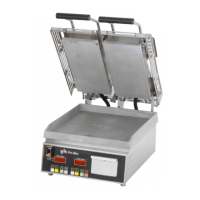
The Pro-Max 2.0 is a 7" tabletop two-sided grill with electronic controls, designed for commercial use in food service locations. It is intended for operation by trained and experienced personnel.

Function Description

The grill is designed for cooking food products using two-sided heating. It features electronic controls for precise temperature and time management. The unit comes with preset time and temperature settings from the factory, which can be adjusted by the user as needed. It supports both single and multiple timer operations, allowing for efficient cooking of different products simultaneously.

Important Technical Specifications

  • Model: Pro-Max 2.0
  • Type: 7" Tabletop Two-Sided Grill
  • Controls: Electronic
  • Voltage Requirements: Specific voltage requirements are indicated on the nameplate. The unit must be plugged into a dedicated receptacle of the correct voltage to avoid damage and voiding the warranty.
  • Heating Elements:
    • Top Element: 500W (available in 120V, 230V, 240V, UK)
    • Bottom Element: 925W (available in 120V, 230V, 240V, UK)
  • Transformers:
    • 115V/10V 6VA (for 120V units)
    • 230V/10V 6VA (for 230V, 240V, UK units)
  • Switches:
    • Eaton 30A@120V switch
    • Switch guard
  • Sensors: RTD Probe, 2K Ohm, 24" leads
  • Power Cords:
    • SJTO 14/3 NEMA 5-15P (for 120V units)
    • Cont EUR 16AMP (for 230V units)
    • Detachable UK cordset (for UK units)
    • IEC 320 16 AMP inlet (for 230V, UK units)
  • Insulation: Fiberglass top and bottom insulation, electrical control insulation.
  • Construction Materials: Aluminum and iron surfaces (for cooking surfaces), PTFE brackets, stainless steel screws and nuts.

Usage Features

  • Initial Setup: The unit should be leveled using the adjustable feet (approximately 1/2" adjustment). Before first use, it needs to be cleaned and heated for about 45 minutes. During initial heating, a small amount of smoke may be emitted as cooking surfaces reach 300-350°F, which is normal and will stop once the grill reaches 400°F. This process should be done in a well-ventilated area.
  • Seasoning:
    • First Time Seasoning: Bring the grill to 275°F by entering "CLN" mode (press "TEMP" button and buttons 2 & 3 for 3 seconds). Once 275°F is reached, brush cooking surfaces with a SALT-FREE release agent, let sit for 20 minutes, then wipe clean with a warm damp cloth. Exit "CLN" mode by turning the unit OFF then ON, or by pressing any program button.
    • Daily Seasoning: Generally, a light coating of SALT-FREE baking release agent in the morning and occasionally throughout the day is sufficient to prevent sticking. Spraying before grilling each item is not necessary.
  • Operating Instructions:
    1. Turn the unit ON. The HEAT ON indicator, Time & Temp Display, and LED indicator will flash until the unit reaches operating temperature (approx. 30 minutes). Once operating temperature is reached, the heat indicator LED turns off, and the program LED and Time & Temp Display stop flashing.
    2. Place product on the cooking surface and close the lid.
    3. Press a PROGRAM button to start the timer. The LED light above the button will flash, and the displayed time will count down to "0," at which point the unit will display "done" and beep. Press the PROGRAM button again to turn off the beeper.
    4. To cancel a program during cooking, press and hold the PROGRAM button for 5 seconds.
    5. Raise the lid, remove the food, and scrape residue into the grease catcher tray using a spatula. Metal utensils can be used, but nonmetal utensils prolong the life of the cooking surface.
    6. Turn the unit OFF when not in use.
  • Multiple Timers: The unit supports multiple timers for cooking different products. When a program is started, its LED flashes. If another program is started, the first LED changes to solid, and the new program's LED flashes. Pressing a program button will show its countdown time and make its LED flash. When a program completes, "done" is displayed, an alarm sounds, and the display switches to the next active program.
  • Temperature Display: The unit's actual temperature can be viewed by pressing the "TEMP" button.
  • Programming Time and Temperature:
    1. Press and hold "TEMP."
    2. While holding "TEMP," press and hold any program button on the left for one second. The LED above the program number will light, and the display will read "----."
    3. Enter the four-digit security code: 4, 3, 2, 1. The preset time will then be displayed, and the LED for that program will flash.
    4. Set the desired time using the "3" (increase) or "4" (decrease) buttons.
    5. Press "TEMP" to save the time.
    6. Program bottom and top temperature settings using "3" (increase) or "4" (decrease) buttons, pressing "TEMP" to save each setting.
    7. Continue programming other buttons within 15 seconds without re-entering the security code.

Maintenance Features

  • Cleaning:
    1. Enter the cleaning cycle by pressing and holding the "TEMP" button and buttons 2 & 3 for 3 seconds. "CLN" will be displayed.
    2. The cooking surfaces will heat to 275°F (135°C).
    3. Raise the top platen and remove non-stick protective sheets (caution: surfaces are hot).
    4. Scrape cooking surfaces with a spatula to remove loose food debris.
    5. Prepare a cleaning solution: 1/2 tablespoon dish detergent & 1/2 cup warm water.
    6. Pour 1/4 cup of solution onto the bottom cooking surface, spread it with a cleaning pad, and use moderate pressure to scrape away burnt-on food.
    7. Apply cleaning solution to the cleaning pad and scrape burnt-on food on top cooking surfaces.
    8. Drain cleaning solution to the grease trap.
    9. Wipe off remaining cleaning solution with a thick damp cloth until clean.
    10. Empty and clean the grease catcher cup.
    11. Re-season the grill cooking surfaces following the Daily Seasoning procedures.
    12. To exit "CLN" mode, turn the unit OFF then ON, or press any of the four program buttons.
  • Carbon Buildup: Carbon buildup (a black matter from cooked-on release agents, oils, food particles) can reduce cooking efficiency and cause material to flake off. If carbon buildup occurs, use a carbon removal agent (safe for aluminum surfaces) according to its instructions, then re-season the grill.
  • Safety Precautions for Cleaning:
    • DO NOT immerse or let the unit stand in water.
    • DO NOT hose down the unit or the table/counter.
    • Keep away from running water.
    • DO NOT use sharp objects to remove carbon buildup.
    • DO NOT use ice on the cooking surface.
    • Ensure power is turned OFF, the unit is UNPLUGGED, and is NOT TOO HOT before cleaning.
    • Apply only cleaners safe for aluminum and iron surfaces.
    • DO NOT splash the front control panel.
    • DO NOT splash the flex conduit connecting the top and bottom of the unit.
  • Parts and Service: Use only genuine Star factory-supplied parts. Contact the factory, a service representative, or a local service company for maintenance and repairs. Replacement cord sets must be purchased from Star Manufacturing International, Inc. or authorized agents.
  • Customer Support: For assistance with operation or maintenance, contact the service department via writing, phone, fax, or e-mail. Always mention the model number, serial number, and voltage of the unit.
    • Business Hours: 8 am to 4:30 p.m. Central Standard Time
    • Telephone: (314) 678-6303
    • Fax: (314) 781-2714
    • E-mail: Parts@star-mfg.com, Service@star-mfg.com, Warranty@star-mfg.com
    • Website: www.star-mfg.com
    • Mailing Address: Star Manufacturing International Inc., 10 Sunnen Drive, St. Louis, MO 63143 U.S.A.
  • Shipping Damage: Check all shipping containers for visible and concealed freight damage. If equipment is received damaged, a claim must be made with the delivering carrier. For concealed damage, request an inspection from the carrier within 15 days, retaining all contents and packaging materials.

Star Pro-Max 2.0 Specifications

General IconGeneral
BrandStar
ModelPro-Max 2.0
CategoryGrill
LanguageEnglish

Related product manuals