BATTERY MAINTENANCE STATE OF CHARGE
64 65
PROCEDURE
• Open the vent caps and look inside the fill wells. Check electrolyte
level; the minimum level is at the top.
• If there is no electrolyte visible, add just enough distilled / deionized
water to cover the plates.
• Replace and tighten all water vent caps.
• Put batteries on a complete charge before adding any additional
water (refer to the charging section).
• Once charging is completed, remove the vent caps and check
the electrolyte level.
• Add water until the electrolyte level is
1
⁄8” below the bottom of
the fill well.
• Clean, replace and tighten all vent caps.
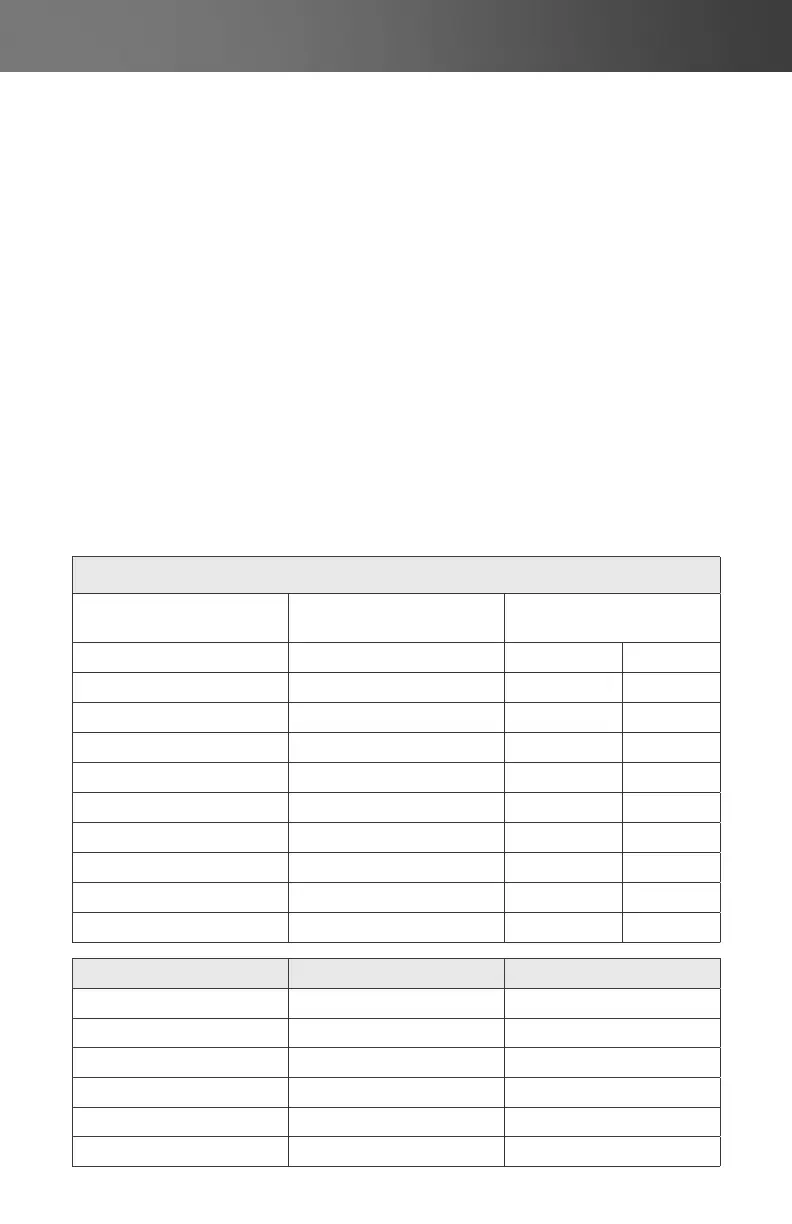
Percent of Charge
corrected to 25°C
Open Circuit Voltage
6V 8V
100% 1.28 6.37 8.49
90% 1.26 6.31 8.41
80% 1.24 6.25 8.33
70% 1.22 6.19 8.25
60% 1.20 6.12 8.16
50% 1.18 6.05 8.07
40% 1.15 5.98 7.97
30% 1.13 5.91 7.97
20% 1.10 5.83 7.77
10% 1.07 5.75 7.67
Percent of Charge Freezing Temperature
1.280 100% -68.9°C / -92.02°F
1.265 92% -57.4°C / -71.32°F
1.250 85% -52.2°C / -61.96°F
1.200 62% -26.7°C / -16.06°F
1.150 40% -15°C / 5°F
1.100 20% -7.2°C / 19.04°F



 To Next Page