How-to Video
Battery Indicator
You will hear an indicator through your hearing aid when battery voltage is low and the battery needs replacing.
Hearing Aid Care
Cleaning Your Hearing Aids
Use the cleaning brush or soft cloth to clean debris from around the user control, microphone, battery
compartment, receiver and earmold.
Never use water, solvents, cleaning fluids or oil to clean your hearing aid.
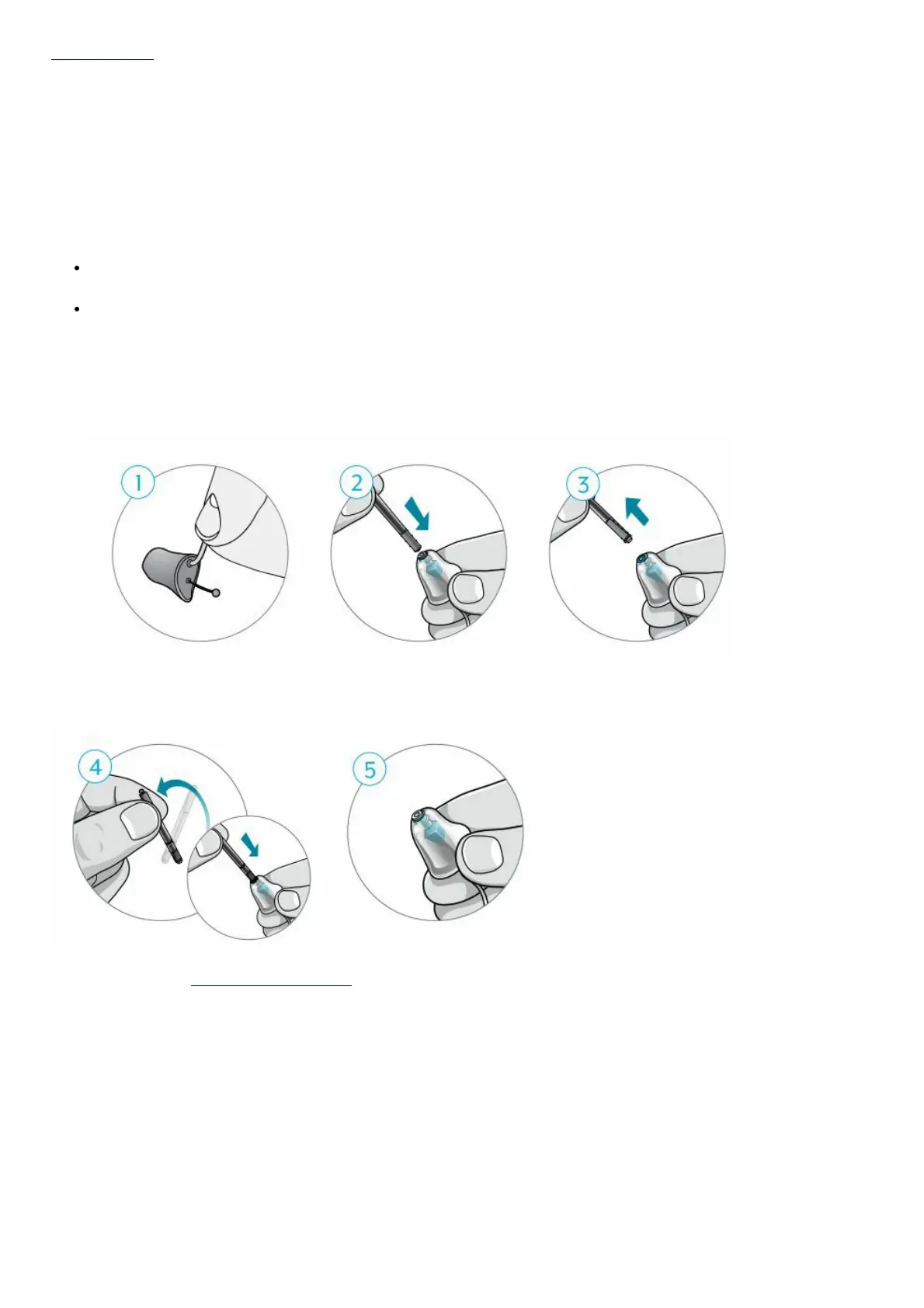
Changing Hear Clear Wax Guards
1. Hold onto the cable where the receiver enters the earmold.
2. Insert the empty end of the application stick straight into the used wax guard in the receiver.
3. Pull the stick straight out to remove the used wax guard (do not twist).
4. Use the opposite
end of the stick to firmly insert the clean wax guard straight into the receiver.
5. Pull the stick straight out (do not twist) and discard the stick.
For more help, visit Starkey.com/Support
The Starkey logo and Starkey are registered trademarks of Starkey Laboratories, Inc.
©2021 Starkey. All Rights Reserved. 4/21 FLYR3842-00-EE-GS
File Downloads



 To Next Page