10
MX-100R, MX-200 and MX-300 HD Modulator
Software Update
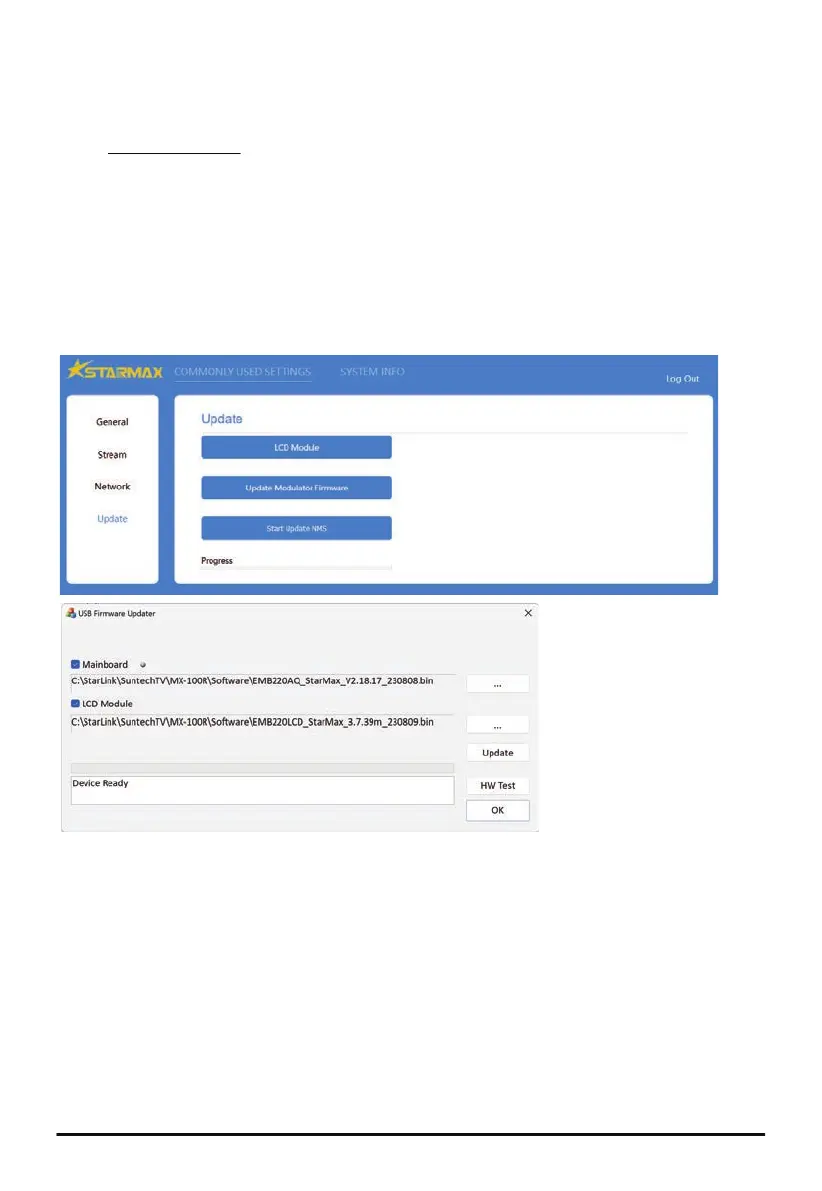
Software Update can be accessed through the serial USB port #1 on MX-100R and the Ethernet (RJ-45)
port on MX-200/MX-300. Windows based utility tool is available for software update of MX-100R. Refer
to the Web Configuration section for connecting Ethernet port of MX-200/MX-300 to a PC.
It’s not recommended to update software through a router, which may cause the update to fail
due to possible packet loss or drop.
It may take a while for the Modulator to restart after software update, do NOT turn off the Modulator
during the software update is in progress.
After software update, if the Web page doesn’t get refreshed automatically, do NOT turn off the
Modulator but refresh the page manually, or open another Web browser to reconnect.
In case the software update doesn’t run through successfully, push the ESC button for 5 seconds
before refreshing the page.
■ LCD Module Update
LCD Module update applies to the graphical user interface of configuration menu shown on LCD.
Select the file with xxx.bin extension for LCD Module update.
■ Modulator Firmware Update
(MX-200 and MX-300 only)
Modulator Firmware update applies to the modulation functions running on the encoder chip.
Select the file with xxx.vimage extension for Modulator Firmware update.
■ Main MCU or NMS Update
MCU or NMS update applies to the processor functions running on the controller chip.
Select the file with xxx.bin extension for MCU or NMS update.
MX-100R Software Update
MX-200/MX-300 Software Update


 To Next Page
 Loading...