4.4 Removing Shipping Retainers
MVR systems (and other Starrett metrology systems) use metal tabs to prevent movement of
critical components during shipment. Anodized red for easy identification, these are intended to
be removed once the equipment has been placed in its final position. Look for any red tabs and
remove them. There is also a red tab inside the electronics housing, so open the hinged door at
the back of the metrology unit and remove that tab also.
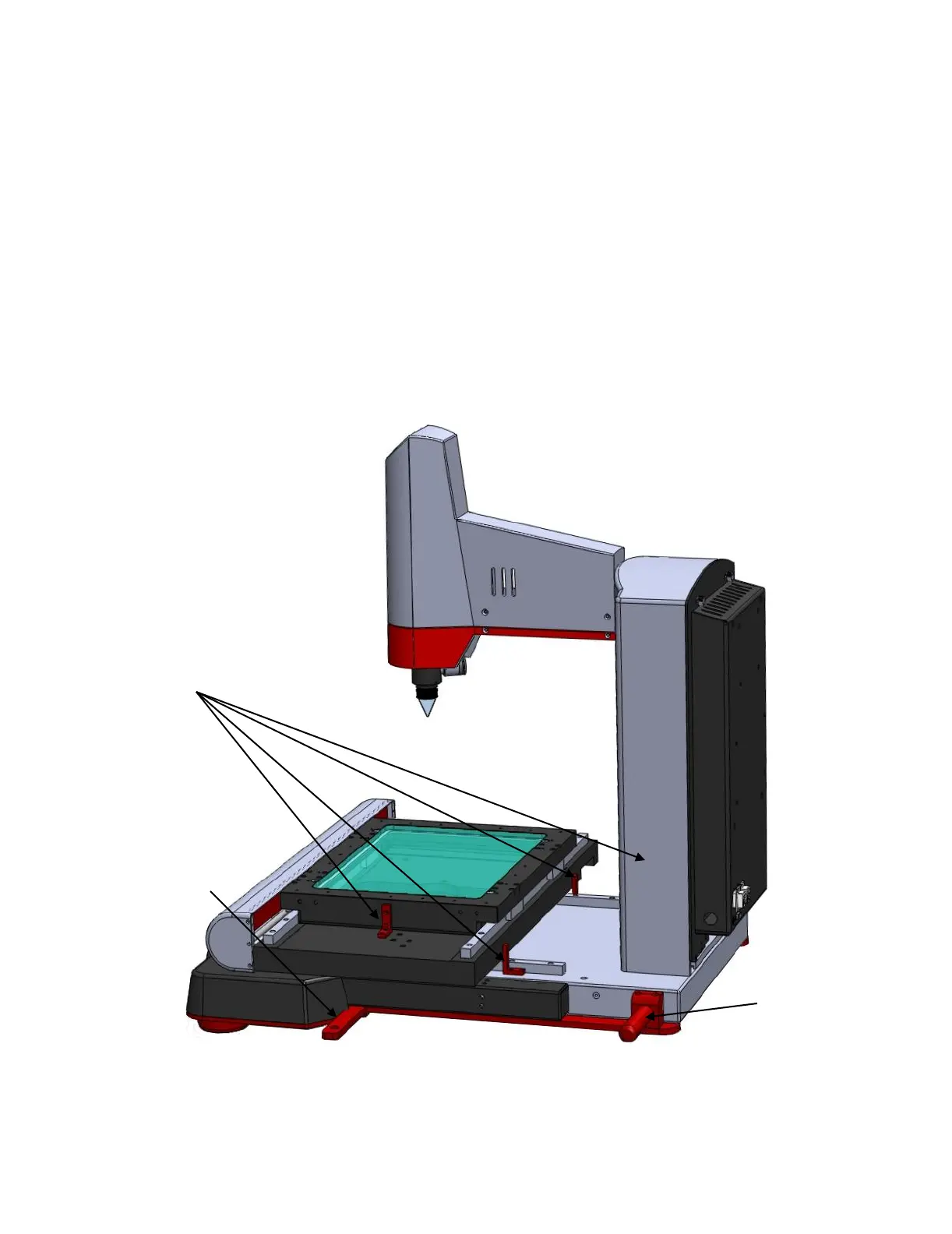
MVR300 metrology units are shipped with two red carrying handles near the back of the base.
These can be removed or be left on the system following installation to facilitate possible later
lifting.
MVR300 metrology units are also shipped with a lift bar toward the front of the base. This bar is
used to secure the units in their shipping crate and can also be used for lifting. This bar slides
out and is normally removed once the system is installed.
Also remove any tape and packing materials that may have been added for shipment.
Please refer to the drawings below for the locations of MVR300 red retainer tabs, carrying
handles, and the lift bar.
Location of MVR300 red retainer tabs, lifting handles, and slider bar


 To Next Page