Page 50
MODENA FIRMWARE UPDATE
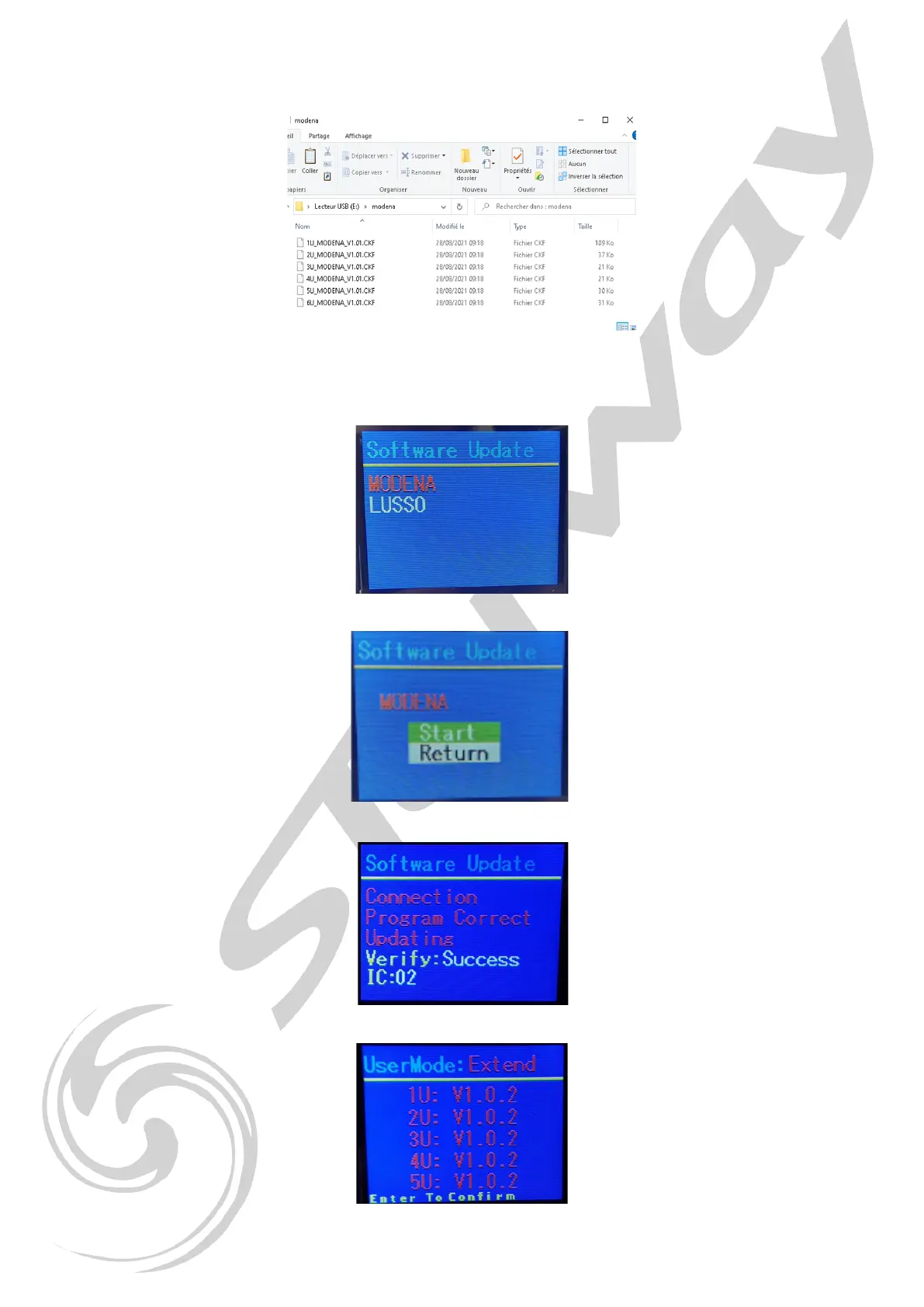
1. Place the update les in a directory on the USB key, for example Lusso:
2. Turn on the projector and go to the menu by pressing “Mode” > “Function” >
“USB Update” > “On”, exit the menu and turn off the projector.
3. Projector off, DMX and ARTnet disconnected, insert the USB key into the connector located on the front panel.
4. Turn on the projector > the screen displays the available directories> select «MODENA»
5. Select «Start» and press «Enter»
6. The update process starts and will upgrade each electronic board.
The projector will perform a reset at the end of the process
7. Remove the key and check the software versions by pressing «Mode» > «Information» > «Software. V» > «Enter»
8. Go to the menu by pressing “Mode” > “Function” > “USB Update” > “OFF”, exit the menu.


 To Next Page