11
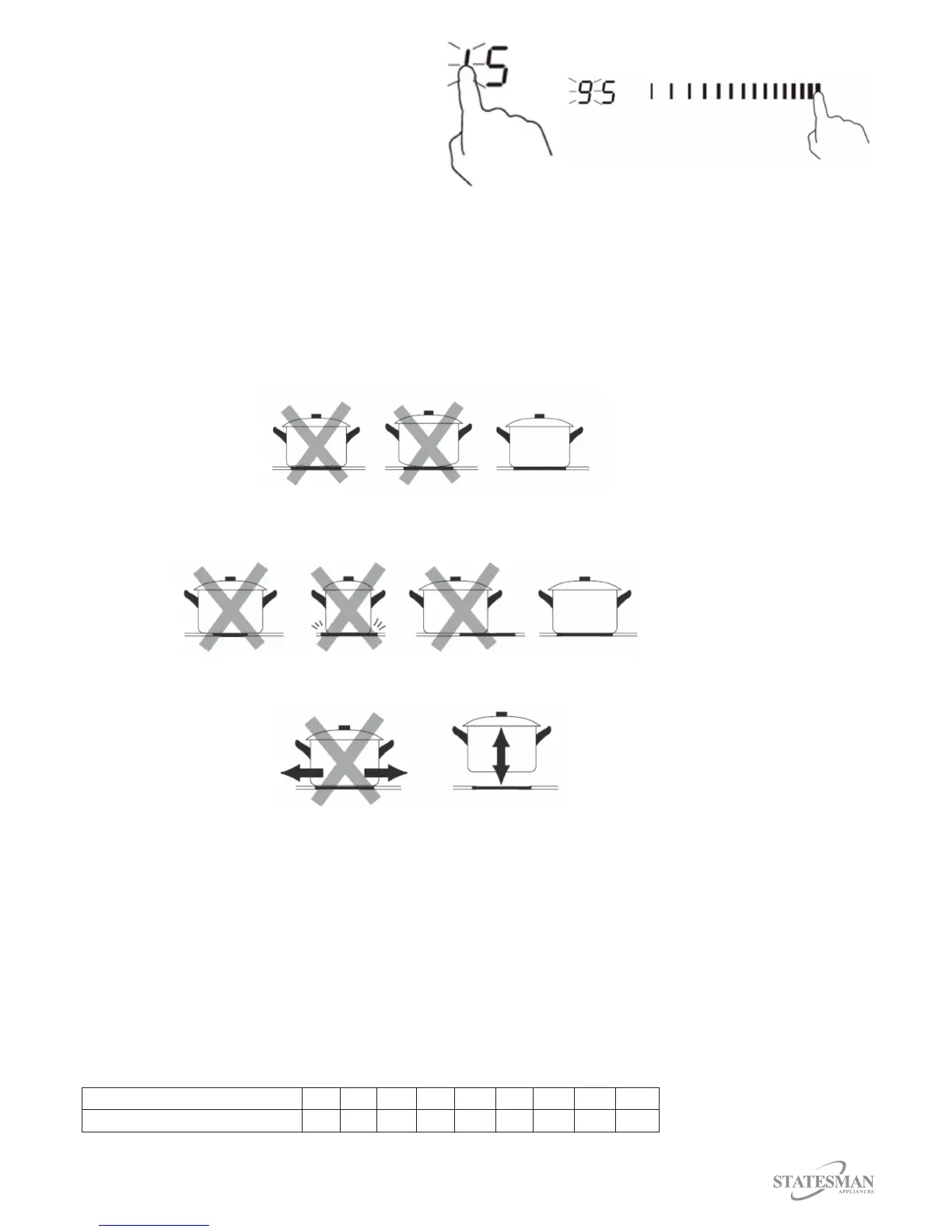
5. Set the time by touching the Slider
Control e.g. 9, the time that has been set
is 95 minutes (Fig. 29). Insert Fig. 29
6. The timer count down will start
immediately and the display will show the
time remaining.
Fig 28.
Fig 29.
7. When the cooking timer expires the selected cooking zone will switch o.
8. To change the time after the timer has been set you will need to start from the rst step.
Choosing the Correct Cookware
Do not use cookware with jagged edges or a curved base.
Ensure the base of the cookware is smooth, sits at against the glass and is the same size as the
cooking zone, ensuring the cookware is central on the cooking zone.
Always lift pans o the appliance, do not slide as this may scratch the glass.
Overheating Protection
The appliance is equipped with a temperature sensor that will monitor the temperature of the
appliance and if excessive temperatures are reached will automatically switch the appliance o.
Residual Heat Warning
When the appliance has been in operation there will be some residual heat left on the cooking zone
after switch o. The letter H will appear on the indicator to warn you that the appliance is still hot.
Automatic Shut O
A safety feature of this appliance is automatic shut o; this will occur if you forget to switch o a
cooking zone:
Power level 1 2 3 4 5 6 7 8 9
Default working timer (hour) 8 8 8 4 4 4 2 2 2



 To Next Page