9
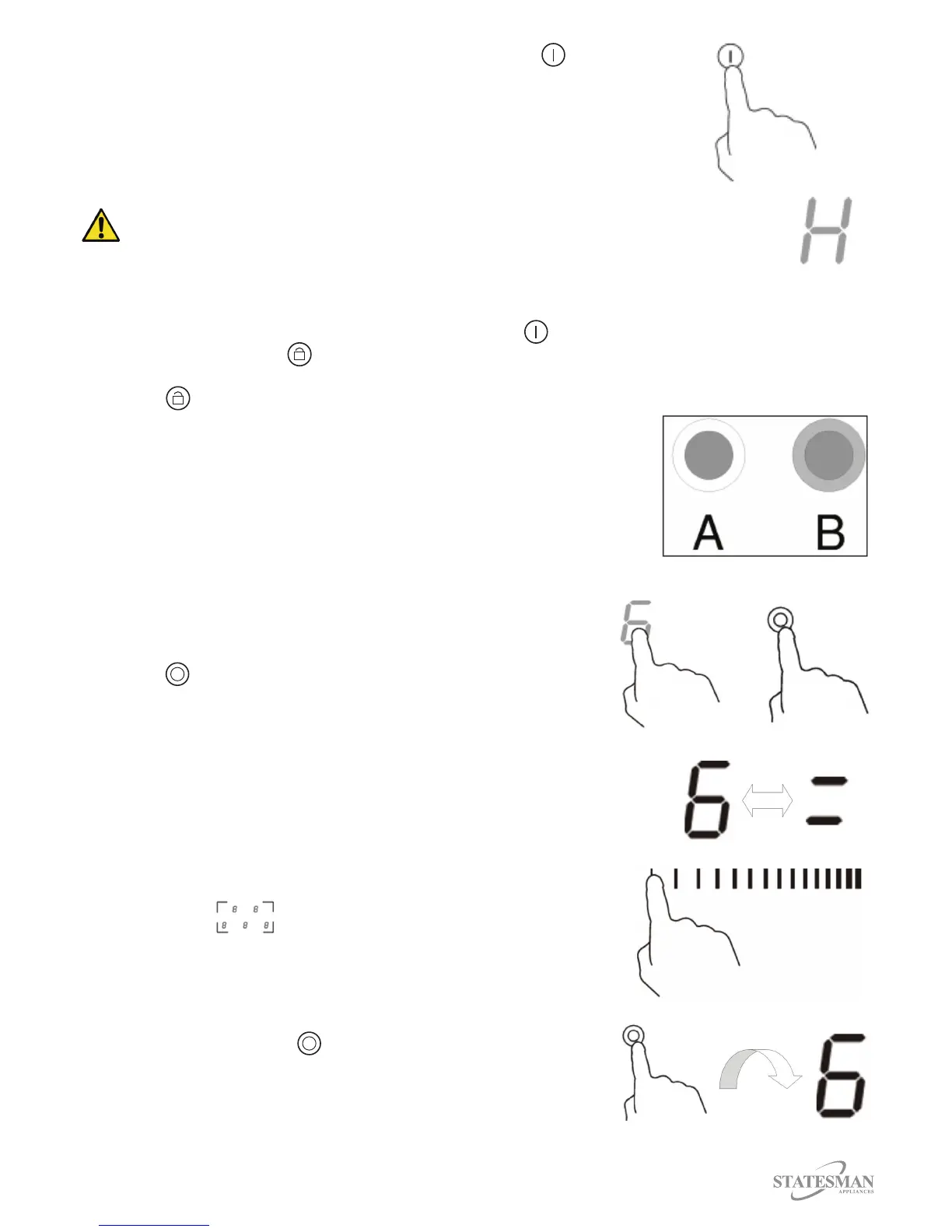
Fig 14.
8. To switch the appliance o touch the ON/OFF Control (Fig. 14).
Important: If a heat setting is not chosen within 1 minute then the
appliance will automatically switch o.
Important: The heat setting can be modied at any point during
cooking.
WARNING: “H” indicates that a particular cooking zone is too hot to touch, when
the cooking zone has cooled down to a safe temperature the “H” will disappear.
Locking the Controls
You can lock the controls to prevent any unintended use or misuse by children, when locked all
controls will be disabled except for the ON/OFF Control .
1. Touch the Lock Control , the timer indicator will show “Lo”.
2. To unlock the controls ensure the appliance is switched on and touch and hold the Lock
Control for a couple of seconds.
Using the Double Zone Function
This function only works on cooking zone 3.
1. The dual cooking zone has two cooking areas.
The inner ring of the heating element (A) can be
controlled separately or both sections at once (B) (Fig. 15).
•
•
Fig 15.
2. Touch the Heating Zone Control for cooking zone 3. (Fig. 16)
3. The power lever indicator will ash, press Dual Zone
Control after 5 seconds the power level indicator will
stop ashing (Fig. 17).
Fig 16.
Fig 17.
4. The double zone function is now activate and the display will
show the power level “6” and “=” alternately. (Fig. 18)
5. The power level can now be adjusted by touching and sliding
the Slider Control to the required setting (1 to 9). (Fig. 19)
Fig 18.
Fig 19.
6. To deactivate the double cooking zone, touch the Heating
Zone Control for cooking zone 3.
7. Press Dual Zone Control , the double zone function is
now disabled and the power level will return to 6 (Fig. 20).
Fig 20.



 To Next Page