WWW.STEALTHCAM.COM
Toll Free 877-269-8490
Programming the Stealth Cam
This camera is equipped with 3 Quick set Program selection toggle switch
settings and a Manual program setting. Make sure camera is in the OFF
position BEFORE changing any toggle switches.
NOTE: If you choose one of the Preset settings, your camera will only
function in PIR mode not Time Lapse mode.
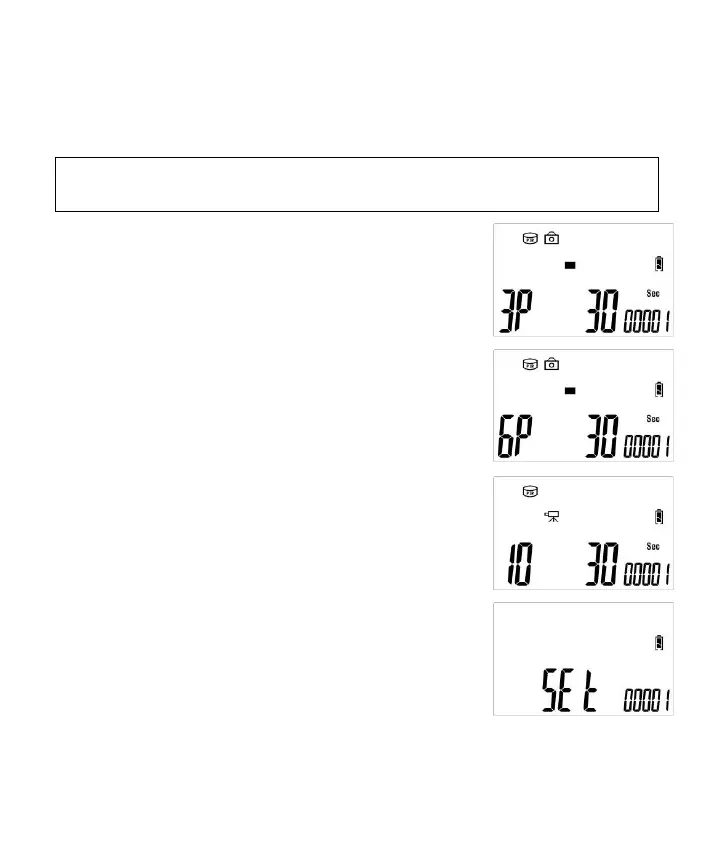
Quick Set 1 (P1) - This bypasses all user defined
settings and uses the following settings: (PIR
mode/ Resolution: 1.3MP / Burst: 3P / Time out:
30 seconds). Slide Power switch to TEST
position and you’ll see the screen on the right.
Quick Set 2 (P2)- This bypasses all user-defined
settings and uses the following settings: (PIR
mode/ Resolution: 1.3MP / Burst: 6P / Time out:
30 seconds). Slide Power switch to TEST position
and you’ll see the screen on the right.
Quick Set 3 (P3) - This bypasses all user-defined
settings and uses the following settings: (PIR
mode/ Video: VGA / Video clip: 10s / Time out:
30 seconds). Slide Power switch to TEST
position and you’ll see the screen on the right.
MANUAL (M) - This allows the user to define
what setting the camera will use. Slide Power
switch to TEST position and you’ll see the screen
on the right. After 2 seconds, this display will
return to Manual programing screen in the following section.


 To Next Page
 Loading...