WWW.STEALTHCAM.COM
Toll Free 877-269-8490
21
• Press[UP]or[DN]toincreaseordecreasethemonthvalue.(01‐
12).
• Press[OK]tosaveyourselectionandenterDaysetting.
• TheDaydigitswillbeblinking.
• Press[UP]or[DN]toincreaseordecreasethedayvalue.(01–31).
• Press[OK]to
confirmthemonthsettingandenterDatesetting.
• TheYEARdigitswillbeblinking.
• Press[UP]or[DN]toincreaseordecreasetheyearvalue.(00–99).
• Oncethisisalldone,press[OK].
• You’llthenseetheword‐dEL‐blinking.
• Press[MENU]
buttontoexittheprogramsettingandbacktothe
statusscreen.
WWW.STEALTHCAM.COM
Toll Free 877-269-8490
22
USINGTHECAMERA
Onceallprogramsettingshavebeensetupproperly,yourStealthCam
isreadyforfielduse.
Gettingstarted
Listedbelowaresomehelpfulpointers onhowtouse your camera to
getthebestresults.
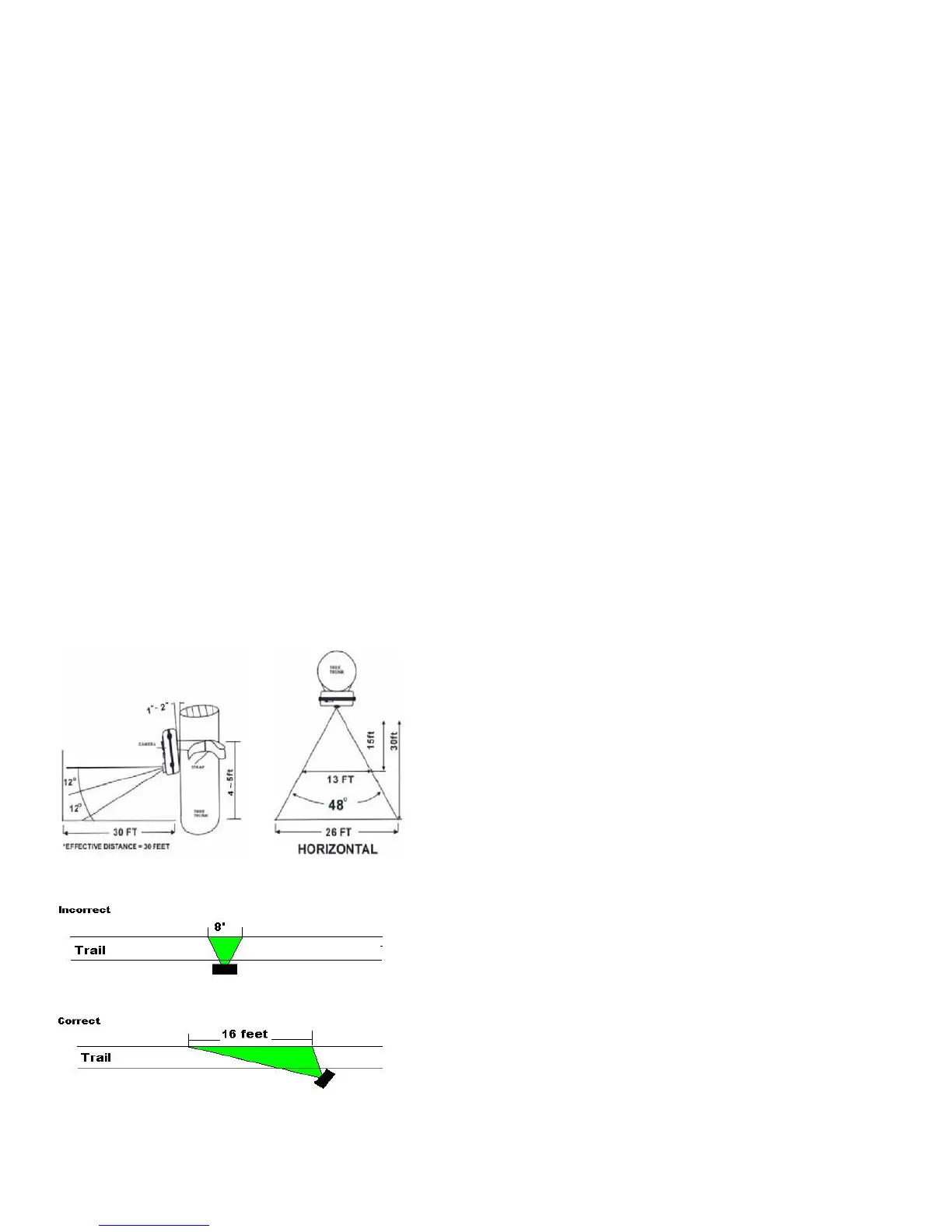
• Mountthecameraabout4‐5feethighwiththecamerapointedat
aslightdownwardangle.
• MountthecamerafacingnorthorsouthNOTeastorwestdueto
therising
and settingof the sun could producefalse triggers and
overexposedimages.
• If you’re cov ering a trail, face the camera down or up the trail.
Mostcommercialcamerastake1‐3secondstosensemotion/heat
andtakeapicture.
• Clear out any brush or weeds in front of
camera. This will cause
falsepicturescausedwindorhightemperatureday s.
• Doublecheckbatterybeforeturningonthecameraforuse.
• Make sure to insert the memory card after setting up the game
camera.
• Make sure to turn the camera ON (or take out of Test Mode)
beforeyouleave.
• Verifytimeanddateiscorrect.
WWW.STEALTHCAM.COM
Toll Free 877-269-8490
23
(Example:Mounting)
(Example:TrailSetup)
WWW.STEALTHCAM.COM
Toll Free 877-269-8490
24
UsingthecamerainPIRdetectionmode
• Mountthecameratothetreeorothersturdyobjectusingeithera
treescrew(optionalaccessory)orsuppliedmountingstrap.
• Open the front housing and movethe switch to the ON position.
At this point, you have 30 seconds to start making any program
changes.
ToCapture
Videos,makesuredisplayreadsVIDEO:
• IfdisplaydoesnotreadVIDEOthen,
¾ Pressthe[MENU]buttononce.
¾ ThewordCAMERAwillblink.
¾ Pressthe[UP]buttonTWOtimestotoggletoVideomode.
¾ Pressthe[OK]buttonTWOtimes.
¾ Pressthe[MENU]button
oncetoexit.
ToCaptureImages,makesuredisplayreadsCAMERA:
• IfdisplaydoesnotreadCAMERAthen,
¾ Pressthe[MENU]buttononce.
¾ ThewordCAMERAwillblink.
¾ Pressthe[UP]buttonONEtimetotoggletoCameramode.
¾ Pressthe[OK]buttonTWOtimes.
¾ Pressthe[MENU]buttononcetoexit.


 To Next Page
 Loading...