CYCLE function
Use this funcon to set the cleaning cycle.
Use the CYCLE buon
to switch between the cleaning cycles.
ON/OFF function
Use this funcon to switch the device ON and OFF.
Use the ON/OFF buon
to switch between the following funcons:
- ON (Switches the device on and starts the selected cleaning cycle.)
- OFF (Stops the selected cleaning cycle and switches the device o at the same me.)
Basic settings
Adjusting the nozzles
The following sengs are recommendaons. Adapt the basic sengs to the actual
properes and the degree of soiling of your pool.
Light soiling
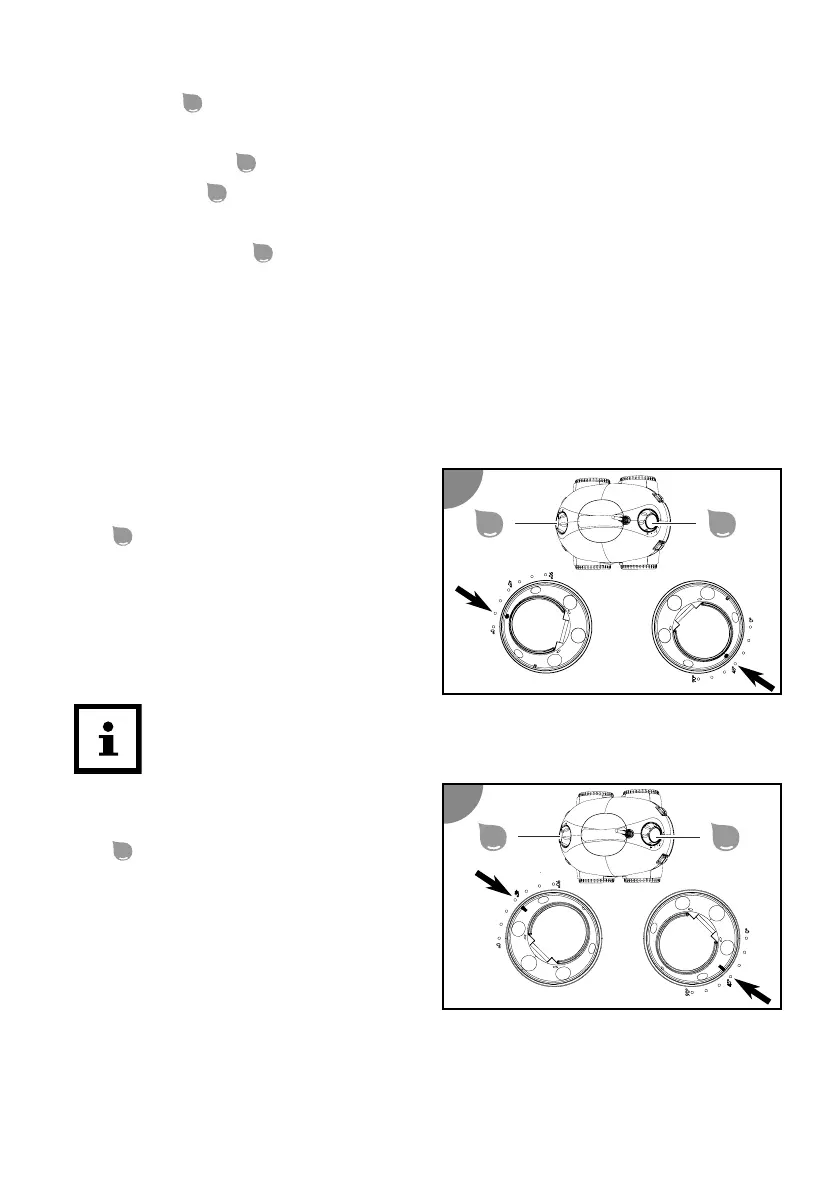
Use the round reference marking on the
nozzle
for adjustment.
1. Set one nozzle to 15° or 30° and the
other nozzle to 45°.
The device moves faster.
Excepon for lightly soiled round or oval pools:
Use the seng 15°/0°.
Medium to heavy soiling
Use the oblong reference marking on the
nozzle
for adjustment.
1. Set both nozzles to 45° or 60°.
The device moves slower.
36







 To Next Page