MIDEX-8
English – 9
ENGLISH
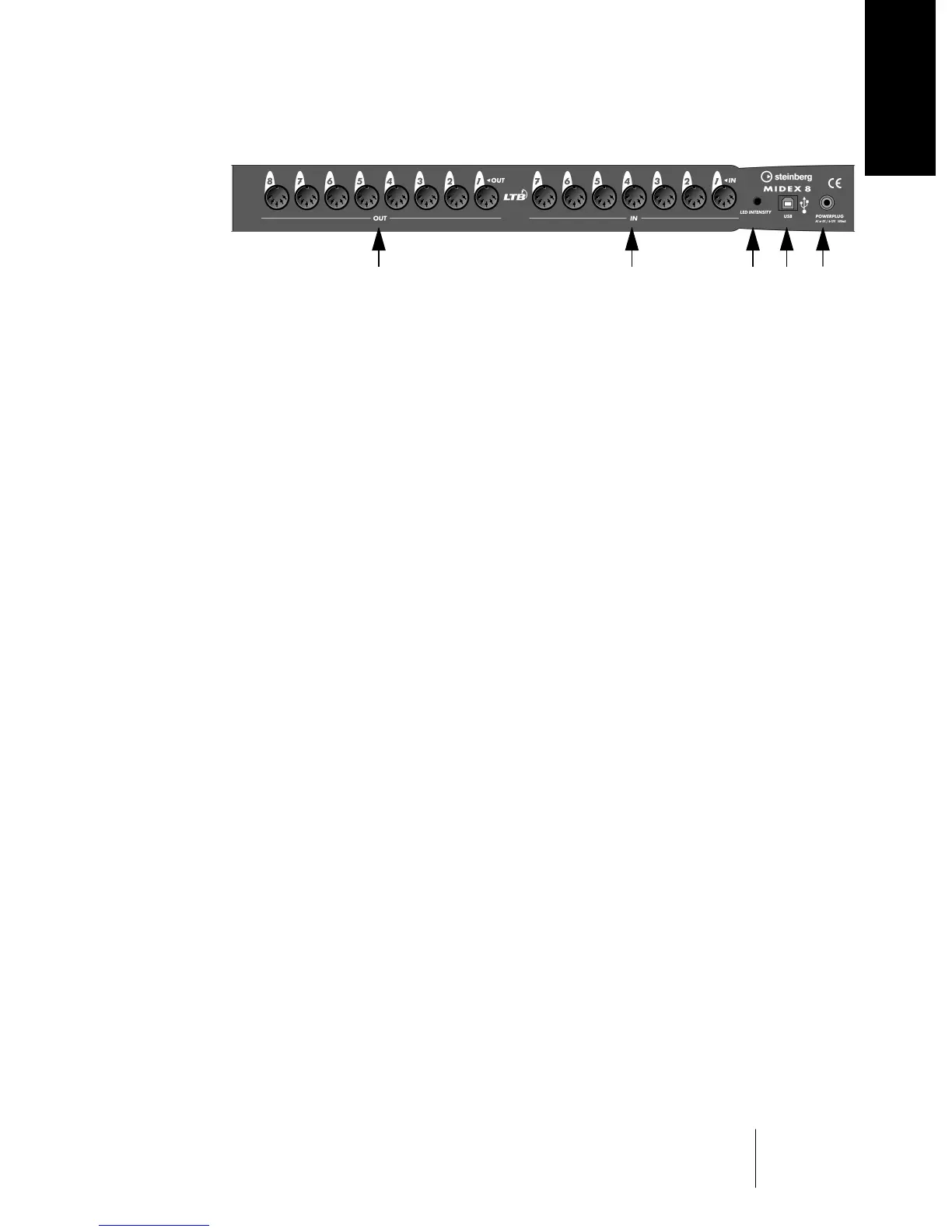
Rear
The eight Out sockets represent the MIDI outputs of the MIDEX-8. A second Output 8
socket is available on the front panel. Both outputs are connected in parallel.
The seven In sockets represent the MIDI inputs 1 to 7 of the MIDEX-8. The eighth
MIDI input is available on the MIDEX-8 front panel.
LED Sensitivity – Using a small screw driver, you can change the response time
setting of the MIDI In and Out LEDs. This is an elegant method to prevent flickering
MIDI LEDs, caused by “Active Sensing” messages that are constantly sent out by
some MIDI devices.
The available sensitivity settings vary from “slow” (a MIDI Event activates the LED for
at least half a second) to “swift” (a MIDI Event lets the LED just light up briefly, but
“Active Sensing” has no effect on the LED).
To set LED sensitivity to “slow”, turn the potentiometer clockwise all the way to the
end. To set LED sensitivity to “swift”, turn the potentiometer counter-clockwise.
USB socket –This MIDEX-8 socket and the host computer’s USB port must be
connected to each other using a USB cable.
Generally, the MIDEX-8 does not need any additional power supply. It gets its power
via the USB port that it is connected to. Any conventional USB port that can provide
500 mA provides enough power to operate a MIDEX-8. For this reason, the MIDEX-8
comes without a power supply unit. But if you use a USB hub, its USB outputs may
not supply enough power for the proper operation of a MIDEX-8. In this case, you
can connect a simple power supply unit to the Powerplug input on the MIDEX-8 to
solve the problem. Find more details on page 35 and page 38.
➀
➁
➂
➃
➀➂➃➄➁
➄


 To Next Page