MIDEX-8
English – 8
MIDEX-8 – Controls and Sockets
Front
➀➂ ➃ ➄➁➅
➀
➁
➂
➃
➄
➅
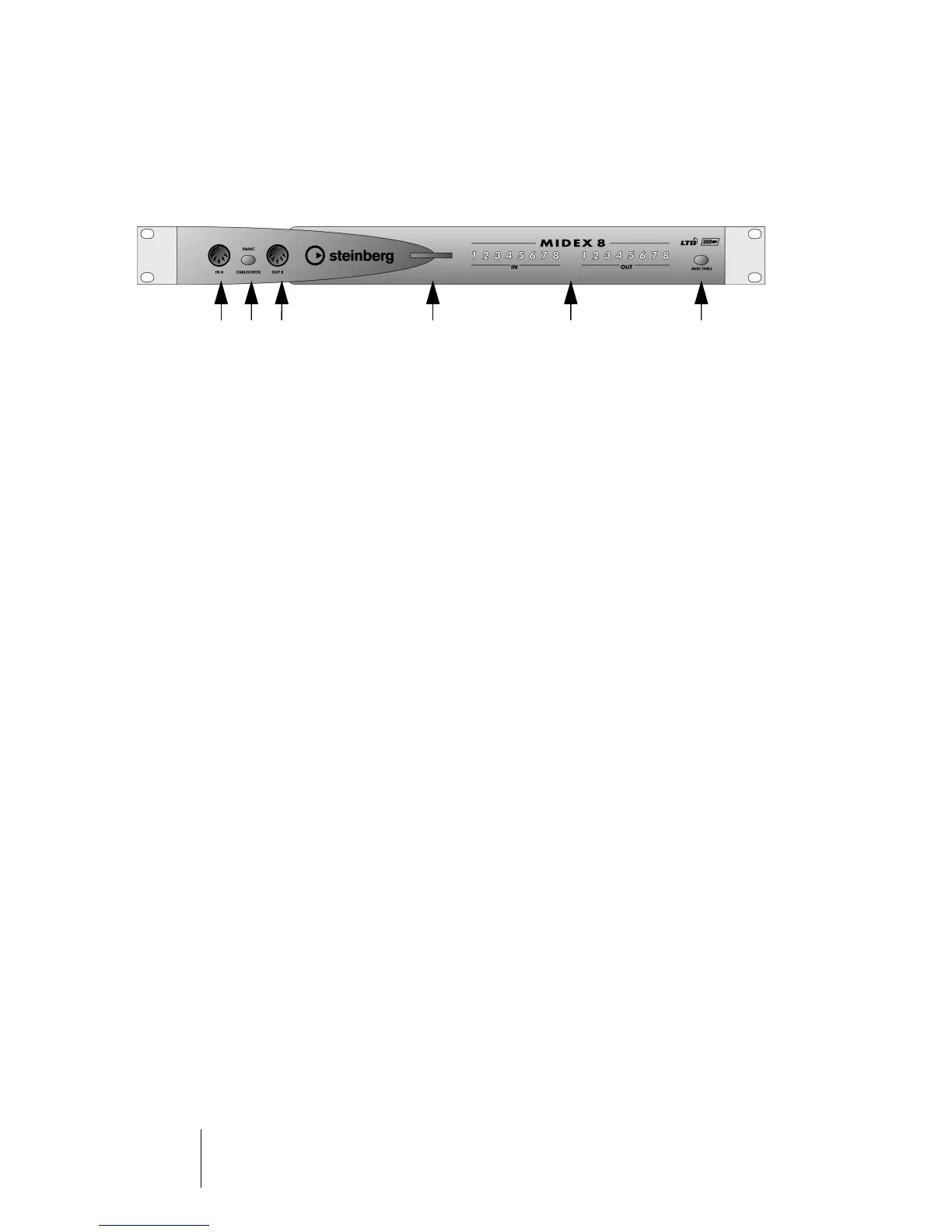
In 8 socket – The last of the available eight MIDI inputs.
Panic/Cablecheck button – Briefly pressing this button starts a MIDI cable check,
pressing it longer (for ca. 3 seconds) sends a MIDI Reset (All Notes Off and Controller
Reset on all channels) and thus removes “hanging notes”. Simultaneously pressing
this button and the MIDI Thru button triggers a USB Reset. Find more information on
page 32.
Out 8 socket – The last of the available eight MIDI outputs.
Power LED – the blue Power LED indicates that the MIDEX-8 is ready for use. This
lights up a few seconds after the connection has been made.
MIDI In and Out LEDs – these LEDs indicate MIDI activity on the MIDI inputs and
outputs.
USB/MIDI Thru button – This lets you toggle between the two MIDI Thru modes.


 To Next Page