Panel Controls and Terminals
UR242 Operation Manual 19
Controls and Functions
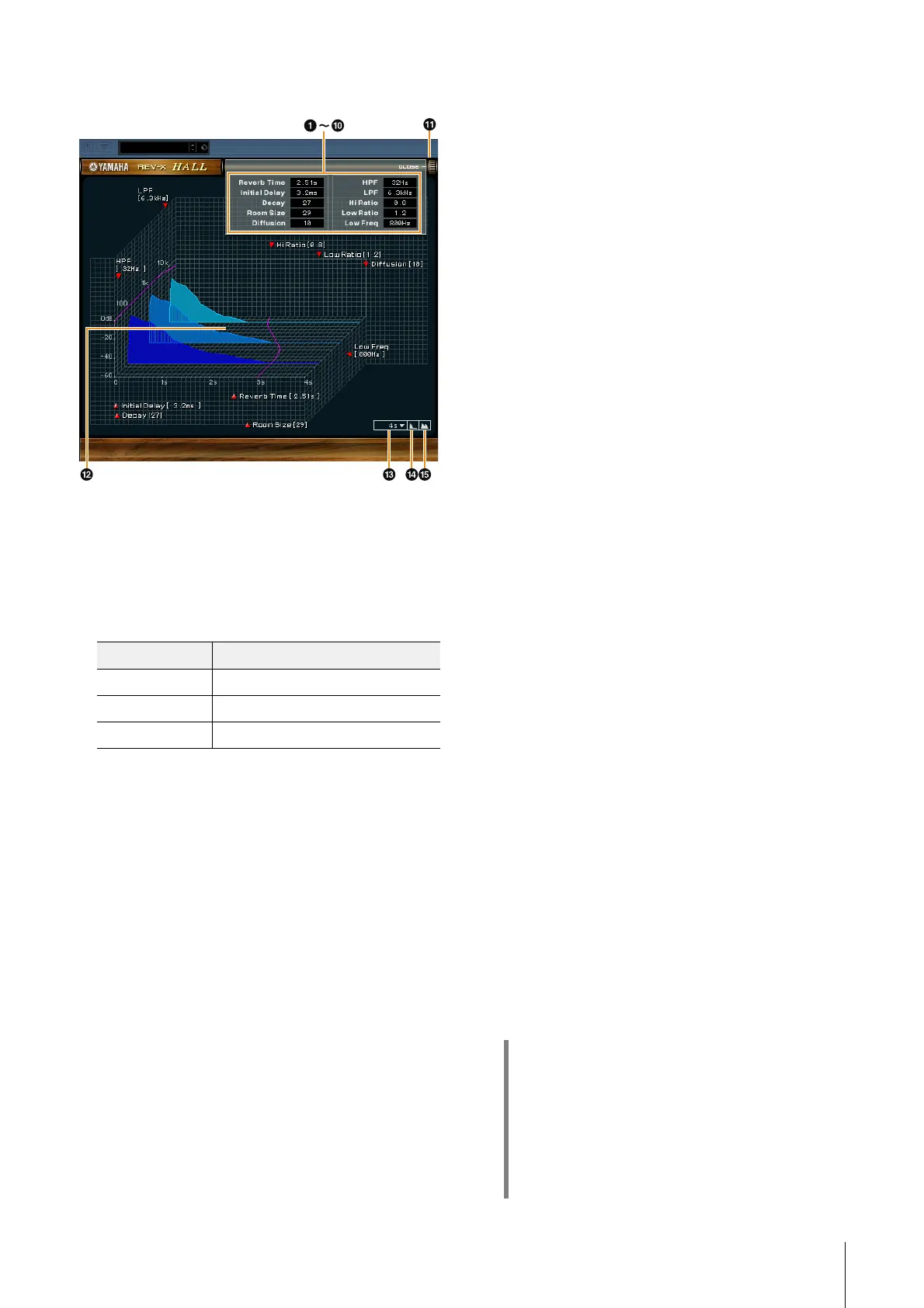
This section uses the Hall type of REV-X as an example.
1 Reverb Time
Adjusts the reverb time. This parameter links to Room Size.
The adjustable range varies depending on the REV-X type.
2 Initial Delay
Adjusts the time that elapses between the direct, original
sound and the initial reflections that follow it.
Range: 0.1 msec – 200.0 msec
3 Decay
Adjusts the characteristic of the envelope from the moment
the reverberation starts to the moment it attenuates and
stops.
Range: 0 – 63
4 Room Size
Adjusts the size of the simulated room. This parameter
links to Reverb Time.
Range: 0 – 31
5 Diffusion
Adjusts the spread of the reverberation.
Range: 0 – 10
6 HPF
Adjusts the cutoff frequency of the high pass filter.
Range: 20 Hz – 8.0 kHz
7 LPF
Adjusts the cutoff frequency of the low pass filter.
Range: 1.0 kHz – 20.0 kHz
8 Hi Ratio
Adjusts the duration of reverberation in the high frequency
range by using a ratio relative to the Reverb Time. When
you set this parameter to 1, the actual specified Reverb
Time is fully applied to the sound. The lower the value, the
shorter the duration of reverberation in the high frequency
range.
Range: 0.1 – 1.0
9 Low Ratio
Adjusts the duration of reverberation in the low frequency
range by using a ratio relative to the Reverb Time. When
you set this parameter to 1, the actual specified Reverb
Time is fully applied to the sound.
The lower the value, the shorter the duration of
reverberation in the low frequency range.
Range: 0.1 – 1.4
) Low Freq
Adjusts the frequency of the Low Ratio.
Range: 22.0 Hz – 18.0 kHz
! OPEN/CLOSE
Opens and closes the window for adjusting the reverb
settings.
@ Graph
Indicates the characteristics of reverberation. The vertical
axis indicates the signal level, the horizontal axis indicates
the time, and the Z-axis indicates the frequency. You can
adjust the characteristics of reverberation by dragging the
handles in the graph.
# Time Axis Setting
Select the display range of the time (horizontal axis) on the
graph.
Display range: 500 msec – 50 sec
$ Zoom Out
Zooms out the display range of the time (horizontal axis) on
the graph.
%
Zoom In
Zooms in the display range of the time (horizontal axis) on
the graph.
REV-X type Range
Hall 0.103 sec – 31.0 sec
Room 0.152 sec – 45.3 sec
Plate 0.176 sec – 52.0 sec
HINT
• You can reset certain parameters to their default
values by holding the [Ctrl]/[command] key while
you click on the appropriate knobs, sliders, and
faders.
• You can adjust the parameters more finely by
holding the [SHIFT] key while you drag on the
appropriate knobs, sliders, and faders.


 To Next Page