Panel Controls and Terminals
UR242 Operation Manual 3
Panel Controls and Terminals
Front Panel
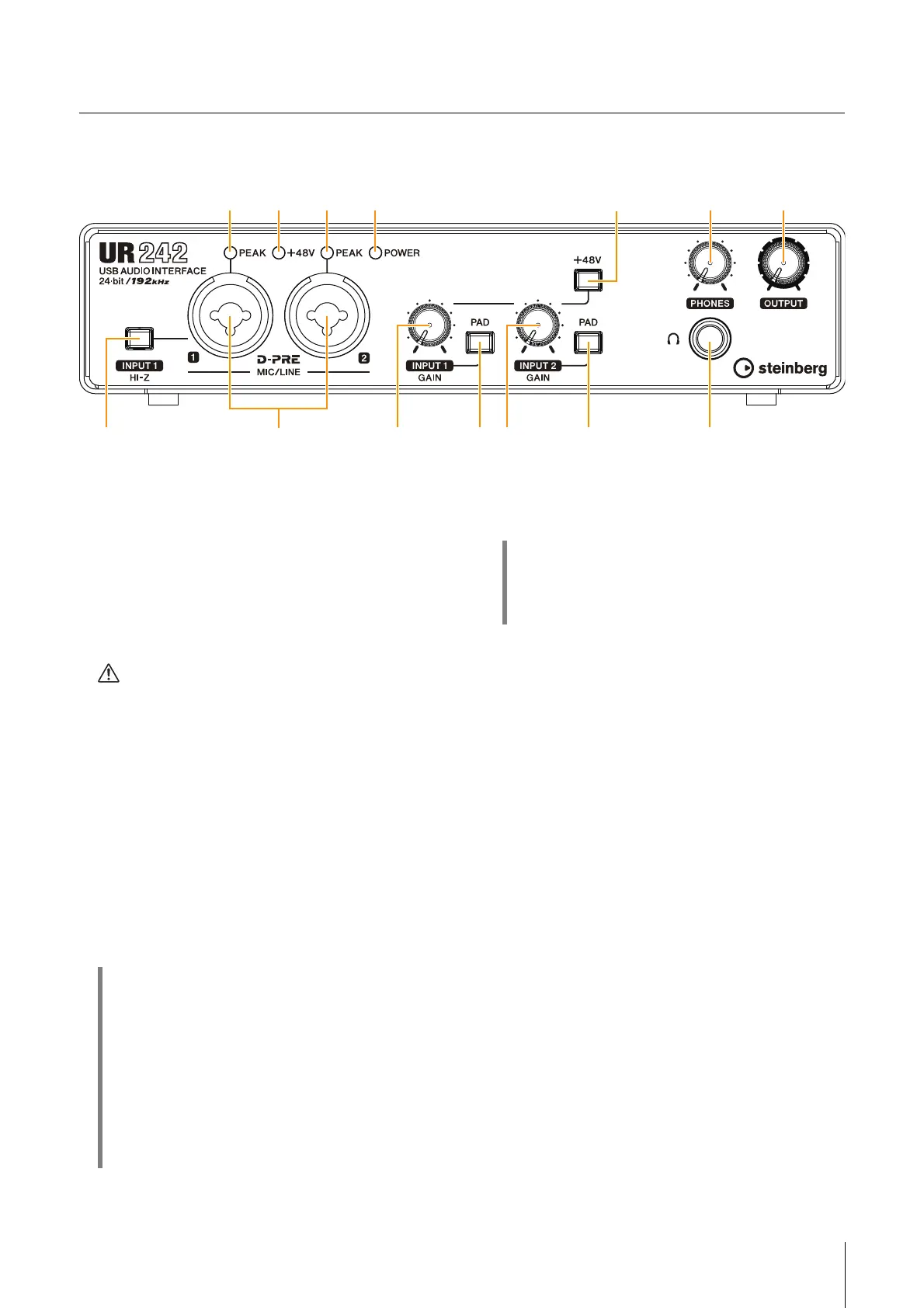
1 [INPUT 1 HI-Z] switch
Switches the input impedance (on O/ off N). Turn this
switch on when connecting high impedance
instruments, such as an electric guitar or electric bass,
directly to the [MIC/LINE 1] jack. When you turn this
switch on, use an unbalanced phone plug for
connection between the instruments and the [MIC/LINE
1] jack. If you use a balanced phone plug, this device
will not work correctly.
CAUTION
• Do not connect or disconnect a device while turning
on the [INPUT 1 HI-Z] switch. Doing so can damage
the connected device and/or the unit itself.
• To protect your speaker system, leave the monitor
speakers turned off when turning the [INPUT 1 HI-Z]
switch on/ off. It’s also a good idea to turn all output
level controls down to their minimum. Neglect of
these precautions may result in loud noise bursts
that may damage your equipment, your ears, or both.
2 [MIC/LINE 1/2] jack
For connecting to a microphone or digital instrument.
This jack can be connected to both XLR-type and
phone-type (balanced/unbalanced).
3 [PEAK] indicator
Lights up when the input signal is 3 dB below the
clipping level.
4 [+48V] indicator
Lights up when the [+48V] switch (phantom power) is
turned on.
5 [POWER] indicator
Lights up when the power is turned on. If the computer
or iPad does not recognize the device, this flashes
continuously.
6 [INPUT 1 GAIN] knob
Adjusts the input signal level of the [MIC/LINE 1] jack.
7 [PAD] switch
Turning the switch on (O) will attenuate the sound input
to the unit. If you hear distortion, turn this switch on (
O).
8 [INPUT 2 GAIN] knob
Adjusts the input signal level of the [MIC/LINE 2] jack.
HINT
Proper use of the HI-Z or LINE inputs
HI-Z:
• Guitar and bass with passive pickups (not battery
powered)
LINE:
• Effect device, preamp, direct box
• Guitar and bass with active pickups (battery powered)
• Digital instruments, such as synthesizers
HINT
Setting optimum recording levels
Adjust the gain knobs so that the [PEAK] indicator
flashes briefly at the loudest input volume.


 To Next Page