Panel Controls and Terminals
UR242 Operation Manual 5
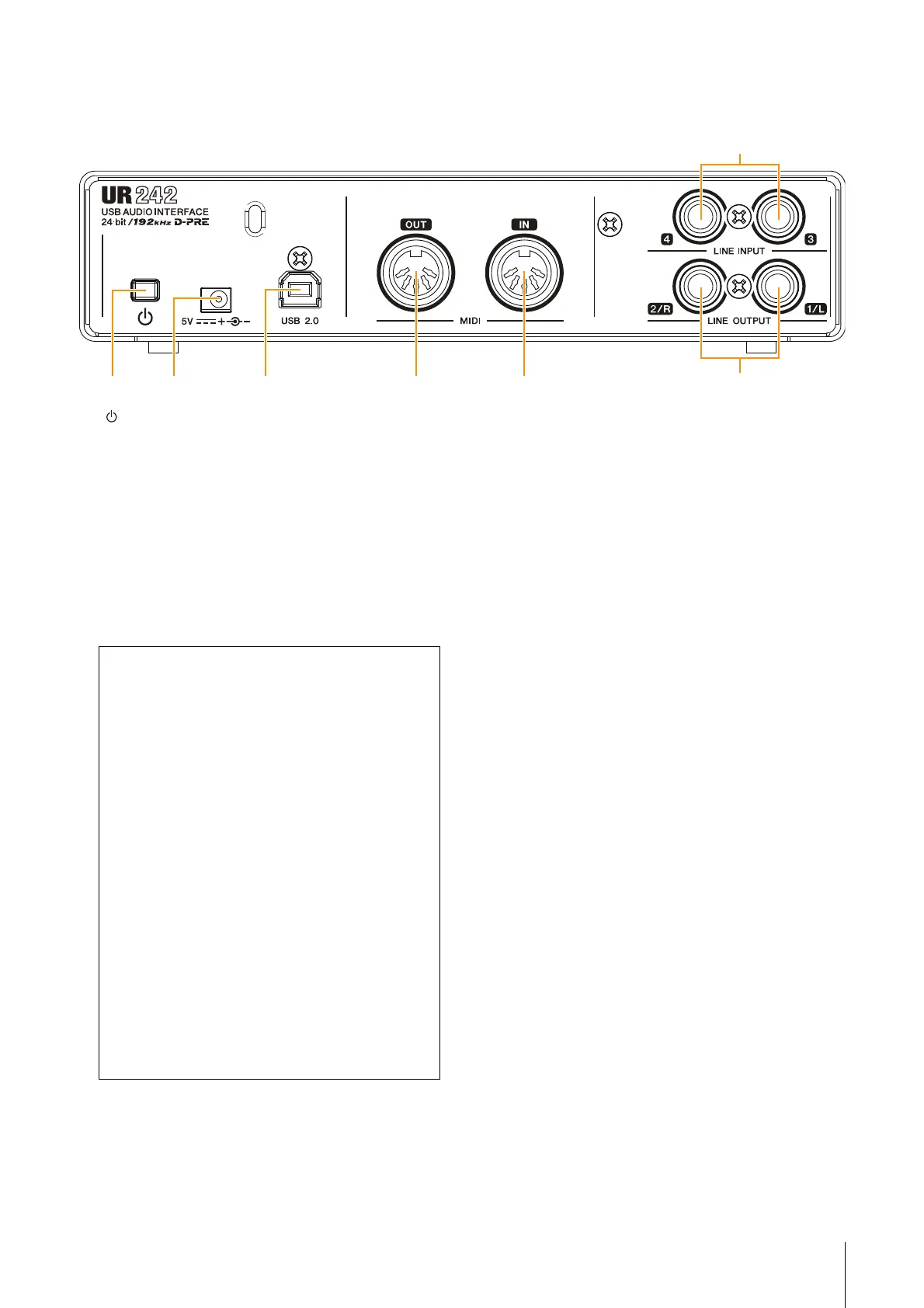
Rear Panel
1 [ ] (Standby/On) switch
Sets the power of the device to On (O) or Standby (N).
2 DC IN [5V]
For connecting to the AC power adaptor.
3 [USB 2.0] terminal
For connecting to a computer or iPad. Automatically
discriminated whether connecting device is a computer
or iPad.
USB Terminal Precautions
4 [MIDI OUT] jack
For connecting to the MIDI IN jack of a MIDI device.
This transmits MIDI signals from the computer.
5 [MIDI IN] jack
For connecting to the MIDI OUT jack of the MIDI device.
This receives and inputs MIDI signals to the computer.
NOTE
Select [Steinberg UR242-1] for the MIDI port when using a MIDI
jack with an iPad application. Please note that [Steinberg UR242-2]
is not available.
6 [LINE INPUT 3/4] jacks
For connecting to digital instrument or a mixer. These
jacks can be connected to phone-type (balanced/
unbalanced). You can select the input signal level of the
[LINE INPUT 3/4] jacks between +4 dBu and -10 dBV.
Select +4 dBu when connecting a professional audio
device, and select -10 dBV when connecting a
consumer device. The default initial setting is -10 dBu.
To select the input signal level, use the “Setup Window”
(page 11) in the section “dspMixFx UR242” or the
“Settings Window” (page 16) in the “Dedicated Windows
for Cubase Series.”
7 [LINE OUTPUT 1/L 2/R] jacks
For connecting to external devices with line level
signals. These jacks can be connected to phone-type
(balanced/unbalanced)
Be sure to observe the following points when
connecting the device to the computer’s USB interface.
Failing to do so may result in the computer freezing or
shutting down, as well as corruption or even loss of
data. If the device or computer does freeze, restart the
application or computer.
NOTICE
• Use an AB type USB cable. USB 3.0 cables are not
supported.
• Be sure to wake the computer from sleep/
suspended/standby mode before connecting it to
the UR242 with a USB cable.
• Before connecting/disconnecting the USB cable,
quit all open software applications on the
computer.
• Before connecting or disconnecting the USB
cable from the [USB2.0] terminal, be sure to set all
output level controls to the minimum.
• Do not connect/disconnect the USB cable in rapid
succession. Wait at least six seconds between
connecting/disconnecting the USB cable.


 To Next Page