Panel Controls and Terminals
UR242 Operation Manual 7
Mac
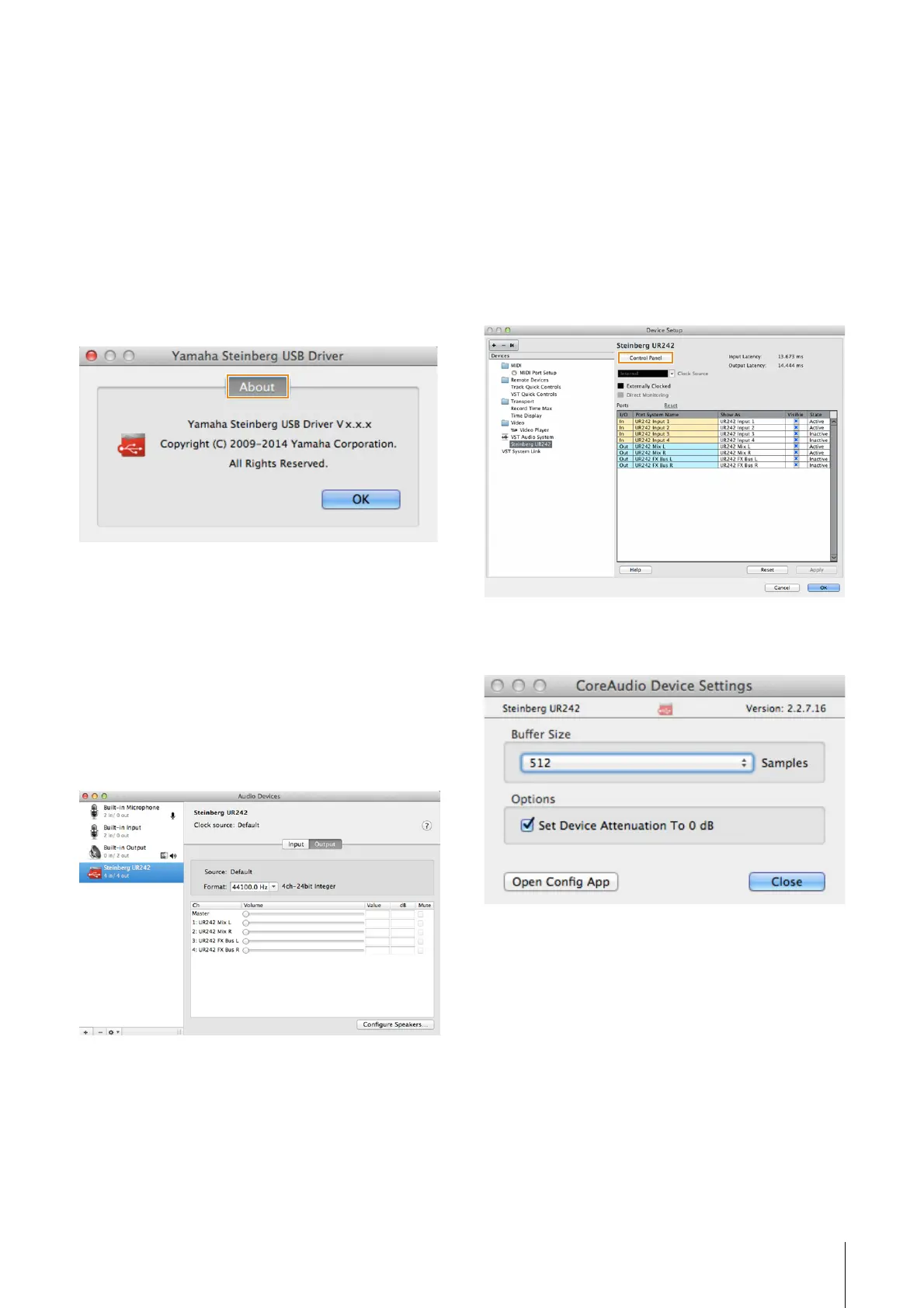
How to Open the Window
• Select [System Preferences] [Yamaha Steinberg USB].
• From the Cubase series menu, select [Devices]
[Device Setup...] [Steinberg UR242] [Control Panel]
[Open Config App].
About Window
Indicates the version and copyright information of the audio
driver.
How to Select the Sample Rate
You can select the sample rate in [Audio MIDI Setup]
window.
1. Select [Applications] [Utilities] [Audio MIDI
Setup].
2. Select the sample rate from the [Format] menu.
How to Select the Buffer Size
You can select the buffer size in the settings window for
each application (DAW software, etc.).
1. From the Cubase series menu, select [Devices]
[Device Setup...].
NOTE
The method for opening the settings window is different for
each application.
2. Click [Control Panel] in [Steinberg UR242] in the
menu on the left side of the window.
The window for selecting the buffer size appears.


 To Next Page